“Could not find a package configuration file provided by” in ROS 2 colcon build: five causes on Humble, Jazzy and Lyrical, measured
CMake Error at CMakeLists.txt:4 (find_package):
  By not providing "Finddiagnostic_updater.cmake" in CMAKE_MODULE_PATH this
  project has asked CMake to find a package configuration file provided by
  "diagnostic_updater", but CMake did not find one.

  Could not find a package configuration file provided by
  "diagnostic_updater" with any of the following names:

    diagnostic_updaterConfig.cmake
    diagnostic_updater-config.cmake

  Add the installation prefix of "diagnostic_updater" to CMAKE_PREFIX_PATH or
  set "diagnostic_updater_DIR" to a directory containing one of the above
  files.  If "diagnostic_updater" provides a separate development package or
  SDK, be sure it has been installed.
Failed   <<< fp [0.66s, exited with code 1]
Short answer: CMake looked in every prefix it knows about and found no diagnostic_updaterConfig.cmake. In my runs that had five causes. The package wasn’t installed. It was missing from package.xml, so rosdep skipped it. /opt/ros/<distro>/setup.bash wasn’t sourced. The name in find_package() had the wrong case. Or it was a workspace package that colcon didn’t know to build first. The usual fix is two steps. Declare the dependency in package.xml, then let rosdep install it:
<depend>diagnostic_updater</depend>source /opt/ros/$ROS_DISTRO/setup.bash
sudo apt-get update
rosdep install --from-paths src --ignore-src -y
colcon buildThe error text was the same on Humble, Jazzy and Lyrical, with CMake 3.22.1, 3.28.3 and 4.2.3.
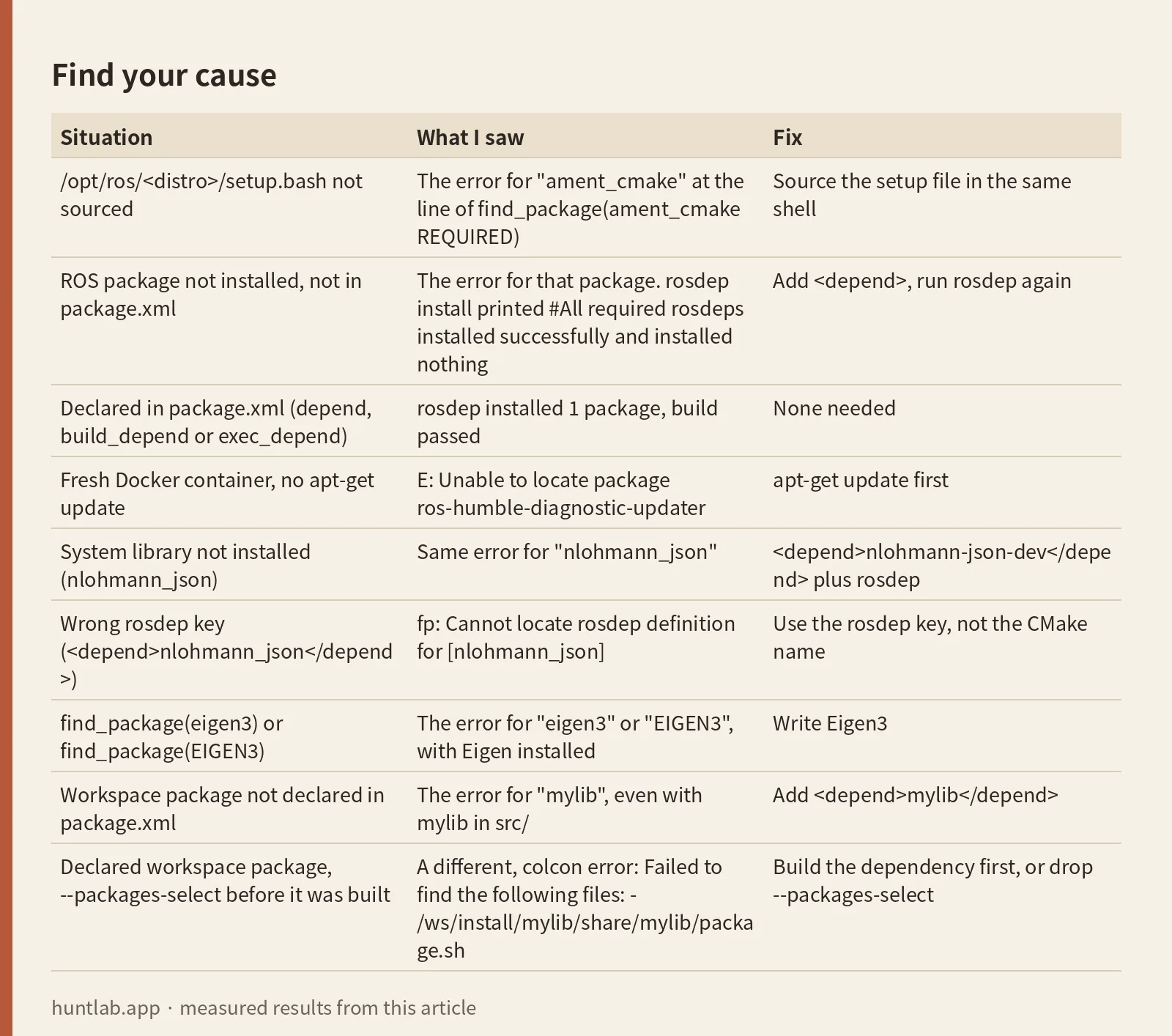
Find your cause
The package name in quotes tells you where to start. If it’s ament_cmake, the environment isn’t sourced. If it’s a ROS package or a system library, it’s an install or package.xml problem. If it’s a package in your own src/, it’s a build-order problem. Every row behaved the same on all three distros.
| Situation | What I saw | Fix |
|---|---|---|
/opt/ros/<distro>/setup.bash not sourced |
The error for "ament_cmake" at the line of find_package(ament_cmake REQUIRED) |
Source the setup file in the same shell |
ROS package not installed, not in package.xml |
The error for that package. rosdep install printed #All required rosdeps installed successfully and installed nothing |
Add <depend>, run rosdep again |
Declared in package.xml (depend, build_depend or exec_depend) |
rosdep installed 1 package, build passed | None needed |
Fresh Docker container, no apt-get update |
E: Unable to locate package ros-humble-diagnostic-updater |
apt-get update first |
System library not installed (nlohmann_json) |
Same error for "nlohmann_json" |
<depend>nlohmann-json-dev</depend> plus rosdep |
Wrong rosdep key (<depend>nlohmann_json</depend>) |
fp: Cannot locate rosdep definition for [nlohmann_json] |
Use the rosdep key, not the CMake name |
find_package(eigen3) or find_package(EIGEN3) |
The error for "eigen3" or "EIGEN3", with Eigen installed |
Write Eigen3 |
Workspace package not declared in package.xml |
The error for "mylib", even with mylib in src/ |
Add <depend>mylib</depend> |
Declared workspace package, --packages-select before it was built |
A different, colcon error: Failed to find the following files: - /ws/install/mylib/share/mylib/package.sh |
Build the dependency first, or drop --packages-select |
What I ran
On 2026-10-29 I used the official ros:humble-ros-base, ros:jazzy-ros-base and ros:lyrical-ros-base Docker images, one after another, on an x86_64 Linux host. I started each container with --entrypoint bash, so /opt/ros was not sourced at the start. A script built a one-file ament_cmake package called fp, changed one thing in package.xml or CMakeLists.txt, ran rosdep install and colcon build from a clean build/ and install/, and recorded the result.
For the ROS dependency I used diagnostic_updater. It isn’t in the ros-base image on any of the three distros, and it’s one small apt package. I checked cv_bridge, Eigen and yaml-cpp first. cv_bridge is also missing from ros-base, but it pulls in OpenCV, so I didn’t install it. libeigen3-dev, libyaml-cpp-dev and tf2_geometry_msgs were already installed on Humble. So for the system library case I used nlohmann_json, which wasn’t installed, and I kept Eigen for the name-case test. For the workspace case I added a second package, mylib, whose CMake step sleeps 5 seconds so that build order shows up.
The CMake package in CMakeLists.txt:
cmake_minimum_required(VERSION 3.8)
project(fp)
find_package(ament_cmake REQUIRED)
find_package(diagnostic_updater REQUIRED)
ament_package()
Cause 1: the package isn’t installed
Most of the time the message means what it says: nothing on the system provides diagnostic_updaterConfig.cmake. A ROS package installs that file under /opt/ros/<distro>/share/<name>/cmake/. A system library installs its own config file, for example under /usr/lib/cmake/ or /usr/share/. With nothing installed, the build failed in 1.1 to 1.2 seconds on every distro, at the find_package line.
Installing the apt package by hand fixed it right away:
sudo apt-get install ros-humble-diagnostic-updater # ros-jazzy-..., ros-lyrical-...The install took 3.5 to 3.9 seconds and set up 1 package. The next colcon build in the same shell passed, and I didn’t re-source /opt/ros. That’s expected. The package goes into /opt/ros/<distro>, which the shell already points at. A fresh shell that sourced the setup file also passed. If a hand install doesn’t help, check the name of the apt package. It’s ros-<distro>- plus the package name with underscores turned into dashes.
Cause 2: rosdep didn’t install it
The common case is a dependency that’s listed in CMakeLists.txt but missing from package.xml. rosdep only reads package.xml, so it doesn’t fail. It reports success:
$ rosdep install --from-paths src --ignore-src -y
#All required rosdeps installed successfully
It installed 0 packages, and the next build failed with the same CMake error. This is the trap. A green rosdep run says nothing about CMakeLists.txt. One ros2_controllers fix was exactly this: a find_package(backward_ros) with no matching line in package.xml.
After I added <depend>diagnostic_updater</depend>, rosdep printed executing command [apt-get install -y ros-humble-diagnostic-updater], installed 1 package in 7.3 to 8.9 seconds, and the build passed on all three distros. A second rosdep run took 0.5 to 0.6 seconds and installed nothing.
rosdep errors you may hit first
The official ros images already have rosdep initialized and a rosdep cache, made when the image was built (2026-10-27 here). They don’t have apt package lists. So the first rosdep install in a fresh container resolved the key and then failed in apt:
E: Unable to locate package ros-humble-diagnostic-updater
ERROR: the following rosdeps failed to install
  apt: command [apt-get install -y ros-humble-diagnostic-updater] failed
In Docker, run apt-get update before rosdep. It took 5.6 to 7.0 seconds. rosdep update took 6.1 to 9.0 seconds and is still worth running, but it wasn’t what broke this.
With the rosdep cache deleted (rosdep update never run), rosdep stopped before resolving anything:
ERROR: your rosdep installation has not been initialized yet.  Please run:
    rosdep update
With /etc/ros/rosdep/sources.list.d/20-default.list also removed (rosdep init never run), rosdep update said:
ERROR: no data sources in /etc/ros/rosdep/sources.list.d

Please initialize your rosdep with

	sudo rosdep init
and rosdep install said:
ERROR: your rosdep installation has not been initialized yet.  Please run:
    sudo rosdep init
    rosdep update
System libraries use rosdep keys, not CMake names
find_package(nlohmann_json REQUIRED) with nothing installed gave the same error for "nlohmann_json". The CMake name isn’t the rosdep key. <depend>nlohmann_json</depend> failed:
ERROR: the following packages/stacks could not have their rosdep keys resolved
to system dependencies:
fp: Cannot locate rosdep definition for [nlohmann_json]
The key nlohmann-json-dev worked. rosdep installed the apt package nlohmann-json3-dev (3.10.5-2 on Humble, 3.11.3-1 on Jazzy, 3.12.0.really.3.12.0.really.3.11.3-3build1 on Lyrical), and the build passed. So one library has three names: the CMake package (nlohmann_json), the rosdep key (nlohmann-json-dev) and the apt package (nlohmann-json3-dev). For Eigen it’s Eigen3, eigen and libeigen3-dev. Look the rosdep key up in the rosdistro rosdep/base.yaml file.
Cause 3: /opt/ros isn’t sourced
Without sourcing, the first find_package fails, and that’s ament_cmake:
CMake Error at CMakeLists.txt:3 (find_package):
  By not providing "Findament_cmake.cmake" in CMAKE_MODULE_PATH this project
  has asked CMake to find a package configuration file provided by
  "ament_cmake", but CMake did not find one.

  Could not find a package configuration file provided by "ament_cmake" with
  any of the following names:

    ament_cmakeConfig.cmake
    ament_cmake-config.cmake
This is the error in ROS2 – colcon build fails to find configuration file provided by “ament_cmake”. Here’s what the environment looked like before and after source /opt/ros/humble/setup.bash:
| Variable | Not sourced | Sourced |
|---|---|---|
CMAKE_PREFIX_PATH |
empty | empty |
AMENT_PREFIX_PATH |
empty | /opt/ros/humble |
PATH |
/usr/local/sbin:...:/bin |
/opt/ros/humble/bin: in front |
Jazzy and Lyrical showed the same pattern with their own paths. Sourcing /opt/ros doesn’t set CMAKE_PREFIX_PATH at all, so an empty CMAKE_PREFIX_PATH isn’t the problem. The error text points you at that variable anyway. I tried setting only one variable by hand without sourcing: CMAKE_PREFIX_PATH=/opt/ros/<distro>, or AMENT_PREFIX_PATH=/opt/ros/<distro>, or /opt/ros/<distro>/bin added to PATH. Each one got CMake past find_package(ament_cmake), and each one then failed with a different error:
CMake Error at /opt/ros/humble/share/ament_cmake_core/cmake/ament_cmake_package_templates-extras.cmake:41 (message):
  execute_process(/usr/bin/python3
  /opt/ros/humble/share/ament_cmake_core/cmake/package_templates/templates_2_cmake.py
  /ws/build/fp/ament_cmake_package_templates/templates.cmake) returned error
  code 1
Don’t set these variables by hand. Source the setup file in the shell that runs colcon. Your workspace’s own install/setup.bash is a different file and does set CMAKE_PREFIX_PATH. After sourcing it I had CMAKE_PREFIX_PATH=/ws/install/fp:/ws/install/mylib. For the difference between the two files, see local_setup.bash vs setup.bash.
Cause 4: wrong case in find_package
CMake package names are case sensitive here. With libeigen3-dev installed, find_package(Eigen3 REQUIRED) passed. Both other spellings failed:
  By not providing "Findeigen3.cmake" in CMAKE_MODULE_PATH this project has
  asked CMake to find a package configuration file provided by "eigen3", but
  CMake did not find one.

  Could not find a package configuration file provided by "eigen3" with any
  of the following names:

    eigen3Config.cmake
    eigen3-config.cmake
Could not find a package configuration file provided by "EIGEN3" with any
of the following names:
EIGEN3Config.cmake
eigen3-config.cmakeThe second file name is always in lower case, even when you write EIGEN3. Don’t let that lowercase name convince you the casing is fine. The same happened with a ROS package. With ros-humble-diagnostic-updater installed, find_package(Diagnostic_Updater REQUIRED) failed and listed Diagnostic_UpdaterConfig.cmake and diagnostic_updater-config.cmake. ROS packages use the exact package name from package.xml. For system libraries, use the name from the library’s docs. The output gives you a clue: if a package is installed and still not found, compare the names it lists against the file on disk:
find /opt/ros/$ROS_DISTRO/share /usr/lib /usr/share -iname '*eigen3*config.cmake'Cause 5: the package is in your workspace but colcon didn’t build it first
Here fp called find_package(mylib REQUIRED), and mylib sat next to it in src/. colcon decides build order only from package.xml. With no <depend>mylib</depend>, colcon graph showed no edge between the two, and the build went wrong in two ways:
- Parallel (the default):
fpfailed with the error for"mylib"after 0.93 seconds, whilemylibwas still in its 5-second CMake step. colcon then reported1 package aborted: mylib. --executor sequential: colcon started withfp, and it failed the same way.
The g2o question on Robotics Stack Exchange has this shape. A library is checked out in the workspace, and colcon doesn’t treat it as a dependency.
With <depend>mylib</depend>, a plain colcon build built mylib and then fp, and both passed in 7.0 to 7.4 seconds. Once mylib was built, colcon build --packages-select fp passed too, without sourcing install/setup.bash. colcon sets up the environment of declared dependencies by itself.
--packages-select fp before mylib was ever built did not produce the CMake error. colcon stopped first, in 0.02 seconds, before CMake ran:
ERROR:colcon.colcon_cmake.task.cmake.build:Failed to find the following files:
- /ws/install/mylib/share/mylib/package.sh
Check that the following packages have been built:
- mylib
So if you see the CMake error for one of your own packages, the dependency is missing from package.xml. A declared dependency that hasn’t been built gives the colcon message above.
package.xml depend tags and what rosdep does with each
I ran rosdep install --from-paths src --ignore-src -y with one tag at a time, from a state where ros-<distro>-diagnostic-updater wasn’t installed. Results were the same on all three distros.
| In package.xml | rosdep installed | colcon build |
|---|---|---|
| nothing | nothing, printed #All required rosdeps installed successfully |
failed, the error above |
<build_depend> |
1 package, ros-<distro>-diagnostic-updater |
passed |
<exec_depend> |
1 package, the same one | passed |
<exec_depend> with --dependency-types build |
nothing | Not tested (the package was missing) |
<depend> |
1 package | passed |
By default rosdep installs every dependency type, so an exec_depend-only package still built here. That isn’t a reason to stop at exec_depend. Anything that filters by type, like --dependency-types build, skips it. For a C++ library you find_package() and link against, use <depend>. It covers build, export and exec. Use <build_depend> only for something needed at build time alone.
Version notes
The CMake error text was identical on Humble (CMake 3.22.1, ament_cmake 1.3.14), Jazzy (CMake 3.28.3, ament_cmake 2.5.6) and Lyrical (CMake 4.2.3, ament_cmake 2.8.8), word for word and with the same line breaks. The rosdep messages were also identical, because all three images had rosdep 0.27.0 and colcon-core 0.21.3. The only extra line on Lyrical was apt’s Solving dependencies.... On Lyrical, colcon printed a timestamp of [-1793238601041840896.000s] in front of the Failed to find the following files message. It looks cosmetic. The build still failed in 0.02 seconds as on the other distros. CMake 4 on Lyrical breaks other things, but not this message. See Unknown CMake command ament_target_dependencies on Lyrical.
Not tested
cv_bridge, pcl_conversions and OpenCV themselves (I only checked that cv_bridge is missing from ros-base). Windows, macOS, conda and pip-installed CMake. Packages built from source into /usr/local or another custom prefix. CMAKE_PREFIX_PATH set together with a sourced environment. --symlink-install, --merge-install, overlays on top of a second workspace, rosdep --skip-keys, ament_python packages, Foxy, Iron, Kilted and Rolling.
FAQ
What does “Could not find a package configuration file provided by” mean in colcon build?
CMake ran find_package(name) and found no nameConfig.cmake or name-config.cmake in any prefix it searched. In my runs the causes were: the package wasn’t installed, it was missing from package.xml so rosdep skipped it, /opt/ros wasn’t sourced, the name had the wrong case, or a workspace package wasn’t declared as a dependency.
rosdep says all required rosdeps installed successfully, but the build still fails. Why?
rosdep reads only package.xml. If the dependency is in CMakeLists.txt but not in package.xml, rosdep installs nothing and still prints success. Add <depend>name</depend> and run rosdep again. In my run it then installed 1 package and the build passed.
Do I need to re-source /opt/ros after installing a ROS package with apt?
No. After apt-get install ros-<distro>-diagnostic-updater, the next colcon build in the same, already sourced shell passed on Humble, Jazzy and Lyrical.
Why does rosdep fail with Unable to locate package in Docker?
The official ros images ship with rosdep initialized and a rosdep cache, but with no apt package lists. Run apt-get update before rosdep install.
Should I write find_package(eigen3) or find_package(Eigen3)?
Eigen3. With libeigen3-dev installed, eigen3 and EIGEN3 both failed with this error, and Eigen3 passed. The rosdep key is eigen.
Measured on 2026-10-29 with ros:humble-ros-base (sha256:d9bcf2e6f72d..., CMake 3.22.1, ament_cmake 1.3.14, diagnostic_updater 4.0.7), ros:jazzy-ros-base (sha256:8eed0a4669bb..., CMake 3.28.3, ament_cmake 2.5.6, diagnostic_updater 4.2.7) and ros:lyrical-ros-base (sha256:3224ee150cb0..., CMake 4.2.3, ament_cmake 2.8.8, diagnostic_updater 4.4.7), all with rosdep 0.27.0 and colcon-core 0.21.3. Full digests are in digests.txt.
Script and raw output: evidence folder. Questions this answers: Could not find a package configuration file provided by “nav2_map_server”, ROS2 Jazzy beginner tutorial fails to build on Ubuntu 24.04 and docker, ROS2 – colcon build fails to find configuration file provided by “ament_cmake”, Colcon (and rosdep) not recognizing the dependency relation between my package and the source checkout of non-ROS library, mecanum_drive_controller: Declare missing backward_ros dependency.