“A module that was compiled using NumPy 1.x cannot be run in NumPy 2.x” and “_ARRAY_API not found” in ROS 2 cv_bridge: pip NumPy 2, OpenCV wheels and the fixes, measured
A module that was compiled using NumPy 1.x cannot be run in
NumPy 2.2.6 as it may crash. To support both 1.x and 2.x
versions of NumPy, modules must be compiled with NumPy 2.0.
Some module may need to rebuild instead e.g. with 'pybind11>=2.12'.

If you are a user of the module, the easiest solution will be to
downgrade to 'numpy<2' or try to upgrade the affected module.
We expect that some modules will need time to support NumPy 2.

Traceback (most recent call last):  File "/tmp/tests.py", line 8, in <module>
    import cv_bridge; from cv_bridge import CvBridge
  File "/opt/ros/humble/local/lib/python3.10/dist-packages/cv_bridge/__init__.py", line 6, in <module>
    from cv_bridge.boost.cv_bridge_boost import cvtColorForDisplay, getCvType
AttributeError: _ARRAY_API not found
A few lines later, usually at CvBridge(), the real failure appears:
  File "/opt/ros/humble/local/lib/python3.10/dist-packages/cv_bridge/core.py", line 71, in __init__
    import cv2
ImportError: numpy.core.multiarray failed to import
Short answer: on Humble and Jazzy, the apt-built cv_bridge and python3-opencv were compiled against NumPy 1.x. A pip NumPy 2 earlier on the path breaks them. The fix that worked every time was to remove pip’s NumPy so Python falls back to the apt one:
pip uninstall numpy        # add --break-system-packages on Jazzy
python3 -c "import numpy; print(numpy.__version__, numpy.__file__)"
# want: /usr/lib/python3/dist-packages/numpy/__init__.py
If another package needs a pip NumPy, use pip install "numpy<2". If you also need a pip OpenCV, pin it to "opencv-python-headless<4.12", because every OpenCV wheel from 4.12 on requires NumPy 2. Current OpenCV 5 wheels break cv_bridge with KeyError: 16 even when NumPy is 1.x. Lyrical is different. Its apt NumPy is 2.3.5, its cv_bridge works with NumPy 2, and numpy<2 has no wheel for its Python 3.14.
Find your error
All of these came from the same image round-trip test on a clean ros:*-ros-base container. The “where” column is the line in the traceback that points at ROS or OpenCV code.
| What you see | Where | Cause in my runs |
|---|---|---|
A module that was compiled using NumPy 1.x cannot be run in NumPy 2.x + AttributeError: _ARRAY_API not found |
cv_bridge/__init__.py, line 6 |
pip NumPy 2 with the apt cv_bridge (Humble, Jazzy). The message is printed, but the import doesn’t fail. |
ImportError: numpy.core.multiarray failed to import |
import cv2, or cv_bridge/core.py line 71 inside CvBridge() |
pip NumPy 2 with the apt python3-opencv (Humble 4.5.4, Jazzy 4.6.0) |
| Exit code 139 (segmentation fault), no exception for the crash itself | imgmsg_to_cv2 |
pip NumPy 2 + pip opencv-python 4.14.0.94 with the apt cv_bridge (Humble, Jazzy) |
KeyError: 16 |
cv_bridge/core.py line 276, cv2_to_imgmsg |
pip opencv-python 5.0.0.93, with any NumPy, on all three distros |
AttributeError: `np.maximum_sctype` was removed in the NumPy 2.0 release. |
import tf_transformations → transforms3d/quaternions.py |
NumPy 2 with apt transforms3d 0.3.1 (Humble) or 0.4.1 (Jazzy) |
AttributeError: module 'numpy' has no attribute 'float'. |
same place | Humble’s transforms3d 0.3.1 with NumPy 1.26.4. numpy<2 doesn’t fix this one. |
ERROR: Cannot uninstall numpy 1.26.4, RECORD file not found. Hint: The package was installed by debian. |
pip install --break-system-packages -U numpy (or opencv-python) |
Jazzy’s pip refuses to replace the apt NumPy, and nothing gets installed |
Some things never broke. sensor_msgs_py.point_cloud2.read_points_numpy, a sensor_msgs/Imu with its float64[9] covariance, and a sensor_msgs/JointState with float64[] fields all went through serialize_message/deserialize_message fine with NumPy 2.2.6 on Humble and 2.5.4 on Jazzy. If your traceback ends in one of those, look elsewhere. (For the point cloud side, see PointCloud2 to an XYZ NumPy array with read_points_numpy.)
What I ran
On 2026-10-28 I used the official ros:humble-ros-base, ros:jazzy-ros-base and ros:lyrical-ros-base images on an x86_64 server, one distro at a time. In each, I installed ros-$DISTRO-cv-bridge, ros-$DISTRO-sensor-msgs-py, ros-$DISTRO-tf-transformations, python3-pip and python3-venv from apt. Then I ran eight checks in separate processes:
- print the NumPy version and file
import cv2(version, file,cv2.CV_8UC3)import cv_bridge- a
CvBridgeround-trip:bgr8to message and back,bgr8tomono8, and a16UC1image read_points_numpyon a two-point cloud- serialize and deserialize an
Imu - serialize and deserialize a
JointState tf_transformations.quaternion_from_euler(0, 0, 1.5707963)
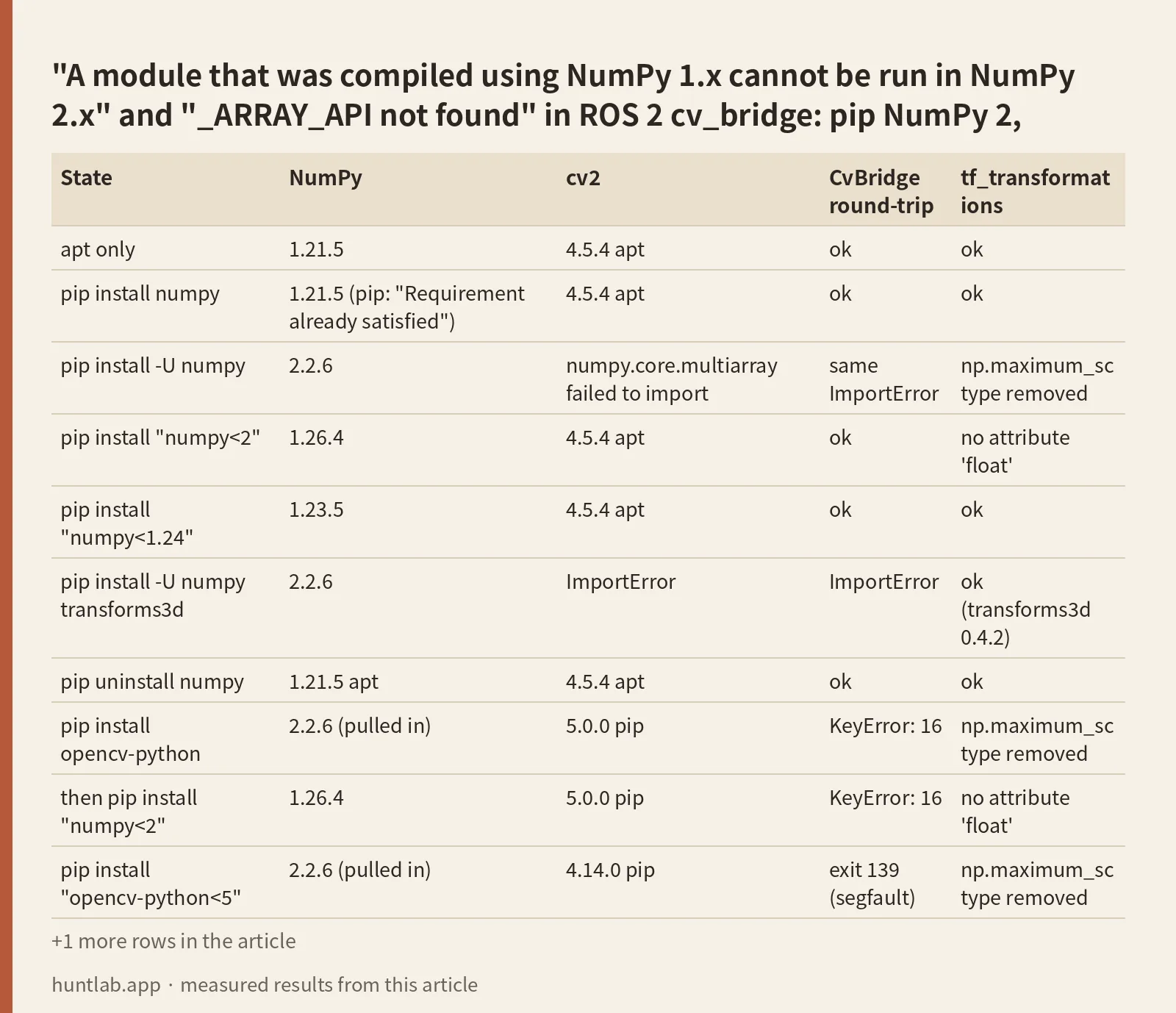
I repeated the checks after each pip change. pip used wheels only. Results on Humble (apt NumPy 1.21.5):
| State | NumPy | cv2 | CvBridge round-trip | tf_transformations |
|---|---|---|---|---|
| apt only | 1.21.5 | 4.5.4 apt | ok | ok |
pip install numpy |
1.21.5 (pip: “Requirement already satisfied”) | 4.5.4 apt | ok | ok |
pip install -U numpy |
2.2.6 | numpy.core.multiarray failed to import |
same ImportError | np.maximum_sctype removed |
pip install "numpy<2" |
1.26.4 | 4.5.4 apt | ok | no attribute 'float' |
pip install "numpy<1.24" |
1.23.5 | 4.5.4 apt | ok | ok |
pip install -U numpy transforms3d |
2.2.6 | ImportError | ImportError | ok (transforms3d 0.4.2) |
pip uninstall numpy |
1.21.5 apt | 4.5.4 apt | ok | ok |
pip install opencv-python |
2.2.6 (pulled in) | 5.0.0 pip | KeyError: 16 |
np.maximum_sctype removed |
then pip install "numpy<2" |
1.26.4 | 5.0.0 pip | KeyError: 16 |
no attribute 'float' |
pip install "opencv-python<5" |
2.2.6 (pulled in) | 4.14.0 pip | exit 139 (segfault) | np.maximum_sctype removed |
pip install "opencv-python-headless<4.12" "numpy<2" |
1.26.4 | 4.11.0 pip | ok | no attribute 'float' |
I ran the Humble script twice, and both runs gave the same table, including the segfault.
Cause 1: the apt cv_bridge and cv2 were built against NumPy 1.x
The NumPy message is misleading in one way. For cv_bridge it is printed with a traceback, but the import doesn’t fail. In every NumPy 2 run, import cv_bridge exited 0, and cv_bridge.getCvType from the boost module was still there. The process dies a few lines later, when CvBridge() runs import cv2 and the apt cv2 raises ImportError: numpy.core.multiarray failed to import. That’s why many tracebacks show both errors. The first comes from cv_bridge_boost, and the one that stops you comes from cv2.
If a pip OpenCV built for NumPy 2 replaces the apt cv2, the ImportError goes away and things get worse. With NumPy 2.2.6 and opencv-python 4.14.0.94, CvBridge() and cv2_to_imgmsg worked. Then imgmsg_to_cv2, which calls into the NumPy 1.x boost module, crashed the interpreter with exit code 139. There was no Python exception. That is the “may crash” in the warning. It happened in both Humble runs and on Jazzy.
The fix is to make the process load the NumPy that cv_bridge was built with:
pip uninstall numpyworked on Humble and Jazzy. pip only removes its own copy. On Humble it saidNot uninstalling numpy at /usr/lib/python3/dist-packages, outside environment /usrand left the apt NumPy in place, which is what you want.pip install "numpy<2"gave 1.26.4, andcv_bridgeplus the aptcv2worked again. It’s the right choice when another pip package needs a newer NumPy than apt’s 1.21.5.
After either fix, check which file is loaded. Then check it again with the interpreter your node actually runs.
Cause 2: OpenCV wheels from 4.12 on require NumPy 2, and 5.0 breaks cv_bridge
On Humble, plain pip install opencv-python printed Successfully installed numpy-2.2.6 opencv-python-5.0.0.93. NumPy 2 often arrives this way. Nobody asked for it, and it comes in as a dependency. I asked pip’s resolver (a dry run with pip 26.2.2) what each OpenCV version needs:
| Package spec | Resolved to | NumPy requirement (Python 3.9+) |
|---|---|---|
opencv-python / opencv-python-headless |
5.0.0.93 | numpy>=2 |
opencv-python<5 |
4.14.0.94 | numpy>=2 |
opencv-python==4.12.0.88 |
4.12.0.88 | numpy<2.3.0,>=2 |
opencv-python==4.11.0.86, opencv-python-headless<4.12 |
4.11.0.86 | numpy>=1.21.2 (py3.10), >=1.26.0 (py3.12) |
opencv-python==4.10.0.84 |
4.10.0.84 | same as 4.11, NumPy 1.x allowed |
opencv-python "numpy<2" |
4.11.0.86 | the resolver backs off to 4.11 by itself |
Pinning NumPy alone doesn’t help after OpenCV 5 is already installed. pip printed opencv-python 5.0.0.93 requires numpy>=2; python_version >= "3.9", but you have numpy 1.26.4 which is incompatible. and installed 1.26.4 anyway. The bridge then failed with KeyError: 16 in cv2_to_imgmsg. That error has nothing to do with NumPy. cv2.CV_8UC3 is 16 in OpenCV 4.x and 64 in the 5.0.0 wheel, while the C++ side of cv_bridge still returns OpenCV 4 type codes. It failed the same way on Lyrical, where NumPy wasn’t an issue at all.
The combination that worked on Humble and Jazzy was pip install "opencv-python-headless<4.12" "numpy<2", which gave 4.11.0.86 with 1.26.4. Or don’t pip-install OpenCV at all, and use the apt cv2.
Cause 3: tf_transformations depends on an old transforms3d
tf_transformations imports transforms3d, and the apt versions use NumPy names that are gone. On Humble, apt transforms3d 0.3.1 calls np.maximum_sctype(np.float). It worked only with NumPy 1.21.5 and 1.23.5. With 1.26.4 it failed on np.float, and with 2.2.6 on np.maximum_sctype. So on Humble numpy<2 fixes cv_bridge but not tf_transformations. Two things worked here: pip install transforms3d (0.4.2, ok with NumPy 2.2.6 and with 1.26.4), or numpy<1.24. Jazzy’s apt 0.4.1 worked with 1.26.4 and failed with NumPy 2.5.4. Lyrical’s apt 0.4.2 worked with NumPy 2.
Cause 4: pip on Jazzy and Lyrical won’t replace the apt NumPy
On Jazzy and Lyrical, plain pip install stops with PEP 668’s externally-managed-environment error. With --break-system-packages, pip install -U numpy and pip install opencv-python both stopped at ERROR: Cannot uninstall numpy 1.26.4, RECORD file not found. Hint: The package was installed by debian. and installed nothing. So on a stock Jazzy the system NumPy is hard to break by accident. NumPy 2 got in two ways in my runs: a venv, or --ignore-installed. Both broke things exactly as on Humble. With --ignore-installed NumPy 2.5.4, import cv2 failed with the ImportError. With opencv-python<5 the round-trip segfaulted, and with opencv-python 5.0.0.93 it raised KeyError: 16.
Be careful with uninstall on Jazzy. pip uninstall --break-system-packages transforms3d printed Successfully uninstalled transforms3d-0.4.1, and that was the apt copy. Afterwards import transforms3d failed, while dpkg still listed python3-transforms3d as installed. apt-get install --reinstall python3-transforms3d brought it back. Before you uninstall anything, check that numpy.__file__ points into /usr/local/lib or your venv.
venvs: –system-site-packages vs isolated
A venv doesn’t protect you here. source /opt/ros/$DISTRO/setup.bash puts the ROS Python packages on PYTHONPATH, so every venv sees the apt-built cv_bridge. For how ROS picks the interpreter at all, see ros2 run, conda and venv: which Python your node really uses.
python3 -m venv --system-site-packages, nothing installed: uses the apt NumPy, and theCvBridgeround-trip, point cloud and message checks passed on all three distros. Afterpip install -U numpyinside it (2.2.6 on Humble, 2.5.4 on Jazzy), it broke the same way as the system install.pip install "numpy<2"inside it fixedcv_bridgeagain.- Isolated venv (no system site packages): it sees ROS but not the apt NumPy,
cv2ortransforms3d. Importingsensor_msgs.msgfailed withNo module named 'numpy'. With pip NumPy 2.2.6,cv_bridgeprinted the same_ARRAY_API not foundmessage. On Humble,pip install "numpy<2" "opencv-python-headless<4.12" transforms3dmade all eight checks pass. On Jazzy, the message checks also needed PyYAML (No module named 'yaml'fromrclpy/parameter.py). On Lyrical, evenimport cv_bridgeneededem(No module named 'em'fromrosidl_pycommon). I didn’t chase those further.
If you need a venv for something like PyTorch, --system-site-packages plus numpy<2 was the shortest setup that worked.
Which pip packages pull in NumPy 2
These come from the resolver dry run in a --system-site-packages venv that already had the apt NumPy:
opencv-pythonandopencv-python-headless: 5.0.0.93, which needsnumpy>=2. Resolved NumPy: 2.2.6 on Humble, 2.5.4 on Jazzy.ultralytics8.4.191: by itself it asks fornumpy>=1.23.0on Linux. But it pullsopencv-python5.0.0.93, so the plan included NumPy 2.2.6 on Humble and 2.5.4 on Jazzy.torch2.14.1: no NumPy requirement, and the dry run installed no NumPy.
So in these runs, “I installed ultralytics and cv_bridge broke” was really OpenCV 5 and the NumPy 2 it requires. Installing ultralytics with "opencv-python-headless<4.12" "numpy<2" in the same command is the obvious next step, but I didn’t run it.
Version notes
- Humble (Ubuntu 22.04, Python 3.10.12, pip 22.0.2): apt NumPy 1.21.5, no PEP 668.
pip install -U numpyas root put NumPy 2.2.6 in/usr/local/lib/python3.10/dist-packages, ahead of apt. This is the easiest distro to break. - Jazzy (Ubuntu 24.04, Python 3.12.3, pip 24.0): apt NumPy 1.26.4. The breakage is the same once NumPy 2 is loaded.
numpy<2was already satisfied by apt.numpy<1.24had no wheel for Python 3.12 (the oldest offered was 1.26.0). - Lyrical (Ubuntu 26.04, Python 3.14.4, pip 25.1.1): apt NumPy 2.3.5. Every check passed with apt NumPy, and also with NumPy 2.5.4 in a venv.
numpy<2found no wheel (from versions: 2.3.2, 2.3.3, ...). Don’t downgrade NumPy on Lyrical.opencv-python5.0.0.93 still gaveKeyError: 16, andopencv-python<5(4.14.0.94) worked.
Not tested
arm64 and Jetson, conda environments, pip install --user, building cv_bridge from source against NumPy 2, opencv-python 4.13, actually installing ultralytics or torch (dry run only), Iron and Rolling, and rclpy publish/subscribe over DDS (I only tested serialization).
FAQ
How do I fix “AttributeError: _ARRAY_API not found” when importing cv_bridge?
On Humble and Jazzy, a pip NumPy 2 is shadowing the apt NumPy 1.x that cv_bridge was built with. Run pip uninstall numpy so Python falls back to apt, or pip install "numpy<2". Then confirm with python3 -c "import numpy; print(numpy.__file__)".
Why does cv_bridge import fine but my node dies at CvBridge()?
The boost module prints the NumPy 1.x message but still loads. CvBridge() then imports cv2, and the apt cv2 raises ImportError: numpy.core.multiarray failed to import. With a pip OpenCV 4.14 instead, the process segfaulted in imgmsg_to_cv2.
I pinned numpy below 2 and still get KeyError: 16 from cv2_to_imgmsg. Why?
You have opencv-python 5.x. In it cv2.CV_8UC3 is 64 instead of 16, so cv_bridge‘s type table doesn’t match. Uninstall it and use the apt cv2, or install "opencv-python-headless<4.12" (4.11.0.86). This happened on Humble, Jazzy and Lyrical.
Which opencv-python versions require NumPy 2?
Those I checked: 4.12.0.88 (numpy>=2,<2.3), 4.14.0.94 and 5.0.0.93 (numpy>=2). 4.10.0.84 and 4.11.0.86 accept NumPy 1.x. Asking pip for opencv-python "numpy<2" resolved to 4.11.0.86.
Does ROS 2 Lyrical have this problem?
Not with NumPy. Lyrical’s apt NumPy is 2.3.5, and cv_bridge, point clouds, messages and tf_transformations all worked with NumPy 2.3.5 and 2.5.4. numpy<2 has no wheel for its Python 3.14. OpenCV 5 wheels still break cv_bridge there.
Measured on 2026-10-28 with ros:humble-ros-base (sha256:d9bcf2e6f72d..., ros-humble-cv-bridge 3.2.1, python3-numpy 1.21.5, python3-opencv 4.5.4, Python 3.10.12), ros:jazzy-ros-base (sha256:8eed0a4669bb..., ros-jazzy-cv-bridge 4.1.0, python3-numpy 1.26.4, python3-opencv 4.6.0, Python 3.12.3) and ros:lyrical-ros-base (sha256:3224ee150cb0..., ros-lyrical-cv-bridge 4.1.0, python3-numpy 2.3.5, python3-opencv 4.10.0, Python 3.14.4). pip packages: numpy 2.2.6, 2.5.4, 1.26.4 and 1.23.5, opencv-python 5.0.0.93 and 4.14.0.94, opencv-python-headless 4.11.0.86, transforms3d 0.4.2. Full digests and versions are in digests.txt.
Script and raw output: evidence folder. Questions this answers: vision_opencv #535: Numpy 2.0 support, isaac_ros_common #138: Python import cv fails because of numpy version, NumPy incompatibility leads to yolov8 error, Using ultralytics with ROS2 Humble, Human Pose Estimation with AI in ROS2: _ARRAY_API not found.