“Cannot locate rosdep definition for” in ROS 2 rosdep install: –ignore-src, ROS_DISTRO, wrong keys, pip keys and custom sources, measured
ERROR: the following packages/stacks could not have their rosdep keys resolved
to system dependencies:
pkg_a: Cannot locate rosdep definition for [pkg_b]
That’s what rosdep install --from-paths src -r -y printed in my run. The first word after the package name changes with your package, and the key in brackets changes with your package.xml. The message is wrapped over two lines, so search for “Cannot locate rosdep definition for” rather than the whole sentence.
Short answer: rosdep looked up the key in brackets and found no rule for it on your OS. In my measurements that happened for five reasons. The key was a package in your own workspace and --ignore-src was missing. ROS_DISTRO was not set, so ROS package keys could not be looked up. The key was misspelled or an old name (python-numpy instead of python3-numpy). The key doesn’t exist anywhere. Or it was your own key and you hadn’t added a source for it. The command that worked on Humble, Jazzy and Lyrical, from the workspace root:
source /opt/ros/humble/setup.bash      # sets ROS_DISTRO
apt-get update                          # in Docker the apt lists are empty
rosdep update
rosdep install --from-paths src --ignore-src -y
Then check the key itself with rosdep resolve <key>. If it says no rosdep rule, the key is wrong or missing from the database, and no install flag will fix it.
One warning about -r. With -r, rosdep printed the same error, then Continuing to install resolvable dependencies..., and exited with code 0. In a Dockerfile or CI job the step looks green. Drop -r while you debug.
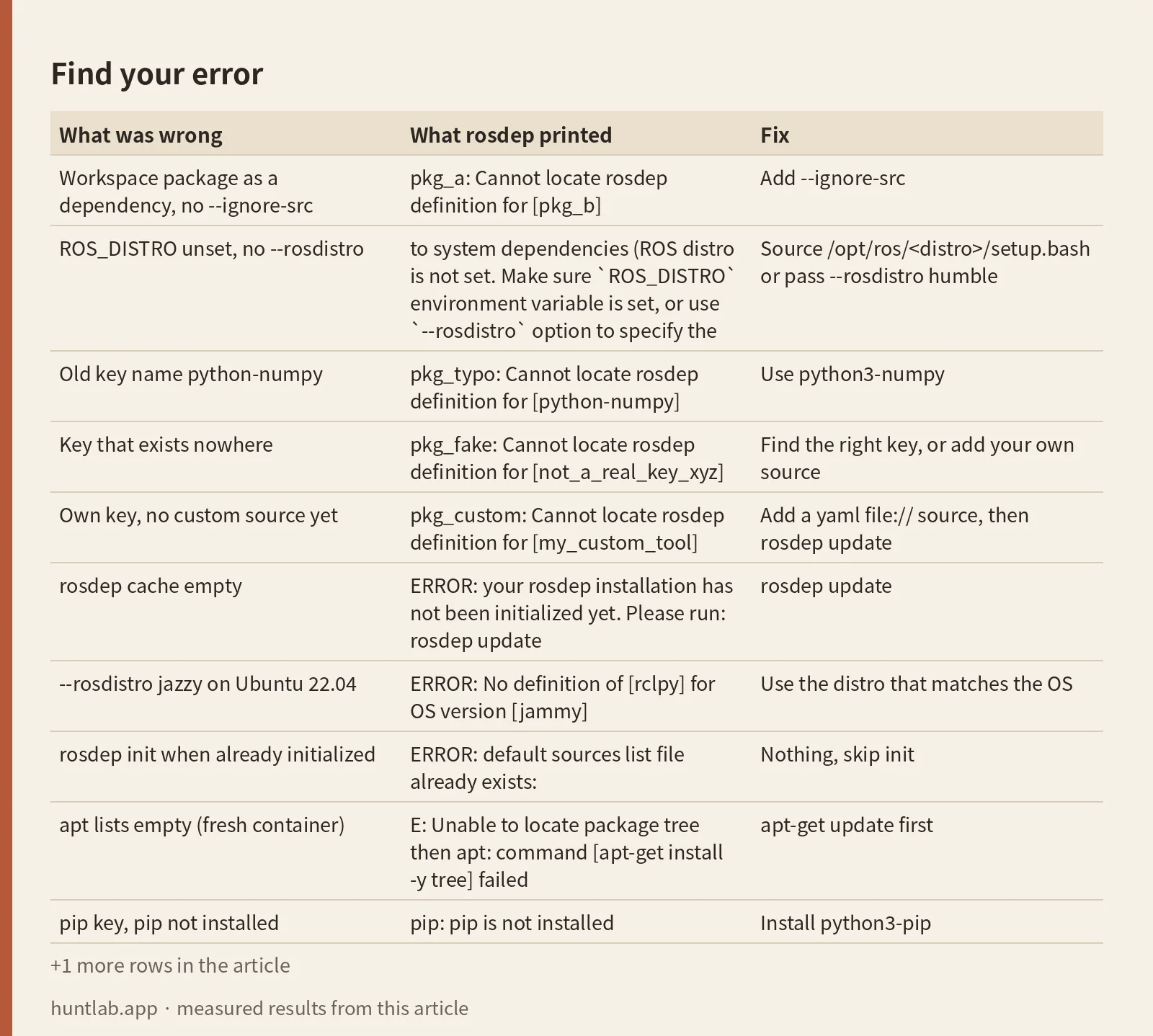
Find your error
Each row was measured with a tiny workspace. The rows were the same on Humble, Jazzy and Lyrical unless the last column says otherwise.
| What was wrong | What rosdep printed | Fix |
|---|---|---|
Workspace package as a dependency, no --ignore-src |
pkg_a: Cannot locate rosdep definition for [pkg_b] |
Add --ignore-src |
ROS_DISTRO unset, no --rosdistro |
to system dependencies (ROS distro is not set. Make sure `ROS_DISTRO` environment variable is set, or use `--rosdistro` option to specify the distro, e.g. `--rosdistro indigo`): then pkg_bt: Cannot locate rosdep definition for [turtlesim] |
Source /opt/ros/<distro>/setup.bash or pass --rosdistro humble |
Old key name python-numpy |
pkg_typo: Cannot locate rosdep definition for [python-numpy] |
Use python3-numpy |
| Key that exists nowhere | pkg_fake: Cannot locate rosdep definition for [not_a_real_key_xyz] |
Find the right key, or add your own source |
| Own key, no custom source yet | pkg_custom: Cannot locate rosdep definition for [my_custom_tool] |
Add a yaml file:// source, then rosdep update |
| rosdep cache empty | ERROR: your rosdep installation has not been initialized yet. Please run: rosdep update |
rosdep update |
--rosdistro jazzy on Ubuntu 22.04 |
ERROR: No definition of [rclpy] for OS version [jammy] |
Use the distro that matches the OS |
rosdep init when already initialized |
ERROR: default sources list file already exists: |
Nothing, skip init |
| apt lists empty (fresh container) | E: Unable to locate package tree then apt: command [apt-get install -y tree] failed |
apt-get update first |
| pip key, pip not installed | pip: pip is not installed |
Install python3-pip |
| pip key on Jazzy or Lyrical (Python 3.12 and 3.14) | rosdep installation of pip packages requires installing packages globally as root. … PIP_BREAK_SYSTEM_PACKAGES=1 |
Set PIP_BREAK_SYSTEM_PACKAGES=1. Humble didn’t need it |
The last five rows are not “Cannot locate rosdep definition”. They are the errors you are likely to hit next, or instead, in the same command.
What I ran
On 2026-10-29 I used the official ros:humble-ros-base, ros:jazzy-ros-base and ros:lyrical-ros-base Docker images, one after another. All three ship rosdep 0.27.0. Inside each one, a script wrote a set of one-file packages: a package.xml with <depend> lines and nothing else. rosdep only reads package.xml, so no code was needed. Each case had its own src folder:
| Folder | Packages and dependencies |
|---|---|
/ws/c/src |
pkg_a depends on pkg_b, rclpy, python3-numpy. pkg_b is in the same folder. |
/ws/b/src |
pkg_bt depends on turtlesim, which is not in the ros-base image |
/ws/d/src, /ws/d2/src |
pkg_typo depends on python-numpy. pkg_fake depends on not_a_real_key_xyz. |
/ws/e/src |
pkg_pip depends on python3-anytree-pip |
/ws/g/src |
pkg_typo again, plus pkg_a2 depending on rclpy, python3-numpy, tree |
/ws/h/src |
pkg_custom depends on my_custom_tool, a key I defined myself |
Most install commands used -s (simulate) so they print what they would install. The pip, fix and custom-key cases ran for real. Every command’s exit code is in the raw output. rosdep resolved against the rosdistro master branch at commit ad81cc6 (committed 2026-10-28T23:48:54Z). It was the same commit before and after the runs.
One thing failed before any of this worked. My first package.xml used [email protected] as the maintainer email, and rosdep refused every command with Invalid email "[email protected]" for person "t". If rosdep fails on a package.xml before it gets to the keys, check the maintainer email.
A package in your own workspace: –ignore-src
Without --ignore-src, rosdep treats every <depend> as a system dependency, including packages that sit next to it in src. There is no rule for pkg_b, so it fails:
$ rosdep install --from-paths /ws/c/src -y -s
ERROR: the following packages/stacks could not have their rosdep keys resolved
to system dependencies:
pkg_a: Cannot locate rosdep definition for [pkg_b]
[exit=1]
With --ignore-src the same folder passed, and the real install ended with #All required rosdeps installed successfully. rosdep keys shows why. Without the flag it listed rclpy, pkg_b, ament_cmake and python3-numpy. With it, only python3-numpy was left. pkg_b was dropped because it’s in the workspace. rclpy and ament_cmake were dropped too, because the image already had them under /opt/ros.
If the missing key is a package you expected to come from source, check that it really is under the path you passed to --from-paths. If it isn’t, cloning it into src fixes rosdep. A dependency that’s in neither place fails later in the build too, as described in “Could not find a package configuration file” in colcon builds.
ROS_DISTRO not set
Keys for ROS packages such as turtlesim or rclpy come from the distro’s release file, not from the shared yaml files. rosdep needs the distro name to pick that file. It reads it from ROS_DISTRO, which setup.bash sets. With the variable removed:
$ env -u ROS_DISTRO rosdep install --from-paths /ws/b/src --ignore-src -y -s
ERROR: the following packages/stacks could not have their rosdep keys resolved
to system dependencies (ROS distro is not set. Make sure `ROS_DISTRO` environment variable is set, or use `--rosdistro` option to specify the distro, e.g. `--rosdistro indigo`):
pkg_bt: Cannot locate rosdep definition for [turtlesim]
[exit=1]
System keys didn’t care. env -u ROS_DISTRO rosdep resolve python3-numpy still printed python3-numpy, while rosdep resolve turtlesim printed ERROR: no rosdep rule for 'turtlesim'. So if only your ROS package keys fail, look at the distro first. Passing --rosdistro humble fixed it, and the simulated install became apt-get install -y ros-humble-turtlesim. On Jazzy and Lyrical it was ros-jazzy-turtlesim and ros-lyrical-turtlesim.
A wrong distro gives a different error. On the Humble image (Ubuntu 22.04), rosdep resolve rclpy --rosdistro jazzy printed WARNING: given --rosdistro jazzy but ROS_DISTRO is "humble". Ignoring environment. and then ERROR: No definition of [rclpy] for OS version [jammy], with the rule data below it. The data showed Jazzy packages only for noble on Ubuntu, and Lyrical packages only for resolute (Ubuntu 26.04). Each distro is built for its own Ubuntu release.
A misspelled or old key: python-numpy
The key in package.xml is a rosdep key, not an apt package name. They often look the same, but not always. python-numpy was the old Python 2 key, and there is no rule for it in the current database:
$ rosdep resolve python-numpy
ERROR: no rosdep rule for 'python-numpy'
[exit=1]

$ rosdep resolve python3-numpy
#apt
python3-numpy
[exit=0]

$ rosdep where-defined python3-numpy
https://raw.githubusercontent.com/ros/rosdistro/master/rosdep/python.yaml
After changing python-numpy to python3-numpy in package.xml, the install printed #All required rosdeps installed successfully. A key that exists nowhere, not_a_real_key_xyz, failed in exactly the same way. rosdep can’t tell a typo from a missing key, so the error looks the same. To find the right name, search the files in the rosdistro rosdep folder (base.yaml for system packages, python.yaml for Python ones) and then check your guess with rosdep resolve.
pip-only keys
Keys ending in -pip install with pip, not apt. rosdep resolve python3-anytree-pip printed #pip and anytree on all three distros. Installing it failed differently by distro:
| Distro (Python) | No pip installed | After apt-get install python3-pip |
With PIP_BREAK_SYSTEM_PACKAGES=1 |
|---|---|---|---|
| Humble (3.10.12) | pip: pip is not installed, exit 1 |
Installed: Successfully installed anytree-2.13.0, via pip3 install -U anytree |
Already installed |
| Jazzy (3.12.3) | Same | Failed with the PEP 668 message below, exit 1 | Installed anytree-2.13.0 |
| Lyrical (3.14.4) | Same | Failed with the PEP 668 message, exit 1 | Installed anytree-2.13.0 |
ERROR: the following rosdeps failed to install
  pip:
rosdep installation of pip packages requires installing packages globally as root.
When using Python >= 3.11, PEP 668 compliance requires you to allow pip to install alongside
externally managed packages using the 'break-system-packages' option.
The recommeded way to set this option when using rosdep is to set the environment variable
PIP_BREAK_SYSTEM_PACKAGES=1
in your environment.
The ros-base images don’t include python3-pip, so the first column hit every distro. rosdep didn’t install pip on its own. On Jazzy and Lyrical, set the variable in the same command or Dockerfile ENV: PIP_BREAK_SYSTEM_PACKAGES=1 rosdep install .... pip also printed its usual warning about running as root. These errors are not “Cannot locate rosdep definition”. The key resolved fine, and the install step failed.
Your own key: a local source list
If the dependency isn’t in rosdistro, you can add your own rule. I wrote /ws/custom.yaml:
my_custom_tool:
  ubuntu: [tree]
and pointed rosdep at it with a list file. Files in sources.list.d are read in name order, so 10- comes before the default 20-default.list:
echo "yaml file:///ws/custom.yaml" > /etc/ros/rosdep/sources.list.d/10-local.listBefore rosdep update, rosdep resolve my_custom_tool still printed ERROR: no rosdep rule for 'my_custom_tool'. rosdep reads only its cache, so adding the list file isn’t enough. After rosdep update:
$ rosdep resolve my_custom_tool
#apt
tree

$ rosdep where-defined my_custom_tool
file:///ws/custom.yaml
Then rosdep install --from-paths /ws/h/src --ignore-src -r -y ran apt-get install -y tree and rosdep check printed All system dependencies have been satisfied. Same result on all three distros. If you edit the yaml later, run rosdep update again. If the key is useful to others, the long-term fix is a pull request to rosdistro.
rosdep update, rosdep init and fresh containers
The official images already ran rosdep init and rosdep update when they were built. Each had a cache in /root/.ros/rosdep/sources.cache dated Oct 27 00:32, about two days old at the time of the run. A stale cache is the usual reason a key that was added to rosdistro recently isn’t found, so run rosdep update anyway. It took 8.9 s on Humble and 6.8 s on Jazzy and Lyrical, and it added the distros humble, jazzy, kilted, lyrical and rolling, skipping the end-of-life ones. As root it also printed Warning: running 'rosdep update' as root is not recommended.. It still exited with 0.
With the cache folder removed, rosdep didn’t say “Cannot locate”. It refused to run:
ERROR: your rosdep installation has not been initialized yet.  Please run:

    rosdep update
Running rosdep init in the image failed at once, because the image had already done it:
ERROR: default sources list file already exists:
	/etc/ros/rosdep/sources.list.d/20-default.list
Please delete if you wish to re-initialize
After I deleted that file, the first rosdep init printed Wrote /etc/ros/rosdep/sources.list.d/20-default.list and the second one failed with the same “already exists” error, exit 1. The error is harmless. Init only writes that one file. In a Dockerfile that may run on an image that’s already initialized, use rosdep init || true or delete the file first, then rosdep update.
The ros-base images also have empty apt lists (/var/lib/apt/lists had no files). Without apt-get update, a key that resolved fine still failed at install time with E: Unable to locate package tree.
What -r does
I ran the /ws/g/src folder, with one bad key (python-numpy) and one good uninstalled key (tree), with and without -r:
| Command | Error printed | Installed the good keys? | Exit code |
|---|---|---|---|
without -r |
yes | no, nothing was installed | 1 |
with -r |
yes, plus Continuing to install resolvable dependencies... |
yes, apt-get install -y tree |
0 |
-r means “continue on errors”. It’s handy when one unknown key would otherwise block everything else. But an exit code of 0 means a script won’t stop, and the build fails later with a less clear error. In every case I ran with -r, the unresolved key still exited 0.
Useful rosdep diagnostic commands
| Command | What it printed in my run |
|---|---|
rosdep resolve <key> |
The installer and package (#apt python3-numpy, #pip anytree, ros-humble-rclpy), or ERROR: no rosdep rule for '<key>' |
rosdep where-defined <key> |
The source file URL, for example .../rosdep/python.yaml or file:///ws/custom.yaml |
rosdep keys --from-paths src --ignore-src |
The keys rosdep will try to resolve, one per line, after dropping workspace and installed ROS packages |
rosdep check --from-paths src --ignore-src |
For a bad key: ERROR[pkg_typo]: Cannot locate rosdep definition for [python-numpy] with OS name and version, then System dependencies have not been satisfied: and the missing apt tree. When everything is fine: All system dependencies have been satisfied |
rosdep install ... -s |
The apt-get install commands it would run, without running them |
rosdep check is the best first command. It tells you which package and which key failed, and what is still missing, and it doesn’t install anything.
Version notes
All three images had python3-rosdep 0.27.0-1, python3-rosdep-modules 0.27.0-1 and python3-rosdistro-modules 1.1.0-1. Every error text above was identical on Humble (Ubuntu 22.04.5), Jazzy (Ubuntu 24.04.5) and Lyrical (Ubuntu 26.04.1). Only these things differed: the OS codename in messages (jammy, noble, resolute), the ros-<distro>- package prefix, and the pip behaviour. Humble’s Python 3.10 installed pip keys without PIP_BREAK_SYSTEM_PACKAGES. Jazzy (Python 3.12.3) and Lyrical (Python 3.14.4) did not. The python3-pip versions installed were 22.0.2, 24.0 and 25.1.1.
One oddity: pip reported Successfully installed anytree-2.13.0, but anytree.__version__ printed 2.12.1 on all three. That’s the package’s own version string, not a rosdep issue. I didn’t look further.
Not tested
Running rosdep as a non-root user with sudo, rosdep fix-permissions, --skip-keys as a fix for a missing key, ROSDISTRO_INDEX_URL or a custom rosdistro index, --include-eol-distros, an http(s) custom source instead of file://, pip keys inside a virtual environment, non-Ubuntu OSes, Foxy, Iron, Kilted and Rolling, and ROS 1.
FAQ
What does “Cannot locate rosdep definition for [key]” mean?
rosdep found no rule that maps that key to a system package for your OS and distro. In my runs the cause was a workspace package without --ignore-src, an unset ROS_DISTRO, a wrong or old key name, or a custom key with no source. Run rosdep resolve <key> to see whether the key exists at all.
Does –ignore-src fix it?
Only when the key is another package in your workspace. Then --ignore-src drops it from the list and the error goes away. For a misspelled key like python-numpy, the error stayed with --ignore-src.
Why does rosdep install succeed even though it printed an error?
Because of -r. With -r, rosdep printed the error, installed the keys it could resolve, and exited with 0. Without -r it installed nothing and exited with 1.
How do I fix “ERROR: default sources list file already exists”?
You don’t need to. rosdep init was already run, and in the official ROS images it was run when the image was built. Skip init and run rosdep update. To re-initialize, delete /etc/ros/rosdep/sources.list.d/20-default.list first.
How do I add a rosdep key for a package that isn’t in rosdistro?
Write a yaml file that maps the key to a package per OS, add a line like yaml file:///path/custom.yaml to a file in /etc/ros/rosdep/sources.list.d/, and run rosdep update. The key didn’t resolve until after rosdep update. Then rosdep where-defined showed the local file.
Measured on 2026-10-29 with ros:humble-ros-base (sha256:d9bcf2e6f72d..., Ubuntu 22.04.5, Python 3.10.12), ros:jazzy-ros-base (sha256:8eed0a4669bb..., Ubuntu 24.04.5, Python 3.12.3) and ros:lyrical-ros-base (sha256:3224ee150cb0..., Ubuntu 26.04.1, Python 3.14.4), all with python3-rosdep 0.27.0-1 and python3-rosdistro-modules 1.1.0-1, resolving against rosdistro master at ad81cc6df71f (2026-10-28T23:48:54Z). Full digests are in digests.txt.
Script and raw output: evidence folder. Questions this answers: How to solve the ERROR Cannot locate rosdep definition for [PCL] in ROS2 Humble?, Rosdep install not locating definitions [rostime] [catkin] [rospy], Cannot locate rosdep definition for [nodelet], Install rosdep definition locally in a package, Can’t init rosdep, tf2_kdl: Cannot locate rosdep definition for [orocos_kdl].