ROS 2 “module ’em’ has no attribute ‘BUFFERED_OPT'” and “No module named ’em'”: colcon building interfaces with a venv Python, measured
--- stderr: my_interfaces
CMake Error at /opt/ros/humble/share/rosidl_adapter/cmake/rosidl_adapt_interfaces.cmake:59 (message):
  execute_process(/venv/e4/bin/python3 -m rosidl_adapter --package-name
  my_interfaces --arguments-file ...
  returned error code 1:

  AttributeError processing template 'msg.idl.em'

  Traceback (most recent call last):

    File "/opt/ros/humble/local/lib/python3.10/dist-packages/rosidl_adapter/resource/__init__.py", line 51, in evaluate_template
      em.BUFFERED_OPT: True,

  AttributeError: module 'em' has no attribute 'BUFFERED_OPT'
...
Summary: 0 packages finished [1.04s]
  1 package failed: my_interfaces
Short answer: CMake built your interfaces with the Python from your active venv or conda env, not with /usr/bin/python3. Look at the path inside execute_process(...). If it is your venv, that interpreter is missing the build-time modules ROS needs, or has the wrong version of one. BUFFERED_OPT means empy 4.x on Humble. Humble’s rosidl_adapter only works with empy 3.x. The fix that worked on Humble, Jazzy and Lyrical was the simplest one: build in a shell where the venv is not active.
deactivate            # or: conda deactivate
cd ~/ros2_ws
rm -rf build install log
colcon build
If you need the venv active while you build, pin the old empy in it on Humble and add the other missing modules:
pip install empy==3.3.4 catkin_pkg lark
# Jazzy and Lyrical venvs also needed:
pip install numpy setuptools
This post is about build time. If the build works but ros2 run can’t import a package from your venv, that’s the shebang problem covered in ros2 run ignores my conda or venv Python.
Find your error text
Each row is one Python module missing from (or wrong in) the interpreter CMake picked. The error you see first depends on which module is missing first. I started from a venv with nothing in it and added one package at a time.
| Error text | Where it happens | Distros | colcon exit code | Fix in the venv |
|---|---|---|---|---|
ModuleNotFoundError: No module named 'em' |
rosidl_adapt_interfaces.cmake:59, at configure |
Humble, Jazzy, Lyrical | 1 | pip install empy==3.3.4 |
AttributeError: module 'em' has no attribute 'BUFFERED_OPT' |
rosidl_adapter template msg.idl.em, at configure |
Humble only, with empy 4.2.1 | 1 | pip install empy==3.3.4 |
ModuleNotFoundError: No module named 'catkin_pkg' |
package_xml_2_cmake.py line 22, ament_package_xml.cmake:95 |
Humble, Jazzy, Lyrical | 1 | pip install catkin_pkg |
Could NOT find Python3 (missing: Python3_NumPy_INCLUDE_DIRS NumPy) |
rosidl_generator_py_generate_interfaces.cmake, at configure |
Jazzy, Lyrical | 1 | pip install numpy |
ModuleNotFoundError: No module named 'lark' |
rosidl_parser/parser.py, during make |
Humble (the only one that got this far without lark) | 2 | pip install lark |
ModuleNotFoundError: No module named 'setuptools' |
build/.../ament_cmake_python/my_interfaces/setup.py, during make |
Jazzy, Lyrical | 2 | pip install setuptools |
colcon reported every one of these as a failure: Failed <<< my_interfaces, then Summary: 0 packages finished and 1 package failed: my_interfaces. Configure-time errors exited with code 1 within 1 to 3 seconds. The make-time errors (lark, setuptools) exited with code 2 after 2 to 10 seconds. If you get no error at all but your messages can’t be imported, see the ament_python section below.
What I ran
On 2026-10-28 I used the official ros:humble-ros-base, ros:jazzy-ros-base and ros:lyrical-ros-base Docker images. The test package was the smallest one possible: an ament_cmake package called my_interfaces with one file, msg/Num.msg (int64 num), and one rosidl_generate_interfaces call. I created venvs with the distro’s own python3 -m venv, so the Python version always matched the one ROS was built for. Before every build I deleted build, install and log. I counted a build as working only if colcon exited 0 and the generated msg/_num.py was in install/.
First, what each distro ships. The apt package is what rosidl was built and tested against:
| Humble | Jazzy | Lyrical | |
|---|---|---|---|
| Python | 3.10.12 | 3.12.3 | 3.14.4 |
python3-empy (apt) |
3.3.4-2 | 3.3.4-2 | 4.2.1-1 |
rosidl_adapter |
3.1.9 | 4.6.9 | 5.2.1 |
rosidl_generator_py |
0.14.6 | 0.22.2 | 0.27.2 |
python3-colcon-core |
0.21.3 | 0.21.3 | 0.21.3 |
| CMake | 3.22.1 | 3.28.3 | 4.2.3 |
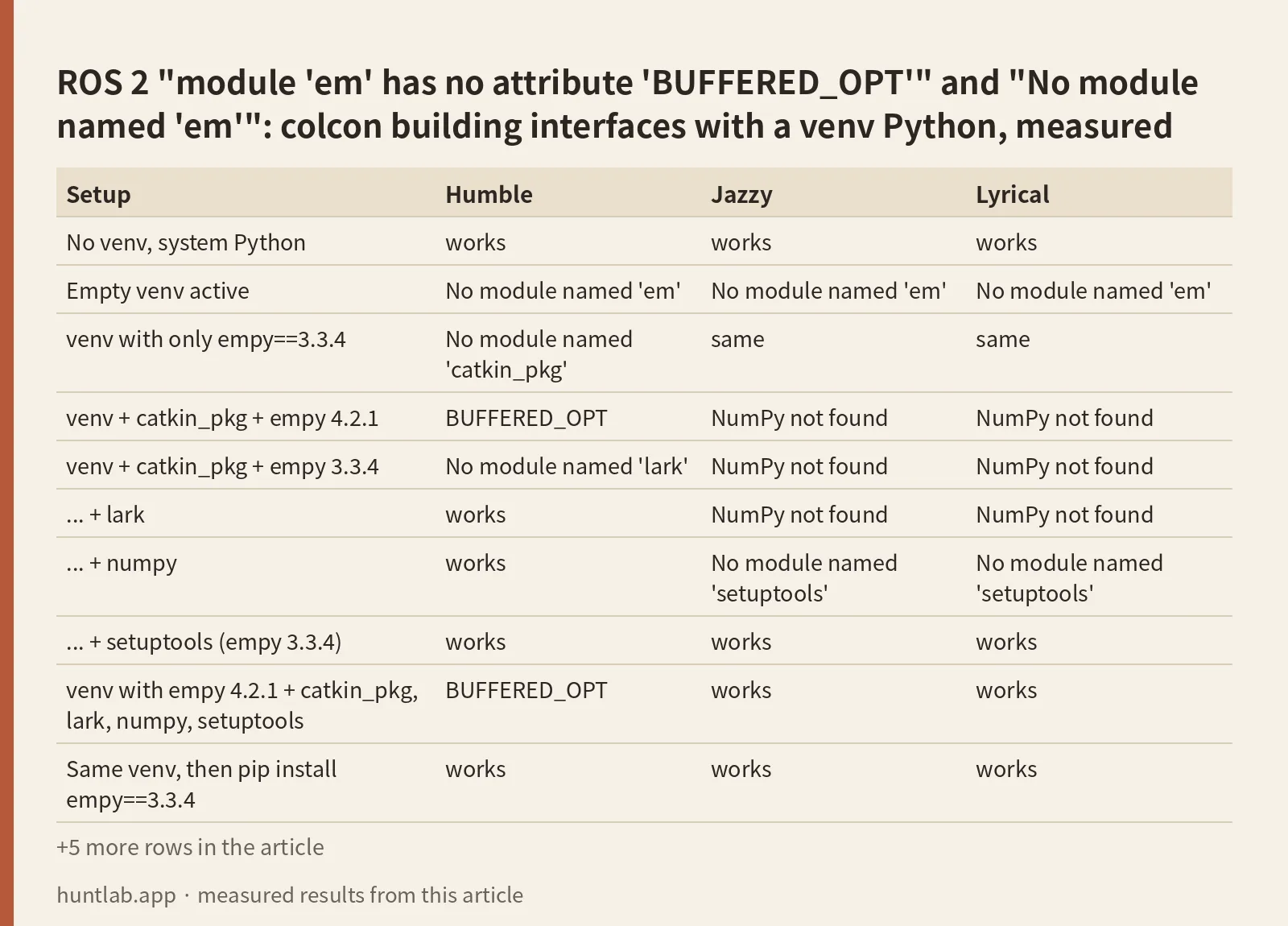
Then the builds. “venv” means a venv created without --system-site-packages and activated with source bin/activate. pip installed empy 4.2.1 when I asked for plain empy, plus catkin_pkg 1.1.1 and lark 1.3.1.
| Setup | Humble | Jazzy | Lyrical |
|---|---|---|---|
| No venv, system Python | works | works | works |
| Empty venv active | No module named 'em' |
No module named 'em' |
No module named 'em' |
venv with only empy==3.3.4 |
No module named 'catkin_pkg' |
same | same |
| venv + catkin_pkg + empy 4.2.1 | BUFFERED_OPT |
NumPy not found | NumPy not found |
| venv + catkin_pkg + empy 3.3.4 | No module named 'lark' |
NumPy not found | NumPy not found |
| … + lark | works | NumPy not found | NumPy not found |
| … + numpy | works | No module named 'setuptools' |
No module named 'setuptools' |
| … + setuptools (empy 3.3.4) | works | works | works |
| venv with empy 4.2.1 + catkin_pkg, lark, numpy, setuptools | BUFFERED_OPT |
works | works |
Same venv, then pip install empy==3.3.4 |
works | works | works |
Same venv, deactivate, build again |
works | works | works |
venv --system-site-packages, nothing installed |
works | works | works |
That venv + pip install -U empy |
BUFFERED_OPT |
works | works |
Active venv + --cmake-args -DPython3_EXECUTABLE=/usr/bin/python3 |
fails (see below) | works | works |
Active venv + -DPython3_EXECUTABLE and -DPYTHON_EXECUTABLE |
works | works | works |
A successful build of the package took 6.7 to 7.6 seconds on Humble, 8.7 to 9.6 on Jazzy and 9.6 to 11.4 on Lyrical.
Why the venv Python gets used
The colcon command itself is not the problem. Its shebang is #!/usr/bin/python3 on all three images, so it runs on the system Python even with a venv active. The problem is CMake. When VIRTUAL_ENV is set, CMake’s FindPython3 picks the venv interpreter. In CMakeCache.txt the empty-venv build had Python3_EXECUTABLE:FILEPATH=/venv/bare/bin/python3. The no-venv build had /usr/bin/python3. Every rosidl step that runs Python then runs that interpreter.
The ROS Python packages (rosidl_adapter, rosidl_parser and the others) still load in the venv, because setup.bash puts /opt/ros/<distro> on PYTHONPATH. Their third-party dependencies come from apt and live in /usr/lib/python3/dist-packages, which a normal venv doesn’t see. That’s why the errors name em, catkin_pkg, lark and numpy and never a ROS package. To check which interpreter your build used, read the path at the start of execute_process(...) in the error, or run:
grep -E '^(Python3_EXECUTABLE|PYTHON_EXECUTABLE)' build/<your_pkg>/CMakeCache.txtBUFFERED_OPT: empy 4 on Humble
empy 4 removed options that empy 3 had. Humble’s rosidl_adapter 3.1.9 still passes em.BUFFERED_OPT to em.Interpreter (line 51 of rosidl_adapter/resource/__init__.py). With empy 4.2.1 in the venv the build fails, and a second traceback follows: AttributeError: 'NoneType' object has no attribute 'shutdown'. That second error comes from the cleanup code. It isn’t a separate problem.
Jazzy (rosidl_adapter 4.6.9) and Lyrical (5.2.1) built with both empy 4.2.1 and 3.3.4. Lyrical’s own apt package is 4.2.1. So BUFFERED_OPT only showed up on Humble in my runs. On Jazzy and Lyrical, a venv build that fails will hit one of the other rows first.
How you get empy 4 matters on Humble:
pip install empyin a normal venv installs the newest version (4.2.1 on the test date).pip install empyin a--system-site-packagesvenv did nothing on Humble, because the apt 3.3.4 already satisfies it. The build kept working.pip install -U empyin that same venv installed 4.2.1 over it, and the build failed withBUFFERED_OPT.
The fix is pip install empy==3.3.4 in that interpreter. In the venv that had failed with BUFFERED_OPT, that one command was enough on Humble.
No module named ’em’, ‘catkin_pkg’, ‘lark’
These three mean the module isn’t in the venv at all. In an empty venv em failed first on every distro, because rosidl_generate_interfaces runs rosidl_adapter before it parses package.xml. With empy present and catkin_pkg missing, package_xml_2_cmake.py failed on its import at line 22. lark is used by rosidl_parser, which only runs during the make step. That’s why its exit code was 2, not 1, and why it printed twice: once from rosidl_generator_cpp and once from rosidl_generator_rs, which run in parallel.
Install the PyPI name, not the import name. The package is empy, not em. They share the em namespace. Then add catkin_pkg and lark.
No module named ‘numpy’ and ‘setuptools’ (Jazzy, Lyrical)
On Jazzy and Lyrical, rosidl_generator_py calls find_package(Python3 ... NumPy) at configure time. Without numpy in the venv, the message is CMake’s, not Python’s:
CMake Error at /usr/share/cmake-3.28/Modules/FindPackageHandleStandardArgs.cmake:230 (message):
  Could NOT find Python3 (missing: Python3_NumPy_INCLUDE_DIRS NumPy) (found
  version "3.12.3")
Call Stack (most recent call first):
  ...
  /opt/ros/jazzy/share/rosidl_generator_py/cmake/rosidl_generator_py_generate_interfaces.cmake:22 (find_package)
After numpy, the venvs on these two distros were missing setuptools. That error came from the setup.py that ament_cmake_python generates in the build directory:
  File "/ws/build/my_interfaces/ament_cmake_python/my_interfaces/setup.py", line 1, in <module>
    from setuptools import find_packages
ModuleNotFoundError: No module named 'setuptools'
On Humble the venv built with empy 3.3.4, catkin_pkg and lark, and I didn’t install numpy or setuptools. Neither was asked for.
-DPython3_EXECUTABLE works on Jazzy and Lyrical, not alone on Humble
Pointing CMake back at the system Python is the other way to keep the venv active:
colcon build --cmake-args -DPython3_EXECUTABLE=/usr/bin/python3On Jazzy and Lyrical that was enough, both with an empty venv and with the empy 4.2.1 venv. On Humble it failed. With the empy 4.2.1 venv the error was Error processing idl file: .../Num.idl followed by the same BUFFERED_OPT traceback, this time from rosidl_generator_py during make (exit code 2). With the empty venv it was:
ImportError: cannot import name 'generate_py' from 'rosidl_generator_py' (/opt/ros/humble/local/lib/python3.10/dist-packages/rosidl_generator_py/__init__.py)The cache shows why. On Humble there is a second variable, PYTHON_EXECUTABLE, and it still held the venv path. Humble’s rosidl_generator_py step ran with it. Setting both fixed Humble:
colcon build --cmake-args -DPython3_EXECUTABLE=/usr/bin/python3 -DPYTHON_EXECUTABLE=/usr/bin/python3The same two flags also worked on Jazzy and Lyrical. If you script one command for all distros, use both.
ament_python package with custom messages
This is a different case. There is no error at build time. I made an ament_python package, py_with_msg, with msg/Num.msg, rosidl_default_generators as a buildtool dependency, rosidl_default_runtime as an exec dependency and member_of_group rosidl_interface_packages in package.xml. It had a node that imports from py_with_msg.msg import Num. On all three distros, without a venv:
Starting >>> py_with_msg
Finished <<< py_with_msg [0.86s]
Summary: 1 package finished [1.07s]
colcon exited 0. Nothing was generated. There was no msg directory under install/ and no rosidl_interfaces entry in the ament index. At runtime:
$ ros2 run py_with_msg talker
  File "/ws2/install/py_with_msg/lib/python3.10/site-packages/py_with_msg/talker.py", line 1, in <module>
    from py_with_msg.msg import Num
ModuleNotFoundError: No module named 'py_with_msg.msg'
[ros2run]: Process exited with failure 1

$ ros2 interface show py_with_msg/msg/Num
Could not find the resource 'py_with_msg' of type 'rosidl_interfaces'
The reason is that an ament_python build only runs setup.py. rosidl_generate_interfaces is a CMake function, and nothing in that build calls it. The dependencies in package.xml don’t change that. The fix is a separate ament_cmake package for the interfaces, with the Python node depending on it:
src/
  my_interfaces/          # ament_cmake
    CMakeLists.txt        # find_package(rosidl_default_generators REQUIRED)
                          # rosidl_generate_interfaces(${PROJECT_NAME} "msg/Num.msg")
    package.xml           # buildtool_depend rosidl_default_generators,
                          # exec_depend rosidl_default_runtime,
                          # member_of_group rosidl_interface_packages
    msg/Num.msg
  py_node/                # ament_python
    package.xml           # exec_depend my_interfaces
    py_node/talker.py     # from my_interfaces.msg import Num
colcon builds my_interfaces first because of the dependency. On all three distros it printed Summary: 2 packages finished, and the node printed:
OK my_interfaces.msg.Num(num=5)Build this interfaces package without a venv, or with the fixes above. It’s a normal rosidl_generate_interfaces package, so every error in the first table applies to it.
Version notes
The error texts matched across distros where the same step failed. Line numbers in the call stack differ: ament_package_xml is called from rosidl_generate_interfaces.cmake:226 on Humble and :220 on Jazzy and Lyrical. Humble needs empy 3.x. Jazzy and Lyrical accepted 3.3.4 and 4.2.1. Only Jazzy and Lyrical needed numpy and setuptools in the venv, and only Humble needed -DPYTHON_EXECUTABLE in addition to -DPython3_EXECUTABLE. Lyrical’s CMake 4.2.3 also printed a CMake Deprecation Warning for cmake_minimum_required(VERSION 3.8). That warning is harmless.
Not tested
Conda environments (I used venv only; the same check on execute_process(...) applies, but I didn’t run it). uv, pyenv and Python versions different from the distro’s. colcon installed with pip inside the venv. The unrelated PyPI package em, and an em.py under /opt/ros breaking colcon itself (cannot import name 'OVERRIDE_OPT' from 'em'). A stale CMakeCache.txt from an earlier build (I deleted build/ every time). A single ament_cmake package that holds both messages and Python nodes. Windows, macOS, Iron, Kilted and Rolling.
FAQ
How do I fix module ’em’ has no attribute ‘BUFFERED_OPT’?
You have empy 4.x in the Python that CMake used, and you are on Humble. Run pip install empy==3.3.4 in that venv, or deactivate the venv and build again. Both worked. Jazzy and Lyrical built fine with empy 4.2.1.
Which empy version does ROS 2 need?
The apt package was empy 3.3.4 on Humble and Jazzy and 4.2.1 on Lyrical. Humble failed with 4.2.1. Jazzy and Lyrical built with both 3.3.4 and 4.2.1.
Why does colcon build fail with No module named ’em’ when empy is installed?
It’s installed for a different Python. With a venv active, CMake used the venv’s interpreter, which can’t see the apt packages in /usr/lib/python3/dist-packages. Check the path in execute_process(…). Either deactivate the venv, install empy==3.3.4 into it, or create it with –system-site-packages.
Does -DPython3_EXECUTABLE=/usr/bin/python3 fix it?
On Jazzy and Lyrical, yes. On Humble, not by itself. PYTHON_EXECUTABLE kept the venv path, and the Python generator still failed. Pass both -DPython3_EXECUTABLE=/usr/bin/python3 and -DPYTHON_EXECUTABLE=/usr/bin/python3 in --cmake-args.
Can an ament_python package have custom messages?
No. colcon finished it with exit code 0 but generated nothing, and the import failed with No module named 'py_with_msg.msg'. Put the .msg files in a separate ament_cmake package and add it as a dependency of the Python package.
Measured on 2026-10-28 with ros:humble-ros-base (sha256:d9bcf2e6f72d..., Python 3.10.12, python3-empy 3.3.4, rosidl_adapter 3.1.9, rosidl_generator_py 0.14.6, colcon-core 0.21.3), ros:jazzy-ros-base (sha256:8eed0a4669bb..., Python 3.12.3, python3-empy 3.3.4, rosidl_adapter 4.6.9, rosidl_generator_py 0.22.2, colcon-core 0.21.3) and ros:lyrical-ros-base (sha256:3224ee150cb0..., Python 3.14.4, python3-empy 4.2.1, rosidl_adapter 5.2.1, rosidl_generator_py 0.27.2, colcon-core 0.21.3). The venvs got empy 4.2.1 or 3.3.4, catkin_pkg 1.1.1 and lark 1.3.1 from PyPI, plus numpy 2.2.6 on Humble and 2.5.4 on Jazzy and Lyrical. Full digests are in digests.txt.
Script and raw output: evidence folder. Questions this answers: Can’t build with colcon on ROS2 Humble. Issue with empy library, rosidl_adapter AttributeError: module ’em’ has no attribute ‘Interpreter’, colcon build uses wrong Python version: No module named, Em error BUFFERED_OPT, Python ROS2 (Humble) package (ament_python) with custom messages, ROS2 Jazzy Python Custom Messages.