ros2 run ignores your conda or venv: No module named ‘torch’ and the #!/usr/bin/python3 fix (measured)
Short answer: ros2 run doesn’t use the Python from your conda or venv environment. colcon build writes #!/usr/bin/python3 as the first line of each Python node script, so the node runs on the system Python and can’t see torch, tensorflow or anything else you installed with that environment’s pip. Add two lines to the package’s setup.cfg so the script uses whichever python3 is first on your PATH, then rebuild with the environment active. That fixed it for a venv and a conda env on Humble and Jazzy. On Jazzy with conda, also pip install pyyaml into the environment, or import rclpy fails next.
# setup.cfg of your ament_python package
[build_scripts]
executable = /usr/bin/env python3
What I ran
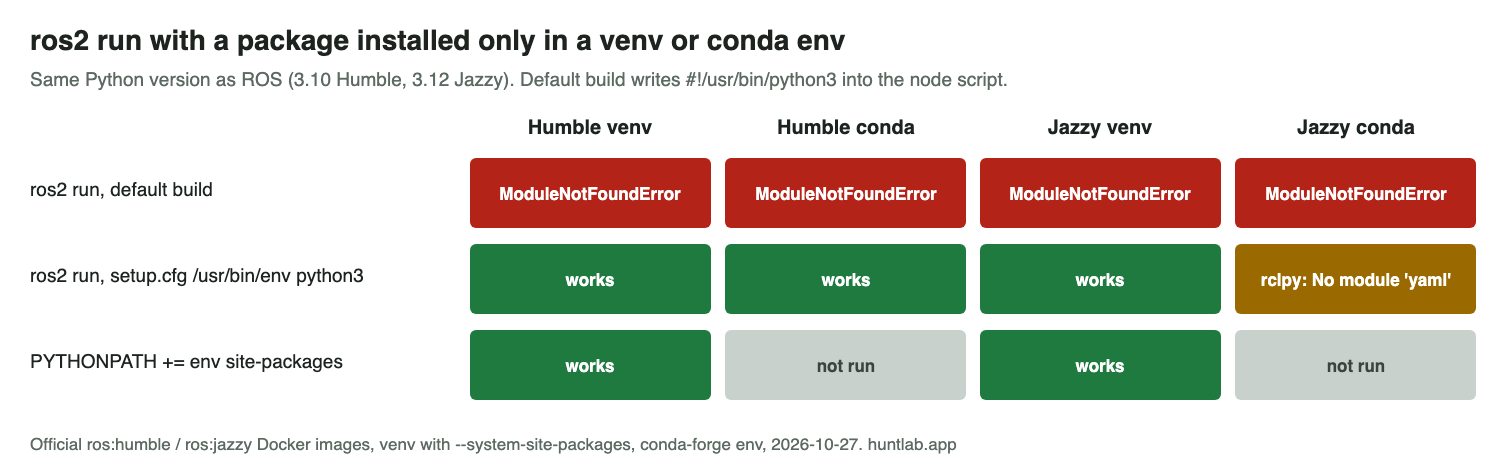
On 2026-10-27 I used the official ros:humble-ros-base and ros:jazzy-ros-base Docker images. I created an ament_python package with ros2 pkg create. Its node prints sys.executable, imports a package that only exists in the environment (tqdm, standing in for torch), and then imports rclpy. I tried two environments with the same Python version as the distro (3.10 on Humble, 3.12 on Jazzy): a venv created with --system-site-packages, and a conda env from conda-forge. In each one I built with the environment active, read the first line of install/demo/lib/demo/n, and ran ros2 run demo n.
Why it happens
With the default package, the installed script starts with #!/usr/bin/python3 in all four cases, even though python3 on the PATH was the venv’s or conda’s at build time. When ros2 run starts it, the node printed python: /usr/bin/python3 and then:
ModuleNotFoundError: No module named 'tqdm'rclpy still imported, because sourcing setup.bash puts ROS on PYTHONPATH for any interpreter. That’s why the error looks like an environment problem when it’s really about which interpreter runs the node. It also explains a common misdiagnosis: the package is installed correctly, and python -c "import torch" works in the same terminal. It’s just not the Python that ros2 run starts.
Fix 1: setup.cfg (what I’d use)
With the [build_scripts] block above and a fresh build, the first line became #!/usr/bin/env python3. The node then printed the environment’s interpreter (/venv/bin/python3 or /mc/envs/env/bin/python3) and imported both tqdm and rclpy on Humble (venv and conda) and on Jazzy (venv).
Two things to keep in mind:
- The script now uses whatever
python3comes first on the PATH when you run it. Activate the same environment in every terminal where you run the node, including terminals that runros2 launch. - I moved
build/andinstall/out of the way before each build, so every run started clean. If an old script is still ininstall/, check its first line withhead -1 install/<pkg>/lib/<pkg>/<node>.
Jazzy with conda: “No module named ‘yaml'”
On Jazzy, the conda run got past tqdm and then stopped inside rclpy:
  File "/opt/ros/jazzy/lib/python3.12/site-packages/rclpy/parameter.py", line 27, in <module>
    import yaml
ModuleNotFoundError: No module named 'yaml'
Jazzy’s rclpy imports PyYAML, which comes from the system package python3-yaml, and a conda env doesn’t see system packages. After pip install pyyaml inside the conda env, import rclpy worked. A plain venv created without --system-site-packages hit the same yaml error on Jazzy. On Humble it imported rclpy without it. Creating the venv with python3 -m venv --system-site-packages avoided it on both.
Fix 2: point PYTHONPATH at the environment
Leaving the script on the system Python and adding the venv’s site-packages to PYTHONPATH also worked, on both distros:
export PYTHONPATH=$(python3 -c 'import site; print(site.getsitepackages()[0])'):$PYTHONPATH
ros2 run demo n
This only works when the environment’s Python version matches the system’s exactly, as it did here. Compiled packages like torch are built for one Python version. I tested this with a venv only, not conda. If the versions differ, you’re back to the problem in No module named ‘rclpy._rclpy_pybind11’. rclpy itself won’t load in a conda Python of another version.
Side note: conda in scripts
With the Miniconda installer, conda create in a non-interactive script stopped with CondaToSNonInteractiveError: Terms of Service have not been accepted for the default Anaconda channels. I used --override-channels -c conda-forge instead. If you build in CI or Docker, make that choice explicitly.
FAQ
Why does ros2 run not use my conda or venv Python?
colcon build writes #!/usr/bin/python3 as the first line of each Python node script. The node runs on the system Python and can’t see packages you installed with the environment’s pip.
How do I make a ROS 2 Python node use the venv or conda interpreter?
Add [build_scripts] with executable = /usr/bin/env python3 to the package’s setup.cfg, then rebuild with the environment active. That fixed it for a venv and a conda env on Humble and Jazzy.
Why does rclpy import but my package gives ModuleNotFoundError?
Sourcing setup.bash puts ROS on PYTHONPATH for any interpreter, so rclpy still imports on the system Python. Your package is only installed in the environment’s Python, which ros2 run doesn’t start.
Why do I get “No module named ‘yaml'” on Jazzy with conda?
Jazzy’s rclpy imports PyYAML, which comes from the system package python3-yaml, and a conda env doesn’t see system packages. After pip install pyyaml inside the conda env, import rclpy worked.
Can I use PYTHONPATH instead of changing setup.cfg?
Adding the venv’s site-packages to PYTHONPATH worked on both distros, but only because the environment’s Python version matched the system’s exactly. I tested this with a venv only, not conda.
Not tested
Lyrical, ament_cmake packages with Python scripts installed by install(PROGRAMS ...), colcon build --symlink-install, environment Python versions that differ from the system’s, and real torch or TensorFlow installs (tqdm stood in for them).
Scripts and raw output: evidence folder. Question this answers: Running a ros2 package in virtual anaconda environment in ROS2 Humble. Related: No module named ‘rclpy’ or ‘rclpy._rclpy_pybind11’ in ROS 2.