SetuptoolsDeprecationWarning: setup.py install is deprecated in colcon build: harmless, hidden by current colcon, and which pip setuptools versions break ament_python, measured
Starting >>> stl_pkg
--- stderr: stl_pkg
/usr/lib/python3/dist-packages/setuptools/command/install.py:34: SetuptoolsDeprecationWarning: setup.py install is deprecated. Use build and pip and other standards-based tools.
  warnings.warn(
---
Finished <<< stl_pkg [0.96s]
With --symlink-install the same block also has easy_install.py:158: EasyInstallDeprecationWarning: easy_install command is deprecated. Use build and pip and other standards-based tools. On Jazzy the text is split over several lines. The first line ends at setup.py install is deprecated. and a box of asterisks follows: “Please avoid running “setup.py“ directly.”
Short answer: the warning is harmless. Every build that printed it finished, and ros2 run started the node every time, on Humble and Jazzy. You only see it if your colcon is old. colcon-core 0.16.0 and later start setup.py with -W ignore:setup.py install is deprecated, and 0.18.4 added -W ignore:easy_install command is deprecated. The current ROS images ship colcon-core 0.21.3, and none of their builds printed either warning. So the fix is to update colcon (sudo apt update && sudo apt install python3-colcon-core) rather than downgrade setuptools. If you can’t update, this filter hid both warnings on Humble and Jazzy:
export PYTHONWARNINGS="ignore:setup.py install is deprecated,ignore:easy_install command is deprecated"Don’t run pip install setuptools==58.2.0 on Jazzy or Lyrical. On Python 3.12 and 3.14 that version can’t even be imported, and the build fails. With the colcon that ships in the images, every build failure in this test came from a setuptools installed with pip. After pip uninstall setuptools, all three distros built again.
Find your error
The first two rows are only warnings. Every other row stopped the build with Failed <<< stl_pkg and a non-zero exit code.
| What you see (last line of the stderr block) | Where it came from in my run |
|---|---|
SetuptoolsDeprecationWarning: setup.py install is deprecated, EasyInstallDeprecationWarning: easy_install command is deprecated |
colcon-core older than 0.16.0. Harmless |
Usage of dash-separated 'install-scripts' will not be supported (Humble), Invalid dash-separated options (Jazzy), Invalid dash-separated key 'install-scripts' in 'install' (setup.cfg) (Lyrical) |
script-dir / install-scripts in setup.cfg. Harmless, but shown even with current colcon |
AttributeError: module 'pkgutil' has no attribute 'ImpImporter'. Did you mean: 'zipimporter'? |
setuptools 58.2.0, 59.6.0 or 65.5.0 from pip on Jazzy or Lyrical |
SyntaxError: invalid syntax after a long dict starting {'package_data': ..., then invalid syntax (<unknown>, line 1) |
setuptools 68.2.0 from pip, all three distros |
TypeError: canonicalize_version() got an unexpected keyword argument 'strip_trailing_zero' |
setuptools 71.1.0 or newer from pip on Humble, with the apt packaging 21.3 |
error: option --uninstall not recognized |
A workspace built with --symlink-install under apt setuptools, rebuilt after pip install of setuptools 84.2.1 |
error: option --editable not recognized |
colcon-core 0.15.2 with setuptools 84.2.1 and --symlink-install (Jazzy) |
One failure prints nothing at all. With setuptools 80.0.0 or newer, --symlink-install finished without an error but installed copies instead of links. More on that below.
What I ran
On 2026-10-29 I used the official ros:humble-ros-base, ros:jazzy-ros-base and ros:lyrical-ros-base Docker images, one after another. The script makes a package with ros2 pkg create --build-type ament_python --node-name stl_node stl_pkg. The generated setup.cfg already uses script_dir and install_scripts with underscores. Each case does three builds:
- a plain
colcon buildin a clean workspace colcon build --symlink-installin a clean workspace- a plain build on top of that symlink build, which makes colcon undo the old develop install
After each build I ran ros2 run stl_pkg stl_node, which prints Hi from stl_pkg.. I counted the warnings and checked for an .egg-link file to see if the symlink install was real. I changed one thing per case:
- the apt setuptools, untouched
- eight
PYTHONWARNINGSvalues - a setup.cfg with dash keys
- no setup.cfg
- 17 pinned setuptools versions from pip plus the latest (84.2.1), each installed in front of the apt one, and then removed again
- colcon-core 0.15.2 from pip, which predates the filter, so I could see the warning at all
- a newer
packagingfrom pip on Humble - a workspace carried over from the apt setuptools to pip setuptools 84.2.1
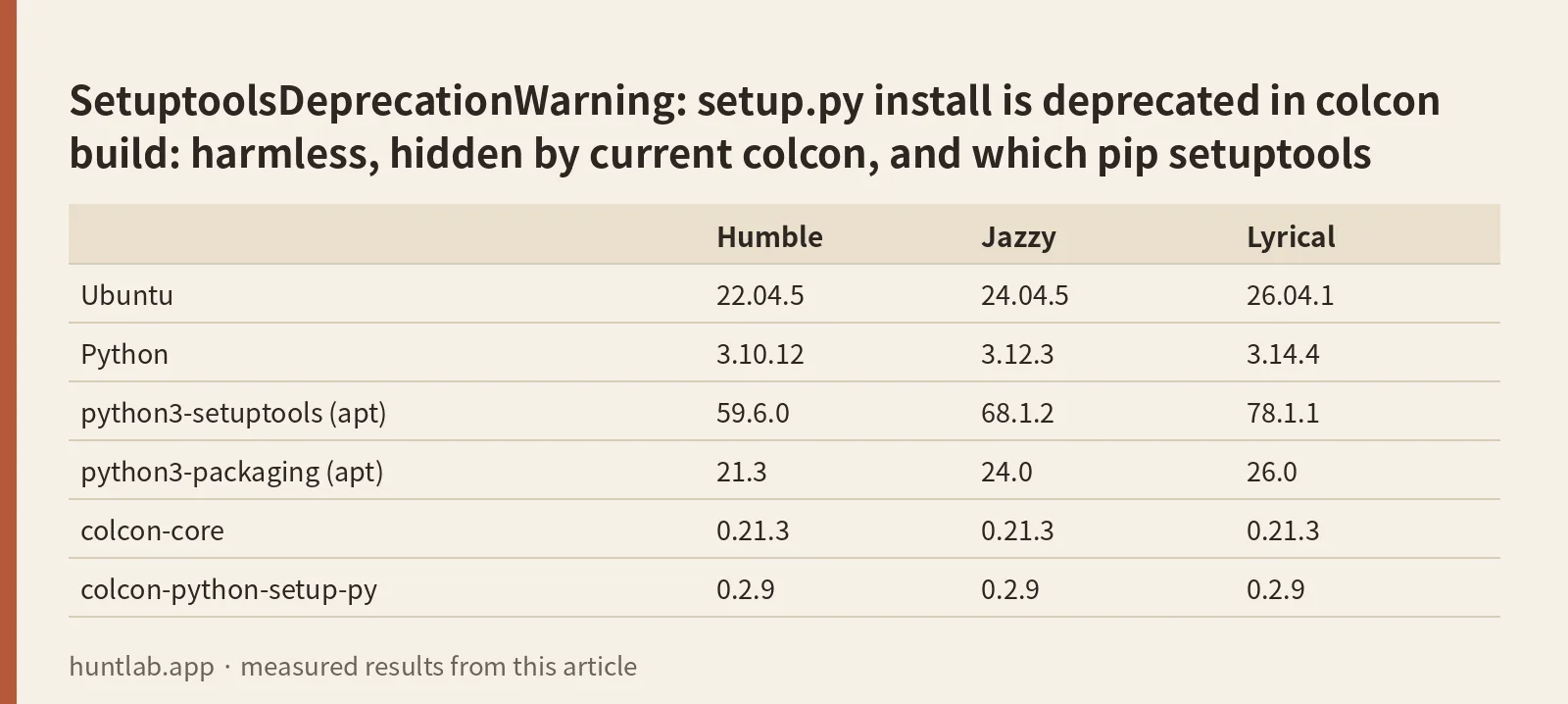
The images came with these versions:
| Humble | Jazzy | Lyrical | |
|---|---|---|---|
| Ubuntu | 22.04.5 | 24.04.5 | 26.04.1 |
| Python | 3.10.12 | 3.12.3 | 3.14.4 |
| python3-setuptools (apt) | 59.6.0 | 68.1.2 | 78.1.1 |
| python3-packaging (apt) | 21.3 | 24.0 | 26.0 |
| colcon-core | 0.21.3 | 0.21.3 | 0.21.3 |
| colcon-python-setup-py | 0.2.9 | 0.2.9 | 0.2.9 |
Why a current colcon shows nothing
With the apt setuptools and colcon-core 0.21.3, all three distros built without any deprecation warning, plain or with --symlink-install. The same held for every pip setuptools that could build. The reason shows up in one of the failing runs, where colcon printed the command it had started: ['/usr/bin/python3', '-W', 'ignore:setup.py install is deprecated', '-W', 'ignore:easy_install command is deprecated', 'setup.py', '--help-commands']. colcon filters the two messages itself. In the colcon-core history, the first filter came in 0.16.0 (“Suppress setup.py deprecation warnings during build”, #626). The easy_install one came in 0.18.4 (#676).
To see the warning I installed colcon-core 0.15.2 from pip. On Humble and Jazzy it showed up as shown at the top of this post. Every build still finished, and the node ran after each one. With setuptools 58.2.0 on Humble, the old colcon printed neither warning. 59.6.0, 65.5.0 and 69.5.1 all printed both. That fits the common advice that 58.2.0 is the last quiet version, but it only matters with an old colcon.
On Lyrical, colcon-core 0.15.2 didn’t work at all. The extensions that build Python packages failed to load with cannot import name 'OVERRIDE_OPT' from 'em', and colcon said No task extension to 'build' a 'ros.ament_python' package. So I couldn’t reproduce the warning on Lyrical.
If you see the warning, check your version with python3 -c "import colcon_core; print(colcon_core.__version__, colcon_core.__file__)". A path under /usr/local or ~/.local means a pip install is shadowing the apt one.
Hiding it with PYTHONWARNINGS
I ran each value with colcon-core 0.15.2 and the apt setuptools. “Hidden” means the build printed neither warning, plain or with --symlink-install.
PYTHONWARNINGS= |
Humble (setuptools 59.6.0) | Jazzy (setuptools 68.1.2) |
|---|---|---|
ignore:setup.py install is deprecated,ignore:easy_install command is deprecated |
hidden | hidden |
ignore:::setuptools.command.install |
plain build hidden. EasyInstallDeprecationWarning still shown with --symlink-install |
nothing hidden |
ignore:::setuptools.command.install,ignore:::setuptools.command.easy_install,ignore:::pkg_resources |
hidden | nothing hidden |
ignore:::setuptools.command.install,ignore:::setuptools.command.develop,ignore:::setuptools.command.easy_install |
hidden | easy_install hidden, setup.py install still shown |
ignore:::setuptools.command.develop |
nothing hidden | easy_install hidden, setup.py install still shown |
ignore:::setuptools._distutils.cmd,ignore:::setuptools.command.develop |
nothing hidden | easy_install hidden, setup.py install still shown |
ignore::UserWarning |
nothing hidden | hidden |
ignore |
hidden | hidden, along with every other warning |
The module-based filters that most answers suggest depend on the setuptools version. On Humble the warning is raised from setuptools/command/install.py. On Jazzy the same message is reported from setuptools/_distutils/cmd.py:66, so ignore:::setuptools.command.install doesn’t match it. The message-based filter in the first row is the same one colcon uses, and it worked on both. Put it in ~/.bashrc if you are stuck on an old colcon.
Which setuptools version you have and why
You get the version apt installed (59.6.0, 68.1.2 or 78.1.1 above) unless something put a newer one in front of it with pip. That something is often pip install -U setuptools, or a requirements.txt that pulls it in. To check, run python3 -c "import setuptools; print(setuptools.__version__, setuptools.__file__)". A path in /usr/local/lib or ~/.local/lib is a pip copy. This is what each pip version did with colcon-core 0.21.3:
| pip setuptools | Humble | Jazzy | Lyrical |
|---|---|---|---|
| 58.2.0, 59.6.0, 65.5.0 | builds | fails: pkgutil has no ImpImporter |
fails: pkgutil has no ImpImporter |
| 68.1.2 | builds | builds | builds |
| 68.2.0 | fails: SyntaxError |
fails: SyntaxError |
fails: SyntaxError |
| 69.5.1, 70.1.1, 70.3.0 | builds | builds | builds |
| 71.1.0, 72.1.0, 72.2.0, 74.1.3, 75.8.0, 78.1.0, 79.0.1 | fails: canonicalize_version() TypeError |
builds | builds |
| 80.0.0, 80.9.0, 84.2.1 | fails: canonicalize_version() TypeError |
builds, but --symlink-install copies |
builds, but --symlink-install copies |
None of the builds that worked printed a deprecation warning, and the node ran after each one. A failure stopped all three builds in the case: plain, symlink and the switch back. In each case the node wasn’t installed (Package 'stl_pkg' not found).
The failures have different causes.
- 58.2.0 to 65.5.0 on Jazzy and Lyrical. These versions call
pkgutil.ImpImporter, which Python 3.12 removed. The error comes frompkg_resourcesas soon assetup.pyimports setuptools. The popularpip install setuptools==58.2.0fix only works on Humble. - 68.2.0 everywhere. colcon-python-setup-py 0.2.9 reads the package metadata by evaluating what
setup.pyprints. With 68.2.0 that output isn’t a valid Python literal, andast.literal_evalraisesSyntaxError. 68.1.2 and 69.5.1 were fine. This is the failure from colcon-python-setup-py issue 56. - 71.1.0 and newer on Humble. These setuptools versions use the
packagingalready installed, and Humble’s aptpackagingis 21.3. Itscanonicalize_version()doesn’t acceptstrip_trailing_zero. Afterpip install packaging(26.3), all of 71.1.0, 75.8.0, 79.0.1, 80.0.0, 80.9.0 and 84.2.1 built on Humble, and the node ran. - 80.0.0 and newer with
--symlink-install. The build said nothing, but nostl-pkg.egg-linkwas written. colcon-core 0.21.3 found no--editableoption insetup.py developand did a normal install. In the 84.2.1 run, the only trace was inlog/latest_build/logger_all.log:INFO:colcon.colcon_core.task.python.build:No '--editable' capability in setuptools, falling back to full install. Edits to your Python files then need a rebuild. colcon-core 0.15.2 has no such check. On Jazzy, with 84.2.1, it failed witherror: option --editable not recognized.
One more trap shows up when you upgrade setuptools under an existing workspace. On all three distros, I built with --symlink-install under the apt setuptools, then installed 84.2.1 with pip (plus packaging 26.3 on Humble). After that, both colcon build --symlink-install and a plain colcon build failed with error: option --uninstall not recognized. colcon tries to undo the old develop install first, and the new setuptools no longer has that option. The old install was still there, so ros2 run kept working. After rm -rf build install log the build passed.
To go back to the apt setuptools, run python3 -m pip uninstall setuptools. On Jazzy and Lyrical my script set PIP_BREAK_SYSTEM_PACKAGES=1 for every pip command. On all three distros, the apt version was active again after that, and the plain, symlink and switch builds all passed with the node running. The apt package files were untouched. dpkg -V python3-setuptools listed only documentation files that the image itself doesn’t ship.
Dash-separated keys in setup.cfg
The other stderr block you can still get with a current colcon comes from setup.cfg. With script-dir and install-scripts instead of script_dir and install_scripts, every build printed a --- stderr: stl_pkg block. On Humble the warning was a UserWarning: Usage of dash-separated 'install-scripts' will not be supported in future versions. Please use the underscore name 'install_scripts' instead. Jazzy printed SetuptoolsDeprecationWarning: Invalid dash-separated options. Lyrical, and pip setuptools 80.9.0 and 84.2.1 on Jazzy, named the key: Invalid dash-separated key 'script-dir' in 'develop' (setup.cfg), please use the underscore name 'script_dir' instead. Each build still finished and the node ran. Changing the dashes to underscores removes the block.
Don’t delete setup.cfg to get rid of it. Without the file the build was clean, but ros2 run said No executable found. I covered that case, and how entry points and script_dir decide where the script lands, in ros2 run “No executable found” for ament_python.
Version notes
The three distros differed in four ways.
- Warning text. On Humble, with setuptools 59.6.0, the warning is one line ending in “Use build and pip and other standards-based tools.” Jazzy’s 68.1.2 prints the boxed version.
- Old pins. Old setuptools pins break on Jazzy and Lyrical because of their Python version.
- New pip setuptools on Humble. Only Humble breaks on a new pip setuptools, because of its old
packaging. - Old colcon on Lyrical. The old colcon I used to show the warning doesn’t run on Lyrical at all.
colcon-python-setup-py issue 58 reports No module named 'setuptools.extern.packaging' with setuptools 72.2.0. I didn’t get that error. 72.2.0 built on Jazzy and Lyrical with colcon-python-setup-py 0.2.9, and on Humble it failed earlier with the canonicalize_version() error.
Not tested
Foxy, Iron, Kilted and Rolling. colcon or setuptools inside a venv or conda env. pip installs to ~/.local (--user). colcon-core versions between 0.15.2 and 0.21.3. setuptools 66.x, 67.x, 73.x, 76.x, 77.x and the 81 to 84 releases other than 84.2.1. Packages with a pyproject.toml, ament_cmake_python, and colcon’s experimental standards-based Python build. Windows and macOS. Large workspaces, where the stderr block may sit between many other packages.
FAQ
Is “SetuptoolsDeprecationWarning: setup.py install is deprecated” an error?
No. In every build that printed it, colcon reported the package as finished and ros2 run started the node. It is printed in colcon’s --- stderr block, which looks alarming but doesn’t fail the build.
Why do I see this warning when others don’t?
Your colcon-core is probably older than 0.16.0. Newer versions start setup.py with -W filters for both messages, and colcon-core 0.21.3 on Humble, Jazzy and Lyrical printed nothing with any setuptools that could build. Update colcon, and check that no pip copy in /usr/local or ~/.local shadows the apt one.
Should I run pip install setuptools==58.2.0?
Not on Jazzy or Lyrical. There, 58.2.0 failed every build with module 'pkgutil' has no attribute 'ImpImporter'. On Humble it built, and with an old colcon it was the only version I tested that printed no warning. With a current colcon you don’t need it on any distro.
Which PYTHONWARNINGS value hides it?
ignore:setup.py install is deprecated,ignore:easy_install command is deprecated hid both warnings on Humble and Jazzy. Module-based values such as ignore:::setuptools.command.install worked on Humble but not on Jazzy, where the warning is reported from setuptools._distutils.cmd.
Why does colcon build fail with error: option –uninstall not recognized?
The workspace was built with --symlink-install under an older setuptools, and you upgraded setuptools with pip. colcon tries to undo the old develop install, and setuptools 84.2.1 no longer accepts --uninstall. Delete build, install and log and build again, or remove the pip setuptools.
Measured on 2026-10-29 with ros:humble-ros-base (sha256:d9bcf2e6f72d..., Python 3.10.12, python3-setuptools 59.6.0), ros:jazzy-ros-base (sha256:8eed0a4669bb..., Python 3.12.3, python3-setuptools 68.1.2) and ros:lyrical-ros-base (sha256:3224ee150cb0..., Python 3.14.4, python3-setuptools 78.1.1), all with colcon-core 0.21.3, colcon-python-setup-py 0.2.9 and colcon-ros 0.5.0. pip setuptools 58.2.0 to 84.2.1, colcon-core 0.15.2 and packaging 26.3 came from PyPI. Full digests and versions are in digests.txt.
Script and raw output: evidence folder. Questions this answers: SetuptoolsDeprecationWarning: setup.py install is deprecated. Use build and pip and other standards-based tools, ament_cmake issue 382: SetuptoolsDeprecationWarning: setup.py install is deprecated, ros2 issue 1362: SetuptoolsDeprecationWarning on Humble, ros2 issue 1577: easy_install problem when using colcon build python package on Jazzy, setuptools==68.2.0 breaks colcon-python-setup-py, setuptools 72.2.0 breaks colcon-python-setup-py.