“No executable found” from ros2 run and “not found on the libexec directory” for ament_python: entry_points, setup.cfg and –symlink-install, measured
$ ros2 run my_pkg my_node
No executable found
The same problem under ros2 launch prints one of two lines, depending on whether the folder exists:
[ERROR] [launch]: Caught exception in launch (see debug for traceback): executable 'my_node' not found on the libexec directory '/ws_a4/install/my_pkg/lib/my_pkg'
[ERROR] [launch]: Caught exception in launch (see debug for traceback): package 'my_pkg' found at '/ws_b1/install/my_pkg', but libexec directory '/ws_b1/install/my_pkg/lib/my_pkg' does not exist
Short answer: ros2 run my_pkg my_node only looks in one folder, install/my_pkg/lib/my_pkg/. “No executable found” means the package was found but no file called my_node is in that folder. For an ament_python package, that file is created by a console_scripts entry point in setup.py, and setup.cfg decides which folder it goes to. In my runs, the error appeared when the entry point was missing, when its name didn’t match what I typed, and when setup.cfg was missing (the script went to install/my_pkg/bin/ instead). Run this first:
cd ~/ros2_ws
find install -name my_node
ros2 pkg executables my_pkg
If find prints install/my_pkg/lib/my_pkg/my_node, the install is fine and you typed a different name. If it prints install/my_pkg/bin/my_node, fix setup.cfg. If it prints nothing, fix entry_points and rebuild. If you get Package 'my_pkg' not found instead, that’s a different error: the workspace isn’t sourced.
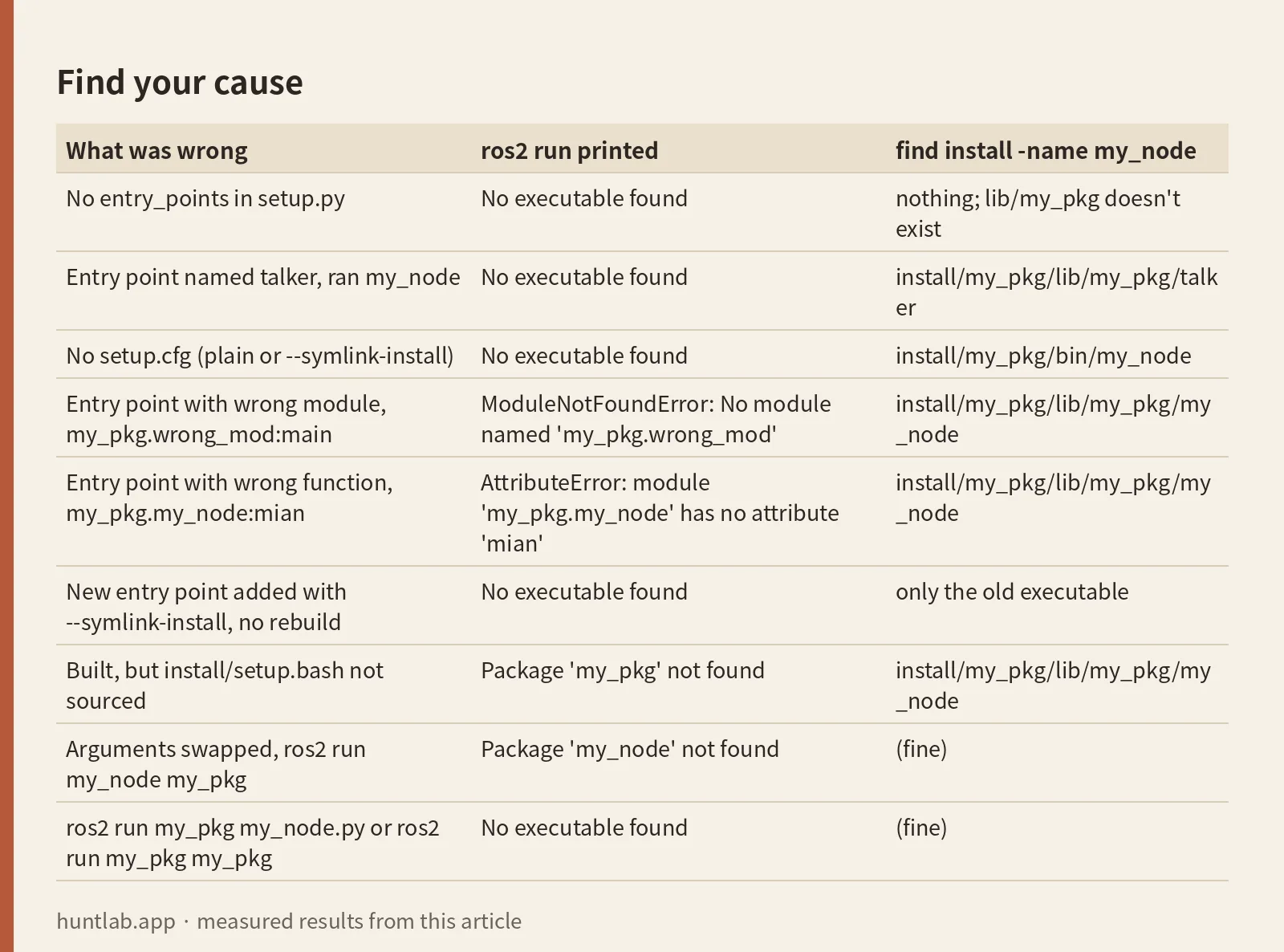
Find your cause
Every row behaved the same on Humble, Jazzy and Lyrical.
| What was wrong | ros2 run printed |
find install -name my_node |
|---|---|---|
No entry_points in setup.py |
No executable found |
nothing; lib/my_pkg doesn’t exist |
Entry point named talker, ran my_node |
No executable found |
install/my_pkg/lib/my_pkg/talker |
No setup.cfg (plain or --symlink-install) |
No executable found |
install/my_pkg/bin/my_node |
Entry point with wrong module, my_pkg.wrong_mod:main |
ModuleNotFoundError: No module named 'my_pkg.wrong_mod' |
install/my_pkg/lib/my_pkg/my_node |
Entry point with wrong function, my_pkg.my_node:mian |
AttributeError: module 'my_pkg.my_node' has no attribute 'mian' |
install/my_pkg/lib/my_pkg/my_node |
New entry point added with --symlink-install, no rebuild |
No executable found |
only the old executable |
Built, but install/setup.bash not sourced |
Package 'my_pkg' not found |
install/my_pkg/lib/my_pkg/my_node |
Arguments swapped, ros2 run my_node my_pkg |
Package 'my_node' not found |
(fine) |
ros2 run my_pkg my_node.py or ros2 run my_pkg my_pkg |
No executable found |
(fine) |
The wrong module and wrong function rows are worth noticing. They don’t give “No executable found”. The script is installed, it starts, and it fails on import. Both end with [ros2run]: Process exited with failure 1.
What I ran
On 2026-10-29 I used the official ros:humble-ros-base, ros:jazzy-ros-base and ros:lyrical-ros-base Docker images, one after another. The script builds a tiny ament_python package called my_pkg with one module, my_pkg/my_node.py, whose main() prints HELLO from my_node v1. Each case gets a fresh workspace and a colcon build. Then I ran ros2 run my_pkg my_node, ran a small launch file that starts Node(package='my_pkg', executable='my_node'), and listed where the script landed with find install -name my_node. I changed one thing per case: the entry point, the setup.cfg, sourcing, the names typed, or the build flags. The last two cases put a newer setuptools from pip (84.2.1) in front of the one from apt.
Cause 1: the entry point is missing or has another name
With no entry_points argument in setup.py, the build finished without a warning. Nothing was installed under lib. ros2 run printed No executable found, and the launch file failed with libexec directory '/ws_a1/install/my_pkg/lib/my_pkg' does not exist, because the folder was never created.
The name to the left of = in the entry point is the executable name. The file name of your Python module doesn’t count. With 'talker = my_pkg.my_node:main' the installed file was install/my_pkg/lib/my_pkg/talker. ros2 run my_pkg my_node failed, ros2 run my_pkg talker worked, and the launch file gave the other variant of the error:
executable 'my_node' not found on the libexec directory '/ws_a4/install/my_pkg/lib/my_pkg'ros2 pkg executables my_pkg showed my_pkg talker, which is the fastest way to see the real name. The fix is to write the entry point like this, and then rebuild:
entry_points={
    'console_scripts': [
        'my_node = my_pkg.my_node:main',
    ],
},
The part after = is package.module:function. If the module path is wrong, the build still passes and the script is still installed in the right place. The error only shows up at run time, as ModuleNotFoundError for a wrong module or AttributeError for a wrong function name. So a traceback means the install worked and the path after = is wrong.
Cause 2: setup.cfg is missing, so the script lands in bin/
This is the cause the error text hides best. With a correct entry point and no setup.cfg, the build finished with no warning, and the script was installed as install/my_pkg/bin/my_node. ros2 run doesn’t look in bin, so it printed No executable found. ros2 pkg executables my_pkg printed nothing. The launch file said the libexec directory does not exist. Yet, in a sourced shell, which my_node found /ws_b1/install/my_pkg/bin/my_node and running my_node on its own printed the hello line. The same thing happened with --symlink-install. This matches the question where the executable ended up in install/<pkg>/bin instead of install/<pkg>/lib.
The fix is this setup.cfg next to setup.py, with your package name in both lines:
[develop]
script_dir=$base/lib/my_pkg
[install]
install_scripts=$base/lib/my_pkg
With it, the script landed in install/my_pkg/lib/my_pkg/my_node and both ros2 run and the launch file worked. One detail surprised me. A setup.cfg with only the [install] section also put the script in lib/my_pkg, with a plain build and with --symlink-install, on all three distros. I wouldn’t rely on that. Keep both sections.
Older packages use dashes: script-dir and install-scripts. Those still built and installed to the right folder on all three distros, but every build printed a deprecation warning. On Humble it was UserWarning: Usage of dash-separated 'script-dir' will not be supported in future versions. Please use the underscore name 'script_dir' instead. On Jazzy and Lyrical it was a longer SetuptoolsDeprecationWarning block that adds “This deprecation is overdue, please update your project and remove deprecated calls to avoid build errors in the future.” Switch to underscores.
Cause 3: the workspace isn’t sourced in this terminal
In a shell that only sourced /opt/ros/<distro>/setup.bash, a package that built fine gave Package 'my_pkg' not found, not “No executable found”. The launch file said package 'my_pkg' not found, searching: ['/opt/ros/humble']. The search list is the useful part: if your workspace isn’t in it, source install/setup.bash in that terminal. The two files and the order to source them are covered in setup.bash vs local_setup.bash.
When do you need to source again? I tested two cases in a shell that was already sourced. A brand-new package built into a different workspace gave Package 'other_pkg' not found until I sourced that workspace’s install/setup.bash. A new entry point added to a package the shell already knew about worked right after the rebuild, with no new source. ros2 run found my_node2 because it looks in the package’s lib folder each time. So re-sourcing matters for new packages and new terminals. It doesn’t fix a missing executable in a package that is already found.
Cause 4: package and executable names mixed up
The order is ros2 run <package> <executable>. Swapping them gave Package 'my_node' not found. Typing the module file name, ros2 run my_pkg my_node.py, gave No executable found, and so did ros2 run my_pkg my_pkg. A dash instead of an underscore, ros2 run my-pkg my_node, gave Package 'my-pkg' not found. The package name is the <name> in package.xml. The executable name is the left side of the entry point. ros2 pkg executables my_pkg prints both, one pair per line.
If the script is installed and runs, but fails because of the Python interpreter (a conda env or venv package not found), that is a shebang problem, not an install problem. The installed script started with #!/usr/bin/python3 on all three images. See ros2 run in a conda or venv: the shebang.
A correct minimal setup.py and setup.cfg
This is the package that worked with ros2 run and ros2 launch on all three distros, with a plain build and with --symlink-install. The layout is src/my_pkg/package.xml, setup.py, setup.cfg, an empty resource/my_pkg marker file, and my_pkg/__init__.py plus my_pkg/my_node.py with a main().
from setuptools import setup
setup(
    name='my_pkg', version='0.0.0', packages=['my_pkg'],
    data_files=[('share/ament_index/resource_index/packages', ['resource/my_pkg']),
                ('share/my_pkg', ['package.xml'])],
    install_requires=['setuptools'], zip_safe=True,
    entry_points={'console_scripts': ['my_node = my_pkg.my_node:main']},
)
[develop]
script_dir=$base/lib/my_pkg
[install]
install_scripts=$base/lib/my_pkgLaunch files and config files go through data_files too, which is a separate topic. If ros2 launch says your launch file isn’t in the share directory, see launch file was not found in the share directory.
–symlink-install and setuptools
With --symlink-install, colcon ran setup.py develop --editable. The site-packages folder held only a my-pkg.egg-link file pointing at the source. The installed lib/my_pkg/my_node was a regular 934-byte file, not a symlink. What that means in practice:
- Editing
my_node.pyshowed up without a rebuild (v1becamev2on the nextros2 run). Without--symlink-install, the same edit didn’t show up until I rebuilt. - Adding a new entry point to
setup.pydid not.ros2 run my_pkg my_node2gaveNo executable founduntil I rancolcon build --symlink-installagain. Any change tosetup.pyorsetup.cfgneeds a rebuild. - Switching the same workspace back to a plain
colcon buildworked without errors.
The apt setuptools versions were 59.6.0 on Humble, 68.1.2 on Jazzy and 78.1.1 on Lyrical, all with colcon-core 0.21.3. None of the builds printed “setup.py install is deprecated” or “easy_install command is deprecated”. The reason is in the command colcon ran: it starts Python with -W ignore:setup.py install is deprecated -W ignore:easy_install command is deprecated, so those two warnings are filtered. If you see them, check your colcon version. That matches the long-running SetuptoolsDeprecationWarning question. With this colcon the two warnings were filtered and the builds were unaffected.
colcon-core 0.21.3 declares setuptools<80. To see what happens past that, I put setuptools 84.2.1 from pip in front through PYTHONPATH. pip warned colcon-core 0.21.3 requires setuptools<80,>=30.3.0, but you have setuptools 84.2.1 which is incompatible. Then:
- A plain build worked, and the script landed in
lib/my_pkg. - A fresh
--symlink-installbuild also finished with no error on screen. But it wasn’t a symlink install. colcon’s log saidNo '--editable' capability in setuptools, falling back to full install, it ransetup.py ... install, and site-packages held copies. Editing the source didn’t change what ran. That message is logged at INFO level and appears only inlog/latest_build/logger_all.log. - A workspace built earlier with
--symlink-installunder the apt setuptools, then rebuilt under 84.2.1, failed. Both--symlink-installand a plain build stopped witherror: option --uninstall not recognized. colcon tries to undo the old develop install first and the newer setuptools rejects the option. The old install was still there and still ran. Deletingbuild,installandlogand building again fixed it.
I never got “error: option –editable not recognized”. colcon checks for --editable before using it, and falls back without saying so on screen. The option that failed was --uninstall. If you upgraded setuptools with pip and your edits stopped showing up, or a rebuild fails with that line, remove the pip setuptools so the apt one is used, or clear build, install and log.
Version notes
Every error text in this post was identical on Humble, Jazzy and Lyrical, and so was every file location. The differences were small. The traceback lines for the wrong module and wrong function differ, because Python is 3.10.12, 3.12.3 and 3.14.4. The dash-key warning is a one-line UserWarning on Humble and a boxed SetuptoolsDeprecationWarning on Jazzy and Lyrical. On Lyrical that block names the file and section: Invalid dash-separated key 'script-dir' in 'develop' (setup.cfg).
Not tested
Foxy, Iron, Kilted and Rolling. ament_cmake packages and ament_cmake_python. Installing Python scripts through data_files or scripts= instead of entry points. A setup.cfg using [options.entry_points] or a pyproject.toml-only package. Running colcon itself inside a venv or conda env. Upgrading setuptools system-wide with pip instead of through PYTHONPATH. Windows and macOS.
FAQ
Why does ros2 run say “No executable found” when colcon build succeeded?
The build doesn’t check that an executable was installed. In my runs it passed with no entry point at all and with no setup.cfg. Run find install -name my_node. If the file isn’t under install/my_pkg/lib/my_pkg/, ros2 run can’t see it.
Why is my Python node installed in install/my_pkg/bin instead of lib/my_pkg?
setup.cfg is missing or doesn’t set the script folder. Add [develop] script_dir=$base/lib/my_pkg and [install] install_scripts=$base/lib/my_pkg, then rebuild. Without it the script landed in bin with both a plain build and --symlink-install.
What does “executable not found on the libexec directory” mean in ros2 launch?
The launch file asked for an executable name that isn’t in install/my_pkg/lib/my_pkg. Usually the entry point has a different name. If the message says the libexec directory “does not exist” instead, nothing was installed there at all, so check entry_points and setup.cfg.
Do I need to rebuild after adding an entry point with –symlink-install?
Yes. Edits to existing Python code showed up without a rebuild, but a new entry point gave “No executable found” until I ran colcon build --symlink-install again. Re-sourcing wasn’t needed for a package the shell already knew about.
Why does colcon build fail with “error: option –uninstall not recognized”?
In my run, that came from a workspace built with --symlink-install under the apt setuptools and rebuilt with setuptools 84.2.1 from pip. colcon-core 0.21.3 requires setuptools below 80. Use the apt setuptools, or delete build, install and log and build again.
Measured on 2026-10-29 with ros:humble-ros-base (sha256:d9bcf2e6f72d..., Ubuntu 22.04.5, Python 3.10.12, setuptools 59.6.0), ros:jazzy-ros-base (sha256:8eed0a4669bb..., Ubuntu 24.04.5, Python 3.12.3, setuptools 68.1.2) and ros:lyrical-ros-base (sha256:3224ee150cb0..., Ubuntu 26.04.1, Python 3.14.4, setuptools 78.1.1), all with colcon-core 0.21.3 and colcon-ros 0.5.0. The newer setuptools test used 84.2.1 and packaging 26.3 from pip. Full digests are in digests.txt.
Script and raw output: evidence folder. Questions this answers: “No executable found” for Python script, ROS2 No executable found (ros2 run pack nodo), ros2 run python executable not found, Executable not found in libexec directory, ROS2: Cannot run my Python script, “No executable found” error, SetuptoolsDeprecationWarning: setup.py install is deprecated.