ROS 2 topic list works but topic echo prints nothing in Docker –net=host: Fast DDS shared memory, measured
# container 1
docker run --rm --net=host -e ROS_DOMAIN_ID=77 ros:humble-ros-base \
  bash -c "source /opt/ros/humble/setup.bash; ros2 topic echo /shm_test std_msgs/msg/String"
# container 2: a node publishing 100 messages on /shm_test at 10 Hz, same flags

$ ros2 topic list          # inside container 1
/parameter_events
/rosout
/shm_test
$ ros2 node list           # inside container 1
                           # (empty)
# ros2 topic echo: 0 of 100 messages, no error printed
Short answer: with --net=host alone, Fast DDS thinks both containers are on the same machine and sends the data over shared memory. Each container has its own private /dev/shm, so the data never arrives. Discovery still gets through, so the topic shows up and the publisher even reports a matched subscriber. Add --ipc=host to both containers, or tell Fast DDS to use UDP only:
docker run --net=host --ipc=host ...                          # fix 1: share IPC (and /dev/shm)
docker run --net=host -e FASTDDS_BUILTIN_TRANSPORTS=UDPv4 ... # fix 2: no shared memory
Both fixes delivered 100 of 100 messages on Humble, Jazzy and Lyrical. The environment variable worked on Humble too, and it worked when I set it on only one of the two containers.
Symptom table
Two containers from the same official image, both started with --net=host, default RMW (Fast DDS). One runs ros2 topic echo, the other publishes 100 messages. Results were the same on Humble, Jazzy and Lyrical.
| Check | What I got with --net=host only |
|---|---|
ros2 topic list in the echo container |
shows /shm_test |
ros2 node list in the echo container |
empty, the publisher node /shm_pub is missing |
get_subscription_count() on the publisher |
1 |
Messages received by ros2 topic echo |
0 of 100, in 3 of 3 runs per distro |
| Error or warning on either side | none |
The empty ros2 node list is a useful clue. Node names travel as ordinary DDS data on a hidden topic, so they get lost the same way your messages do. Topic names come from DDS discovery, which still works. If you see topics but no nodes from the other container, suspect shared memory first.
Many reports quote [RTPS_TRANSPORT_SHM Error] Failed init_port fastrtps_port7412: open_and_lock_file failed. I never got that line, or any other error, in any run. The silent failure was all I saw. So don’t wait for an error before you suspect this cause.
What I ran
On 2026-10-29 I used the official ros:humble-ros-base, ros:jazzy-ros-base and ros:lyrical-ros-base images on an Ubuntu 24.04 cloud VM with Docker 29.1.3, one distro after another. For each case:
- Container
shm-subrunsros2 topic echo /shm_test std_msgs/msg/Stringfor 20 seconds. - 3 seconds later, container
shm-pubstarts a small rclpy node. It waits 2 seconds, then publishesmsg 1tomsg 100at 10 Hz with default QoS, and prints how many subscriptions it matched. - At about 9 seconds,
ros2 node listandros2 topic listrun insideshm-sub. - I count the
data:lines that echo printed.
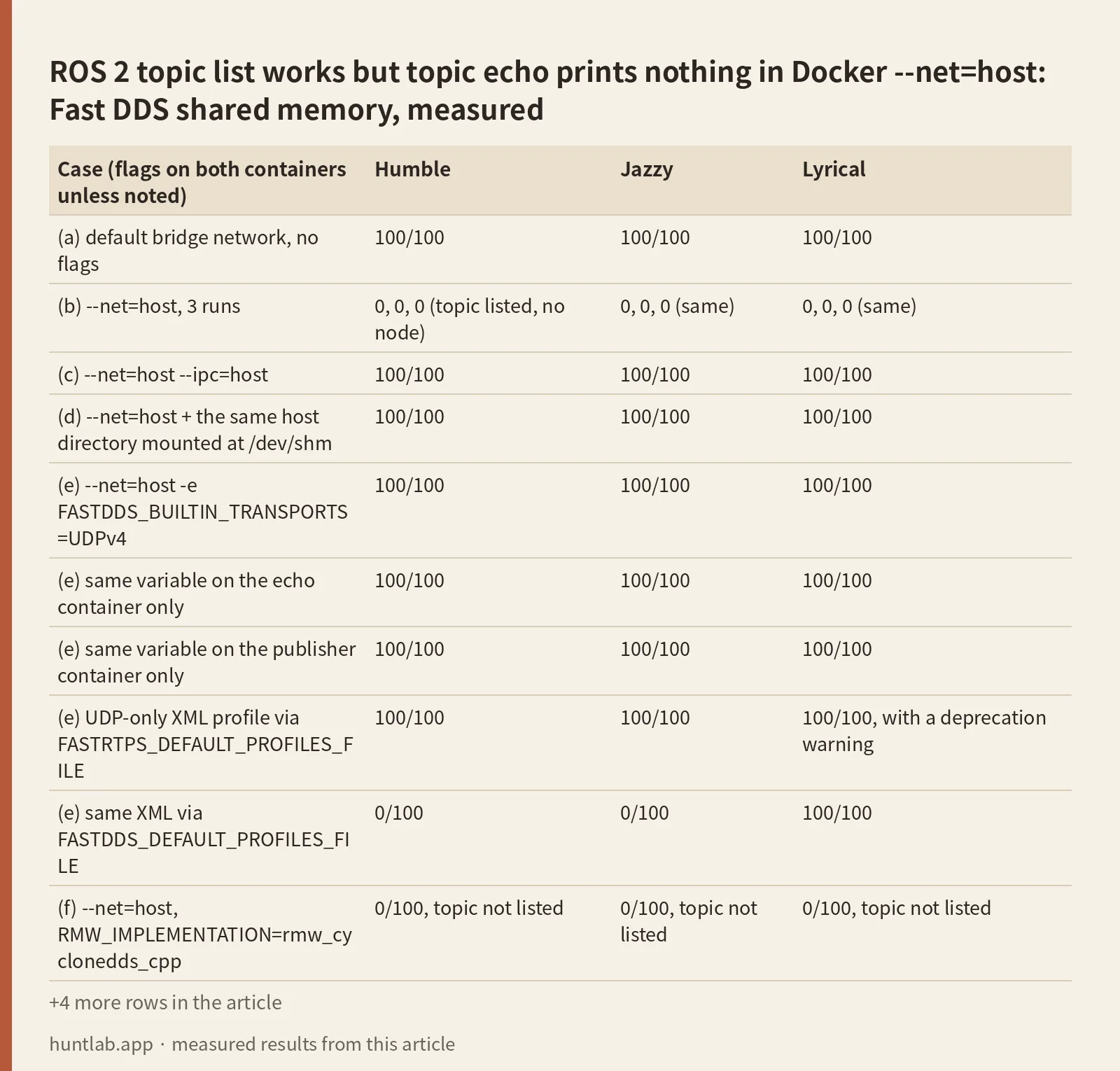
Every run used ROS_DOMAIN_ID=77, because the host network was shared with other services. Each case took about 22 seconds. Here are the results. “Nodes” means whether /shm_pub showed up in ros2 node list.
| Case (flags on both containers unless noted) | Humble | Jazzy | Lyrical |
|---|---|---|---|
| (a) default bridge network, no flags | 100/100 | 100/100 | 100/100 |
(b) --net=host, 3 runs |
0, 0, 0 (topic listed, no node) | 0, 0, 0 (same) | 0, 0, 0 (same) |
(c) --net=host --ipc=host |
100/100 | 100/100 | 100/100 |
(d) --net=host + the same host directory mounted at /dev/shm |
100/100 | 100/100 | 100/100 |
(e) --net=host -e FASTDDS_BUILTIN_TRANSPORTS=UDPv4 |
100/100 | 100/100 | 100/100 |
| (e) same variable on the echo container only | 100/100 | 100/100 | 100/100 |
| (e) same variable on the publisher container only | 100/100 | 100/100 | 100/100 |
(e) UDP-only XML profile via FASTRTPS_DEFAULT_PROFILES_FILE |
100/100 | 100/100 | 100/100, with a deprecation warning |
(e) same XML via FASTDDS_DEFAULT_PROFILES_FILE |
0/100 | 0/100 | 100/100 |
(f) --net=host, RMW_IMPLEMENTATION=rmw_cyclonedds_cpp |
0/100, topic not listed | 0/100, topic not listed | 0/100, topic not listed |
| (f) Cyclone DDS on the default bridge network | 100/100 | 100/100 | 100/100 |
(f) Cyclone DDS, --net=host, pinned to lo with a unicast peer |
100/100 | 100/100 | 100/100 |
(g) --ipc=host on the echo container only |
0/100 | 0/100 | 0/100 |
(h) both --ipc=host, publisher as --user 1000:1000, echo as root |
0/100 | 0/100 | 100/100, node not listed |
Whenever a case worked, all 100 messages arrived, from msg 1 to msg 100. Whenever it failed, none did. I never saw a partial count. The publisher reported matched_subs=1 in every Fast DDS case, including the ones that got nothing.
Why: shared memory without shared memory
Fast DDS ships with two built-in transports, UDP and shared memory. When it finds a remote participant that it thinks is on the same host, it sends the data through shared memory segments under /dev/shm. With --net=host both containers see the same network interfaces, so each one decides the other is local. But Docker still gives every container its own IPC namespace and its own /dev/shm. The writer puts the data where the reader can’t see it.
The eProsima guide on Fast DDS shared memory in Docker says the same thing. Without --ipc=host, “Fast DDS will identify both containers as the same host, but since they will have separate shared memory spaces, they will not be able to communicate with one another.”
The matrix backs this up in three ways. The bridge network (a) worked, because the containers have different addresses and Fast DDS uses UDP. Every fix that shares /dev/shm (c, d) or removes shared memory (e) worked. And sharing IPC on only one side (g) failed, because the two sides still can’t see each other’s segments.
This is not a discovery problem. If ros2 topic list doesn’t show the other side’s topics at all, the cause is somewhere else, such as a mismatched domain ID or a discovery range setting. I covered that case in ROS 2 nodes can’t see each other.
Fix 1: –ipc=host on both containers
docker run --rm -it --net=host --ipc=host -e ROS_DOMAIN_ID=77 ros:humble-ros-base ...Result: 100/100 on all three distros, and /shm_pub appeared in ros2 node list. This keeps shared memory, which is the fast path for large messages such as images and point clouds.
Both containers need the flag. With it on only one (g), I got 0/100. The containers also share the host’s /dev/shm now, so Fast DDS files land there. Humble left nothing behind after a clean exit. Jazzy left lttng-ust-wait-8* files. Lyrical left fastdds_* and sem.fastdds_* files after every --ipc=host run, all owned by root.
User IDs matter here. In case (h), the echo container ran as root and the publisher as UID 1000, both with --ipc=host. Humble and Jazzy got 0/100, and Lyrical got 100/100. If you mix a root container with a non-root container or a host user, use fix 2 instead. I didn’t check why Lyrical got through.
Fix 2: turn off shared memory with FASTDDS_BUILTIN_TRANSPORTS=UDPv4
docker run --rm -it --net=host -e FASTDDS_BUILTIN_TRANSPORTS=UDPv4 -e ROS_DOMAIN_ID=77 ros:humble-ros-base ...Result: 100/100 on all three distros. I expected this variable to be Jazzy-only, but Humble’s Fast DDS 2.6.12 honored it. If your Humble image has an older Fast DDS, check the version (see below) or use the XML profile.
It was enough to set it on one side. With UDPv4 on the echo container only, or on the publisher container only, I still got 100/100. That is handy when one side is a container you can’t easily change, or a node on the host. My tests used two containers, though. A host process plus one container is in “Not tested”.
The cost: data now goes over loopback UDP. For small messages at 10 Hz this made no visible difference. I didn’t measure throughput for large messages.
Fix 3: a UDP-only XML profile
This is the older way, and it still works on every distro I tried. Save the profile and point Fast DDS at it:
<?xml version="1.0" encoding="UTF-8" ?>
<profiles xmlns="http://www.eprosima.com/XMLSchemas/fastRTPS_Profiles">
  <transport_descriptors>
    <transport_descriptor>
      <transport_id>udp_only</transport_id>
      <type>UDPv4</type>
    </transport_descriptor>
  </transport_descriptors>
  <participant profile_name="udp_only_participant" is_default_profile="true">
    <rtps>
      <userTransports>
        <transport_id>udp_only</transport_id>
      </userTransports>
      <useBuiltinTransports>false</useBuiltinTransports>
    </rtps>
  </participant>
</profiles>
docker run --net=host -v $PWD/udp.xml:/udp.xml -e FASTRTPS_DEFAULT_PROFILES_FILE=/udp.xml ...Result with FASTRTPS_DEFAULT_PROFILES_FILE: 100/100 on Humble, Jazzy and Lyrical. On Lyrical it printed:
[WARN] [1793233294.416841521] [rmw_fastrtps_shared_cpp]: FASTRTPS_DEFAULT_PROFILES_FILE value is used for participant configuration, but it is deprecated and will no longer be supported. Use FASTDDS_DEFAULT_PROFILES_FILE instead.The variable name matters, and the right one depends on the distro. FASTDDS_DEFAULT_PROFILES_FILE worked on Lyrical but was ignored on Humble and Jazzy, where I got 0/100 with no message at all. If you share one compose file across distros, set both variables to the same path.
Fix 4: share one /dev/shm directory
docker run --net=host -v /some/host/dir:/dev/shm ... # same directory for both containersResult: 100/100 on all three. This is the -v /dev/shm:/dev/shm fix from older Foxy answers. I mounted a dedicated directory instead of the host’s real /dev/shm, to keep the test away from other processes on the machine. It shares less than --ipc=host. I didn’t test this with mixed user IDs.
Switching to Cyclone DDS is not automatically a fix
ros-<distro>-rmw-cyclonedds-cpp installed from apt in all three images. With RMW_IMPLEMENTATION=rmw_cyclonedds_cpp and --net=host, the two containers never found each other on this VM. The topic was missing from ros2 topic list, the publisher reported matched_subs=0, and 0 of 100 messages arrived. That is a discovery failure, not the shared-memory problem. On the default bridge network, Cyclone got 100/100.
Cyclone’s trace showed it picked the VM’s cloud interface:
ros2: using network interface ens5 (udp/172.26.6.157) selected arbitrarily from: ens5, docker0When I pinned it to loopback with a unicast peer, it got 100/100 with --net=host on all three distros:
<CycloneDDS><Domain Id="any">
  <General><Interfaces><NetworkInterface name="lo"/></Interfaces><AllowMulticast>false</AllowMulticast></General>
  <Discovery><Peers><Peer address="127.0.0.1"/></Peers><ParticipantIndex>auto</ParticipantIndex><MaxAutoParticipantIndex>50</MaxAutoParticipantIndex></Discovery>
</Domain></CycloneDDS>
Pass it with -e CYCLONEDDS_URI=file:///path/to/cyclone.xml. I didn’t find out why multicast on ens5 failed here. A desktop with a normal LAN interface may behave differently. Also, in my first Humble pass, both Cyclone containers hung on exit and I had to stop them with docker kill. Every side has to use the same RMW, so if you go this way, switch both containers. Fast DDS with fix 1 or fix 2 was the simpler change.
docker-compose for the fix
This is the docker run setup I measured, written as compose. I didn’t run the compose file itself.
services:
  talker:
    image: ros:humble-ros-base
    network_mode: host
    ipc: host                               # fix 1, on every ROS service
    environment:
      - ROS_DOMAIN_ID=77
      # fix 2 instead of ipc: host (works on Humble 2.6.12, Jazzy, Lyrical):
      # - FASTDDS_BUILTIN_TRANSPORTS=UDPv4
    command: bash -c "source /opt/ros/humble/setup.bash; ros2 run my_pkg talker"
  listener:
    image: ros:humble-ros-base
    network_mode: host
    ipc: host
    environment:
      - ROS_DOMAIN_ID=77
    command: bash -c "source /opt/ros/humble/setup.bash; ros2 run my_pkg listener"
Run every service as the same user, or use the UDPv4 line. If topics are listed and messages still don’t arrive after this, check QoS next. An incompatible reliability setting gives the same “topic visible, no data” picture, and I measured it in ROS 2 incompatible QoS: no messages will be sent.
Version notes
- Humble:
ros-humble-fastrtps2.6.12,rmw_fastrtps_cpp6.2.10.FASTDDS_BUILTIN_TRANSPORTS=UDPv4worked. OnlyFASTRTPS_DEFAULT_PROFILES_FILEwas read. - Jazzy:
ros-jazzy-fastrtps2.14.7,rmw_fastrtps_cpp8.4.4. Same behavior as Humble in every Fast DDS case. - Lyrical: the package is now
ros-lyrical-fastdds3.6.2, withrmw_fastrtps_cpp9.4.10. Both profile variables were read, and the old one printed a deprecation warning. The mixed-UID case worked. Files in/dev/shmare namedfastdds_*instead offastrtps_*, so search for both when you clean up. - Default RMW was
rmw_fastrtps_cppin all three images, withRMW_IMPLEMENTATIONunset. - To check your own version:
dpkg -l | grep -E 'fastrtps|fastdds'.
Not tested
A ROS node running directly on the host talking to a container node. The runner had no ROS install, so every result above is container to container. Also not tested: Docker Desktop on macOS or Windows, rootless Docker, Podman, Kubernetes pods, --shm-size limits, large messages and throughput, Fast DDS data-sharing or zero-copy (loaned messages), launch files, the [RTPS_TRANSPORT_SHM Error] ... open_and_lock_file failed message (it never appeared), Foxy, Iron, Kilted and Rolling.
FAQ
Why does ros2 topic list show the topic but ros2 topic echo prints nothing in Docker?
With --net=host and no --ipc=host, Fast DDS discovers the other container over UDP, then sends data over shared memory that the other container can’t see. I got 0 of 100 messages on Humble, Jazzy and Lyrical, with the topic listed and no error. Add --ipc=host to both containers or set FASTDDS_BUILTIN_TRANSPORTS=UDPv4.
Does FASTDDS_BUILTIN_TRANSPORTS=UDPv4 work on ROS 2 Humble?
Yes, with the Fast DDS 2.6.12 in the current ros:humble-ros-base image. It gave 100 of 100 messages, and setting it on only one of the two containers was enough.
Do I need –ipc=host on both containers?
Yes. With --ipc=host on the echo container only, 0 of 100 messages arrived on all three distros. With it on both, 100 of 100 arrived. They also need to run as the same user: root in one and UID 1000 in the other gave 0 of 100 on Humble and Jazzy.
Why is ros2 node list empty when ros2 topic list works?
Node names are sent as regular DDS data, so they get lost over the broken shared memory path, just like your messages. Topic names come from discovery, which still works. In every failing Fast DDS case, the topic was listed and the publisher node wasn’t.
Is switching to Cyclone DDS the fix?
Not on its own in my test. With --net=host, Cyclone DDS picked the cloud VM’s network interface, and the containers didn’t discover each other at all (0 of 100). It worked once I pinned it to lo with a unicast peer, or ran it on the bridge network.
Measured on 2026-10-29 with ros:humble-ros-base (sha256:d9bcf2e6f72d..., fastrtps 2.6.12, rmw_fastrtps_cpp 6.2.10, rmw_cyclonedds_cpp 1.3.5), ros:jazzy-ros-base (sha256:8eed0a4669bb..., fastrtps 2.14.7, rmw_fastrtps_cpp 8.4.4, rmw_cyclonedds_cpp 2.2.4) and ros:lyrical-ros-base (sha256:3224ee150cb0..., fastdds 3.6.2, rmw_fastrtps_cpp 9.4.10, rmw_cyclonedds_cpp 4.1.5), on Ubuntu 24.04 with kernel 7.0.0-1009-aws and Docker 29.1.3. Full digests are in digests.txt.
Script and raw output: evidence folder. Questions this answers: ROS2-foxy nodes can’t communicate through docker container border, ROS2 galactic nodes can’t communicate through docker container border, Docker container and host communication: source behaves oddly, RTPS_TRANSPORT_SHM Error and at the same time no topics are available in ros2 topic list, Failed to exchange Messages between two docker containers when run on host network option, ROS2 topics on Docker detected by host but can’t subscribe.