Does ROS 2 traffic leave the machine? ROS_LOCALHOST_ONLY vs ROS_AUTOMATIC_DISCOVERY_RANGE, measured on eth0
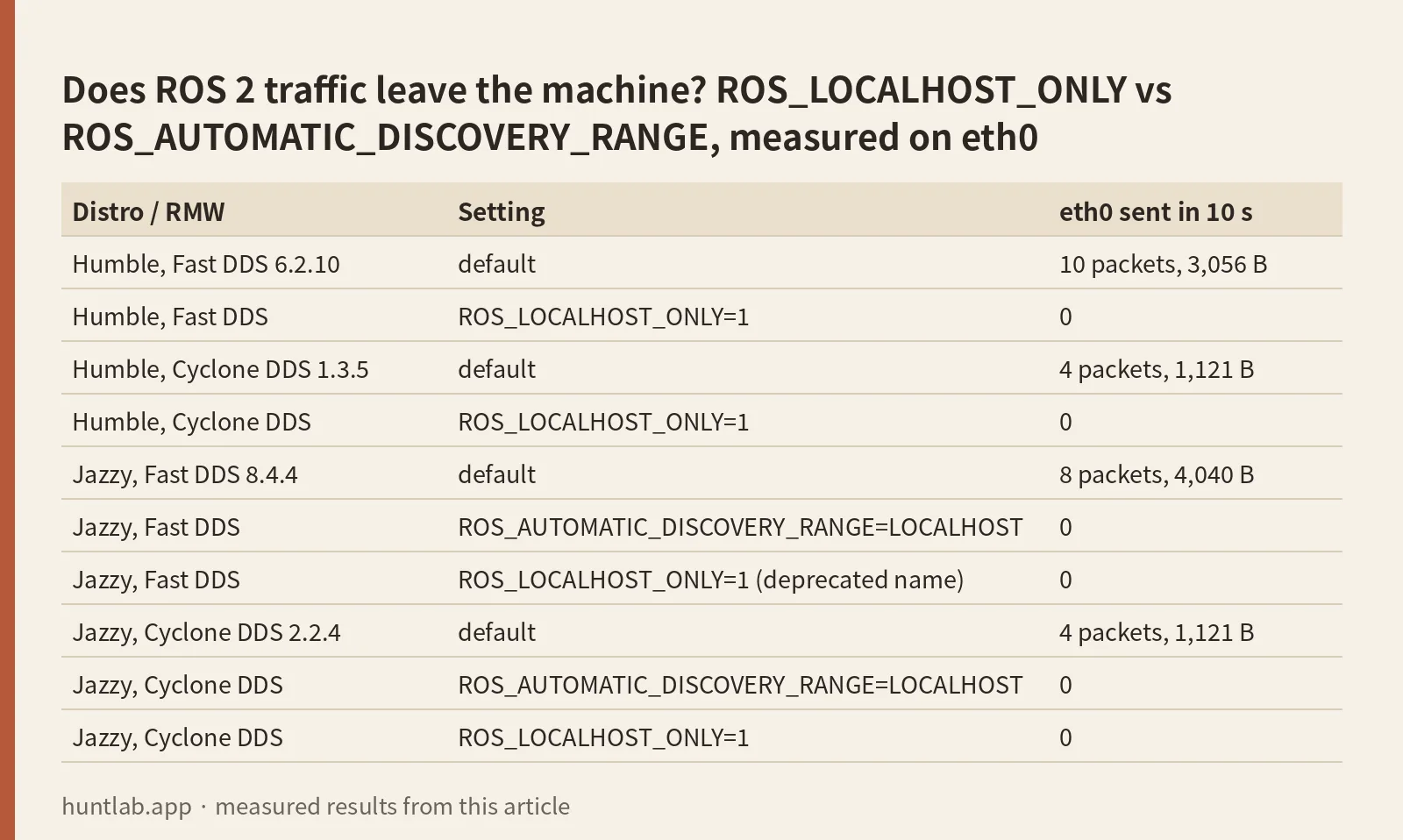
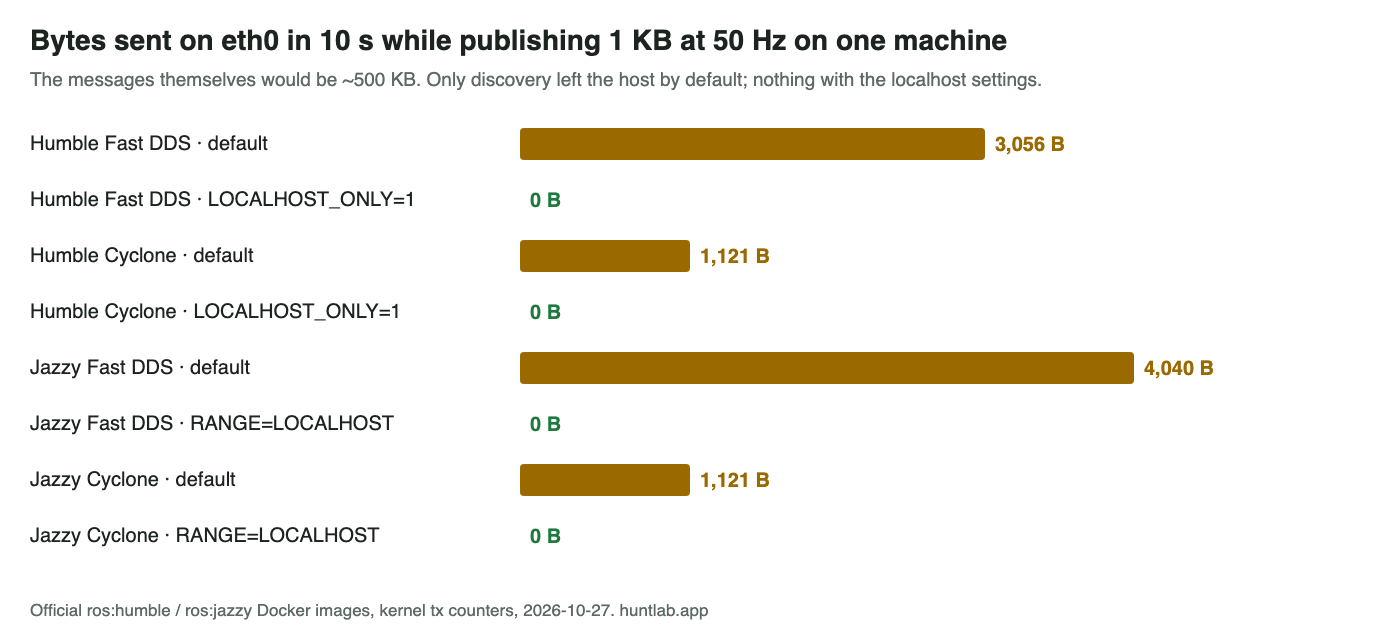
Short answer: on one machine, ROS 2 already keeps the message data off your network. In my test, 50 messages a second of 1 KB each produced only DDS discovery traffic on eth0: 3–4 KB in 10 seconds, while the 500 KB of messages never left the host. To stop even that, set ROS_LOCALHOST_ONLY=1 on Humble or ROS_AUTOMATIC_DISCOVERY_RANGE=LOCALHOST on Jazzy and newer. With either one, eth0 sent 0 bytes with both Fast DDS and Cyclone DDS. If ros2 topic list then shows nothing, call it again after a few seconds. The first call ran before discovery finished.
What I ran
On 2026-10-27 I used the official ros:humble-ros-base and ros:jazzy-ros-base Docker images on a Linux host. Each container gets a normal network interface (eth0) plus loopback (lo). Inside one container, ros2 topic pub -r 50 published a std_msgs/String with 1,000 characters, and ros2 topic hz subscribed for 10 seconds. I read the kernel’s transmit counters for eth0 and lo (/sys/class/net/*/statistics/tx_*) before and after those 10 seconds. Every run received the messages at 50 Hz.
| Distro / RMW | Setting | eth0 sent in 10 s |
|---|---|---|
| Humble, Fast DDS 6.2.10 | default | 10 packets, 3,056 B |
| Humble, Fast DDS | ROS_LOCALHOST_ONLY=1 |
0 |
| Humble, Cyclone DDS 1.3.5 | default | 4 packets, 1,121 B |
| Humble, Cyclone DDS | ROS_LOCALHOST_ONLY=1 |
0 |
| Jazzy, Fast DDS 8.4.4 | default | 8 packets, 4,040 B |
| Jazzy, Fast DDS | ROS_AUTOMATIC_DISCOVERY_RANGE=LOCALHOST |
0 |
| Jazzy, Fast DDS | ROS_LOCALHOST_ONLY=1 (deprecated name) |
0 |
| Jazzy, Cyclone DDS 2.2.4 | default | 4 packets, 1,121 B |
| Jazzy, Cyclone DDS | ROS_AUTOMATIC_DISCOVERY_RANGE=LOCALHOST |
0 |
| Jazzy, Cyclone DDS | ROS_LOCALHOST_ONLY=1 |
0 |
The messages themselves would be about 500 KB in 10 seconds (500 × 1 KB). Nothing close to that crossed eth0 in any configuration. The few packets in the default rows are discovery announcements, which go out every few seconds so that other machines can find the nodes.
So why is my network slow?
The question this answers describes a router slowing down while all nodes run on one machine. In my single-host test, the message data stayed on the host and only a few KB of discovery went out. If you see much more than that, something on another machine is probably subscribed. Examples are RViz on a laptop, ros2 bag record on another host, or a second robot on the same ROS_DOMAIN_ID. Once a subscriber exists on another machine, the data has to cross the network to reach it. I didn’t measure that multi-machine case here. Either way, the localhost settings above stop it, because they also stop other machines from discovering your nodes.
To check quickly, compare your interface counters before and after 10 seconds, the same way I did:
cat /sys/class/net/eth0/statistics/tx_bytes; sleep 10; cat /sys/class/net/eth0/statistics/tx_bytesReplace eth0 with your interface name (ip link lists them). Other programs on the machine count too, so stop large downloads before you test.
Cyclone DDS: “selected interface “lo” is not multicast-capable”
With Cyclone DDS and ROS_LOCALHOST_ONLY=1 on Humble, every command printed:
selected interface "lo" is not multicast-capable: disabling multicastIn my test this was only a warning. The subscriber still got 50 Hz, and eth0 sent nothing. You don’t need the ifconfig lo multicast / route add workaround from the question for nodes on one host to talk. On Jazzy with Cyclone DDS 2.2.4 the warning didn’t appear.
ros2 topic list shows nothing
The other half of that question is that ros2 topic list stayed empty. I tested this on Jazzy with Fast DDS, three times per setting, with a publisher already running:
| Setting | First ros2 topic list |
--no-daemon |
Again 3 s later |
|---|---|---|---|
| default | found it 1 of 3 | 1 of 3 | 3 of 3 |
ROS_AUTOMATIC_DISCOVERY_RANGE=LOCALHOST |
0 of 3 | 0 of 3 | 3 of 3 |
ROS_LOCALHOST_ONLY=1 |
0 of 3 | 0 of 3 | 3 of 3 |
The first call after the ROS 2 daemon starts often comes back empty, because the daemon hasn’t finished discovery yet. With the localhost settings it was empty every time. A second call a few seconds later listed the topic every time. Before you change network settings, run the command twice. Also make sure the shell running ros2 has the same RMW_IMPLEMENTATION, ROS_DOMAIN_ID and localhost variables as your nodes. I ran ros2 daemon stop before every test so that each one started a fresh daemon. Do the same after you change any of these variables.
FAQ
Does ROS 2 send messages over the network when all nodes run on one machine?
Not in my test. Publishing 1 KB messages at 50 Hz produced only DDS discovery traffic on eth0, about 1 to 4 KB in 10 seconds, while the 500 KB of messages never left the host.
How do I keep ROS 2 traffic on localhost only?
Set ROS_LOCALHOST_ONLY=1 on Humble or ROS_AUTOMATIC_DISCOVERY_RANGE=LOCALHOST on Jazzy and newer. With either one, eth0 sent 0 bytes with both Fast DDS and Cyclone DDS.
Why does ros2 topic list show nothing with the localhost settings?
The first call ran before the daemon finished discovery. With the localhost settings the first call was empty every time, and a second call 3 s later listed the topic every time.
Is “selected interface lo is not multicast-capable” a problem with Cyclone DDS?
In my test it was only a warning. The subscriber still got 50 Hz and eth0 sent nothing, so the ifconfig lo multicast workaround wasn’t needed for nodes on one host.
Why is my network slow if all ROS 2 nodes run on one machine?
In my single-host test only a few KB of discovery went out. If you see much more, something on another machine is probably subscribed, such as RViz on a laptop or a second robot on the same ROS_DOMAIN_ID. I didn’t measure that multi-machine case.
Not tested
Traffic between two machines, Wi-Fi, Zenoh (rmw_zenoh_cpp), large messages such as images and point clouds, Fast DDS shared-memory settings, and Lyrical. I counted bytes per interface and didn’t decode packets. I only measured what crossed eth0, not how each DDS moved the data inside the host.
Scripts and raw output: evidence folder. Questions this answers: How to avoid ROS2 topic messages to be transferred over the network while used on the same machine?, CycloneDDS is not working well ROS_LOCALHOST_ONLY=1 in ros2 humble. Related: ROS 2 nodes can’t see each other: ROS_AUTOMATIC_DISCOVERY_RANGE.