ROS 2 “Failed to parse global arguments” and “Cannot have a value before ros__parameters”: params YAML and -p errors, measured
[ERROR] [rcl]: Failed to parse global arguments
terminate called after throwing an instance of 'rclcpp::exceptions::RCLInvalidROSArgsError'
  what():  failed to initialize rcl: Couldn't parse params file: '--params-file /y/no_ros_parameters.yaml'. Error: Cannot have a value before ros__parameters at line 2, at ./src/parse.c:787, at ./src/rcl/arguments.c:406
In Python the same failure ends in rclpy._rclpy_pybind11.RCLError: failed to initialize rcl: Couldn't parse params file: ..., with the same text after Error:.
Short answer: “Failed to parse global arguments” isn’t the real error. It’s the line rcl prints before it rejects your --ros-args. The cause is the text after the last Error:, and it comes from one of two places. Either the YAML parser rejected the file, or the command-line parser rejected a -p rule. The node never starts, so nothing in your code runs. The file layout that worked on Humble, Jazzy and Lyrical has the node name, then ros__parameters, then the parameters, indented with spaces:
/number_publisher:        # node name, as the node calls itself (or /** for every node)
  ros__parameters:        # required, exactly this key
    number: 5
    timer_period: 1.5     # 1.5 or 1.0, not 1, if the node declared a double
    label: from_yaml
ros2 run my_pkg my_node --ros-args --params-file params.yamlTwo mistakes produce no error at all. A YAML key that doesn’t match the node name is skipped, and so is a --params-file (or -p) placed before --ros-args. In both cases the node starts with its default values. If your parameters seem to be ignored, check those two first.
Find your error text
Take the part after Error: and look it up in this table. Every row behaved the same in an rclpy node and an rclcpp node, on all three distros.
| What was wrong | Text after Error: (or the exception) |
|---|---|
No ros__parameters: key under the node name |
Cannot have a value before ros__parameters at line 2 |
| File not indented at all (every key at column 0) | Cannot have a value before ros__parameters at line 1 |
| Tabs used for indentation | Error parsing a event near line 1 |
A key with no value (number:) |
No value at line 3 |
List mixing types ([1, 2.5]) |
Sequence should be of same type. Value type 'double' do not belong at line_num 3 |
| Path to the file is wrong | Error opening YAML file |
-p timer_period:= 1.0 (space after :=) |
Couldn't parse parameter override rule: '-p timer_period:='. Error: error not set |
-p -publish_rate:=100.0 (dash before the name) |
Couldn't parse parameter override rule: '-p -publish_rate:=100.0'. Error: Expecting token or wildcard |
--param-file (typo) after --ros-args |
Python: rclpy._rclpy_pybind11.UnknownROSArgsError: ['--param-file', '/y/good.yaml']. C++: found unknown ROS arguments: '--param-file', '/y/good.yaml' |
timer_period: 1 for a parameter declared as 0.5 |
Python: InvalidParameterTypeException: Trying to set parameter 'timer_period' to '1' of type 'INTEGER', expecting type 'DOUBLE'. C++: Wrong parameter type, parameter {timer_period} is of type {double}, setting it to {integer} is not allowed. |
number: "5" for a parameter declared as 1 |
Same exception, of type 'STRING', expecting type 'INTEGER' |
The last two rows aren’t parse errors. The file parsed fine, and declare_parameter threw afterwards, so you get a traceback that points into your own node code with no “Failed to parse global arguments” line. In C++ every row ends with terminate called after throwing an instance of ... and the process aborts.
What I ran
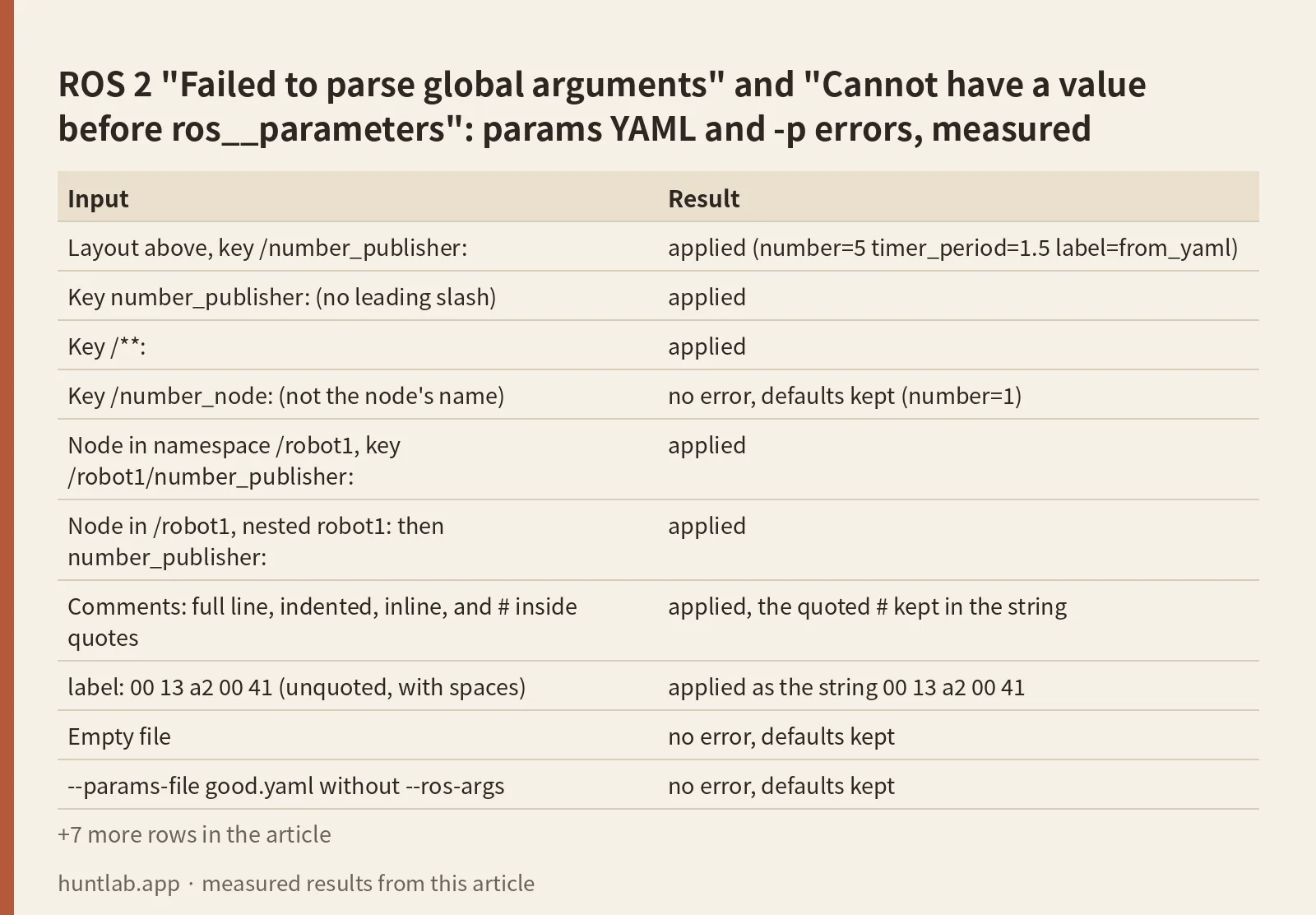
On 2026-10-28 I used the official ros:humble-ros-base, ros:jazzy-ros-base and ros:lyrical-ros-base Docker images. One package held two nodes, a Python script and a C++ executable, both named number_publisher. Each declares number (default 1), timer_period (default 0.5) and label (default "default"), logs the three values and exits. I started each node with ros2 run 30 times, each time with a different file or argument. The results below were the same for both nodes on all three distros:
| Input | Result |
|---|---|
Layout above, key /number_publisher: |
applied (number=5 timer_period=1.5 label=from_yaml) |
Key number_publisher: (no leading slash) |
applied |
Key /**: |
applied |
Key /number_node: (not the node’s name) |
no error, defaults kept (number=1) |
Node in namespace /robot1, key /robot1/number_publisher: |
applied |
Node in /robot1, nested robot1: then number_publisher: |
applied |
Comments: full line, indented, inline, and # inside quotes |
applied, the quoted # kept in the string |
label: 00 13 a2 00 41 (unquoted, with spaces) |
applied as the string 00 13 a2 00 41 |
| Empty file | no error, defaults kept |
--params-file good.yaml without --ros-args |
no error, defaults kept |
-p number:=7 without --ros-args |
no error, defaults kept |
--ros-args -p number:=7 -p timer_period:=1.0 |
applied |
--ros-args -p "label:=hello world" |
applied as hello world |
--ros-args -p timer_period:=1 |
InvalidParameterTypeException, same as the YAML case |
--ros-args --log-level number_publisher:=DEBUG |
works, only that logger at DEBUG |
--ros-args --log-level debug (lowercase) |
works, everything at DEBUG |
| Each broken input in the first table | the error shown there |
The node name is the key, and a wrong one is skipped silently
The top-level key has to match the node’s fully qualified name, the name it passed to Node(...), plus its namespace. It doesn’t have to match the executable, the package or the file name. The leading slash is optional, and a namespace can be written as a path (/robot1/number_publisher:) or as nested keys. A key that matches no node isn’t an error. The file parses, the node finds nothing for itself, and you get the defaults. If you aren’t sure of the name, use /**:, which matched in every run. The Passing ROS arguments to nodes guide gives the rule: “* matches a single token delimited by slashes (/). ** matches zero or more tokens delimited by slashes. Partial matches are not allowed (e.g. foo*).”
The structure comes from the parser’s README (rcl_yaml_param_parser): <node_namespace_string> (optional), then <node1_name>, then ros__parameters, then the fields. It also says: “It only supports canonical int and float types”.
Everything must come after –ros-args
The same guide says: “All ROS-specific arguments have to be specified after a –ros-args flag”. Without the flag, rcl treats --params-file and -p as your program’s own arguments. It doesn’t parse them and doesn’t warn, so the node starts with defaults. With the flag, a misspelled option like --param-file is rejected with UnknownROSArgsError, and that error is the easier one to debug. A value needs to be in the same shell word as :=. With -p timer_period:= 1.0 the shell splits off 1.0, and rcl sees an empty value. To pass a string with spaces, quote the whole rule: -p "label:=hello world".
1 is not a double
The YAML parser types each value from how it’s written: 1 is an integer, 1.0 is a double, and "5" is a string. A declared parameter keeps the type of its default value, and the docs say “By default, attempts to change the type of a declared parameter at runtime will fail” (About parameters). The initial override from a file or -p got the same treatment in my run: declare_parameter threw on both. The fix is to write the value the way the type expects (1.0, not 1). The same page describes the other option. You declare the parameter “using a ParameterDescriptor with the dynamic_typing member variable set to true” so it can accept more than one type. I didn’t test that.
Comments are fine
One question blames # comments for Error parsing a event near line 3. In my run, comments on their own line, indented comments, inline comments and a # inside a quoted string all parsed on every distro. The same “Error parsing a event” message did appear for a file indented with tabs. It said near line 1, although the first tab was on line 2, so check the named line and the one after it. If you see this error, look for tabs there before you remove your comments.
Version notes
The error texts were identical on Humble, Jazzy and Lyrical. Only two things changed. The parse.c and arguments.c line numbers in the message differ: Cannot have a value before ros__parameters was at parse.c:787 on Humble, parse.c:800 on Jazzy and parse.c:1117 on Lyrical. And on Jazzy and Lyrical, rclpy’s InvalidParameterTypeException message ends with : timer_period, the parameter name repeated. When you search for the error, drop the line numbers. Per-logger --log-level name:=DEBUG worked on all three. The question where it failed with Argument does not use a valid severity level was on Foxy, which I didn’t test.
Not tested
Parameter files passed through a launch file (Node(parameters=[...])) or to a component container, dynamic_typing=True, allow_undeclared_parameters, byte arrays, ros2 param load at runtime, Foxy, Iron and Rolling.
FAQ
What does “Failed to parse global arguments” mean?
rcl couldn’t parse something after --ros-args, either a --params-file or a -p rule, so the node didn’t start. The useful part is the last Error: in the next line, for example Cannot have a value before ros__parameters or Expecting token or wildcard.
How do I fix “Cannot have a value before ros__parameters”?
Put a ros__parameters: key between the node name and the parameters, and indent with spaces. The same error showed up when the key was missing (at line 2) and when the whole file had no indentation (at line 1).
My params file loads without errors but the values are not applied. Why?
Two causes gave exactly that in my run. The top-level key didn’t match the node’s name, or --params-file came before --ros-args or without it. Use the name passed to Node(...) including any namespace, or /**, and put every ROS option after --ros-args.
Why do I get InvalidParameterTypeException expecting type DOUBLE?
The node declared the parameter with a double default and the file or -p gave an integer such as 1. Write 1.0. A quoted "5" for an integer parameter fails the same way with type STRING.
Can I use comments in a ROS 2 params YAML file?
Yes. Full-line, indented and inline # comments all parsed on Humble, Jazzy and Lyrical. Error parsing a event came from tab indentation, not from comments.
Measured on 2026-10-28 with ros:humble-ros-base (sha256:d9bcf2e6f72d..., rcl and rcl_yaml_param_parser 5.3.13, rclpy 3.3.22, rclcpp 16.0.21, libyaml 0.2.2), ros:jazzy-ros-base (sha256:8eed0a4669bb..., rcl 9.2.11, rclpy 7.1.12, rclcpp 28.1.22, libyaml 0.2.5) and ros:lyrical-ros-base (sha256:3224ee150cb0..., rcl 10.4.5, rclpy 10.0.11, rclcpp 32.0.3, libyaml 0.2.5), default RMW (Fast DDS). Full digests are in digests.txt.
Script and raw output: evidence folder. Questions this answers: failed to initialize rcl: Couldn’t parse parameter override rule, parser error Couldn’t parse parameter override rule, rclcpp ROS2 params yaml file comments, ros2 component_container yaml parsing, Running node with YAML file gives me error: UnknownROSArgsError.