ros2 launch: “file was not found in the share directory of package” – the install step, stale copies and –symlink-install (measured)
file 'demo.launch.py' was not found in the share directory of package 'my_pkg' which is at '/ws/install/my_pkg/share/my_pkg'Short answer: ros2 launch never looks in your src/ folder. It only searches the package’s installed share directory, the path printed at the end of the error. Your launch file isn’t there because the build never copied it. In an ament_python package, add the launch files to data_files in setup.py. In an ament_cmake package, add install(DIRECTORY launch DESTINATION share/${PROJECT_NAME}) to CMakeLists.txt. Then run colcon build again and re-source install/setup.bash. Two related cases catch people. After a normal build, the installed copy goes stale when you edit the source file. With --symlink-install, a launch file you add after the build isn’t found until you rebuild.
# setup.py (ament_python)
import os
from glob import glob

data_files=[
    # ... resource marker and package.xml entries ...
    (os.path.join('share', package_name, 'launch'),
     glob(os.path.join('launch', '*launch.[pxy][yma]*'))),
],
# CMakeLists.txt (ament_cmake), before ament_package()
install(DIRECTORY launch DESTINATION share/${PROJECT_NAME})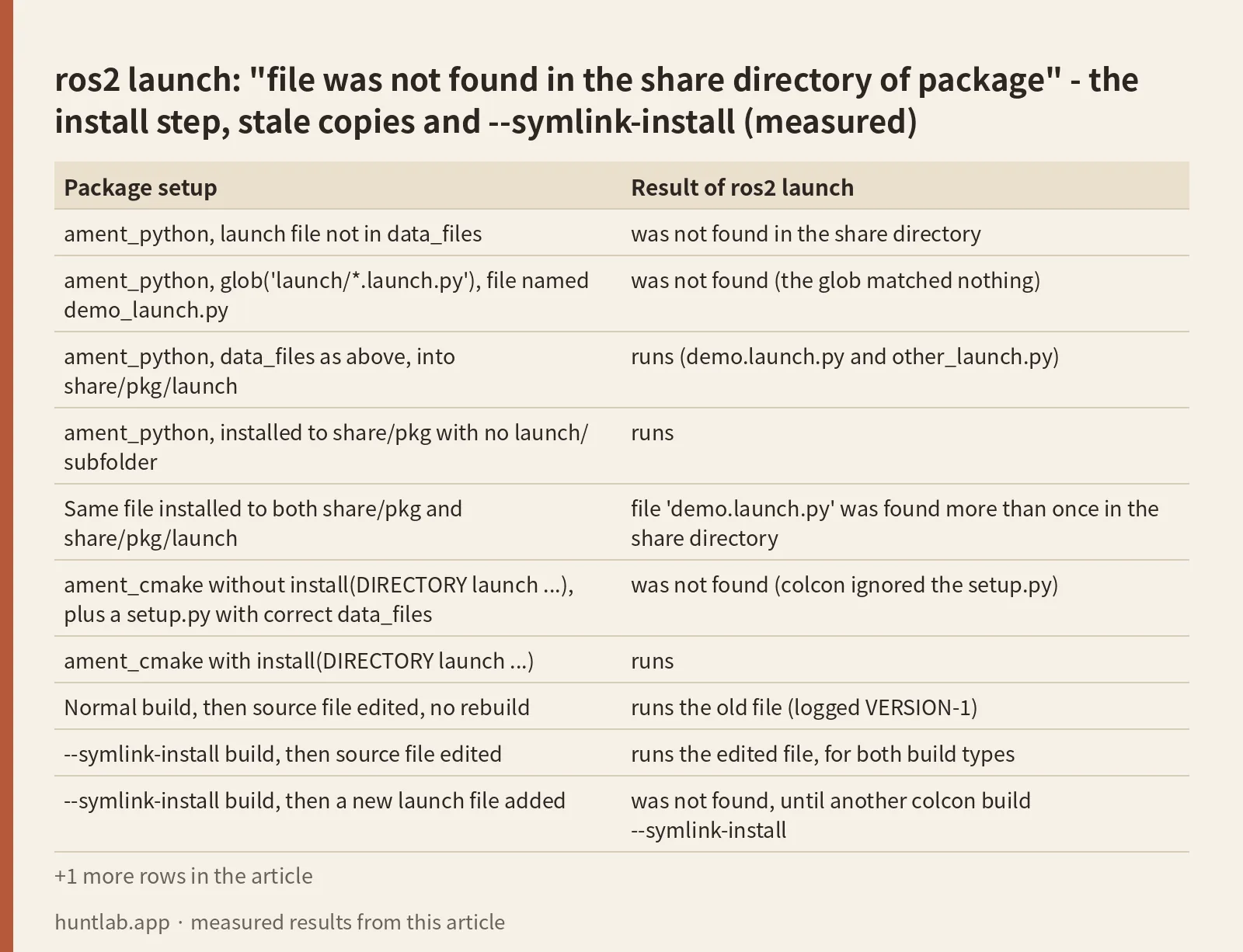
First, look at what was installed
The error gives you the directory it searched, so check that directory before you change anything:
find /ws/install/my_pkg/share/my_pkg -name '*launch*'If nothing comes back, the build didn’t install the file, and the sections below say why. If the file is there and you still get the error, check the spelling: ros2 launch compares the file name exactly.
How ros2 launch finds the file
This is the lookup in ros2launch, read from the installed package in all three images (source on GitHub):
package_share_directory = get_package_share_directory(package_name)
matching_file_paths = []
for root, dirs, files in os.walk(package_share_directory):
    for name in files:
        if name == file_name:
            matching_file_paths.append(os.path.join(root, name))
if len(matching_file_paths) == 0:
    raise FileNotFoundError(
        "file '{}' was not found in the share directory of package '{}' which is at '{}'" ...
It walks the whole install share directory, including subfolders, and wants exactly one file with that name. Your source tree isn’t searched. Neither is any folder name you pass. The function was the same on Humble, Jazzy and Lyrical.
What I ran
On 2026-10-28 I used the official ros:humble-ros-base, ros:jazzy-ros-base and ros:lyrical-ros-base Docker images. One workspace held seven tiny packages, each with a launch file that only logs VERSION-1. I built them with plain colcon build, ran ros2 launch on each, then edited and added files to test the stale-copy cases. All three distros gave the same result in every row:
| Package setup | Result of ros2 launch |
|---|---|
ament_python, launch file not in data_files |
was not found in the share directory |
ament_python, glob('launch/*.launch.py'), file named demo_launch.py |
was not found (the glob matched nothing) |
ament_python, data_files as above, into share/pkg/launch |
runs (demo.launch.py and other_launch.py) |
ament_python, installed to share/pkg with no launch/ subfolder |
runs |
Same file installed to both share/pkg and share/pkg/launch |
file 'demo.launch.py' was found more than once in the share directory |
ament_cmake without install(DIRECTORY launch ...), plus a setup.py with correct data_files |
was not found (colcon ignored the setup.py) |
ament_cmake with install(DIRECTORY launch ...) |
runs |
| Normal build, then source file edited, no rebuild | runs the old file (logged VERSION-1) |
--symlink-install build, then source file edited |
runs the edited file, for both build types |
--symlink-install build, then a new launch file added |
was not found, until another colcon build --symlink-install |
| Workspace built but not sourced | different error: Package 'py_fixed' not found |
ament_python: the glob has to match your file names
The second row is the one people miss. glob('launch/*.launch.py') matches robot.launch.py but not robot_launch.py. If nothing matches, setup.py doesn’t complain. The build reports Finished and you only find out at ros2 launch. The pattern in the fix above, *launch.[pxy][yma]*, matched both demo.launch.py and other_launch.py in my run. It is also written to cover .xml and .yaml launch files, which I didn’t test. The current tutorial (Integrating launch files into ROS 2 packages, same text for Humble) uses glob('launch/*'), which installs everything in the folder. I didn’t measure that variant.
The subfolder is up to you. Since the lookup walks the whole share directory, share/pkg and share/pkg/launch both worked. Pick one: installing the same file to both gave the “found more than once” error.
ament_cmake: setup.py is ignored
The build type comes from <build_type> in package.xml. When it says ament_cmake, colcon runs CMake, and a setup.py in the same folder has no effect. In my test package setup.py listed the launch file correctly, and nothing was installed. The fix is the install(DIRECTORY ...) line, and it has to come before ament_package(), as the tutorial says.
Stale copies and –symlink-install
A plain colcon build copies the launch file into install/. Edit the file in src/ and the copy stays as it was. No error appears, and your edits seem to do nothing. With --symlink-install, the installed launch file was a symlink. For ament_cmake it pointed straight at src/cm_fixed/launch/demo.launch.py, and for ament_python at build/py_fixed/launch/demo.launch.py. Edits showed up on the next launch without a rebuild. A file created after the build still wasn’t found, because no symlink exists for it yet. One more colcon build --symlink-install fixed that for both build types.
Not tested
XML and YAML launch files, glob('launch/*') from the current tutorial, ros2 launch called with a file path instead of a package name, and merged or isolated install layouts other than colcon’s default.
FAQ
Does the launch file have to be in a launch/ folder under share?
No. ros2 launch walks the package’s whole share directory with os.walk. A file installed directly to share/my_pkg was found on Humble, Jazzy and Lyrical. It has to exist only once in that tree, though, or you get “was found more than once”.
I edited my launch file but ros2 launch runs the old version. Why?
After a normal colcon build, install/ holds a copy of the file. Rebuild after each edit, or build once with --symlink-install so the installed file is a symlink back to your source.
I use –symlink-install. Why is my new launch file not found?
Symlinks are only created at build time. A launch file added afterwards has no link in install/ until you run colcon build --symlink-install again.
My package has both CMakeLists.txt and setup.py. Which one installs the launch files?
The one named by build_type in package.xml. With ament_cmake, the data_files in setup.py were ignored in my test, and only install(DIRECTORY launch DESTINATION share/${PROJECT_NAME}) in CMakeLists.txt installed the file.
The error says “Package not found” instead. Is that the same problem?
No. Package 'my_pkg' not found means the workspace isn’t sourced, or the package didn’t build. Run source install/setup.bash in that terminal. The “share directory” error only shows up once the package itself is found.
Measured on 2026-10-28 with ros:humble-ros-base (sha256:d9bcf2e6f72d..., ros2launch 0.19.14, launch 1.0.15, Python 3.10, setuptools 59.6.0), ros:jazzy-ros-base (sha256:8eed0a4669bb..., ros2launch 0.26.13, launch 3.4.12, Python 3.12, setuptools 68.1.2) and ros:lyrical-ros-base (sha256:3224ee150cb0..., ros2launch 0.29.9, launch 3.9.8, Python 3.14, setuptools 78.1.1), colcon-core 0.21.3, colcon-ros 0.5.0. Full digests are in digests.txt.
Script and raw output: evidence folder. Questions this answers: ros2 launch file was not found in the share directory, _launch.py was not found in the share directory of package, ROS2 Launch file is not found.