colcon build: “listing git files failed – pretending there aren’t any” in ament_python packages (measured)
Short answer: listing git files failed - pretending there aren't any comes from setuptools_scm, a pip package that hooks into every setup.py build once it’s installed. It isn’t an error. In my tests the build finished and the node ran every time this line appeared, so if colcon build failed, the cause is another line in the output. The line shows up when setuptools_scm 7.x or 8.x is installed and the workspace either isn’t a git repository or is owned by a different user. If you don’t use setuptools_scm, pip3 uninstall setuptools-scm removes it. The other common advice is to downgrade setuptools to 58.2.0. I didn’t test that version, but the message appeared with setuptools 59.6.0 and with 84.2.1, so the setuptools version doesn’t seem to be what triggers it.
The message
listing git files failed - pretending there aren't anyIn my runs it was printed twice per package, and colcon build still reported the package as finished.
With setuptools_scm 8.x the same text is prefixed with ERROR setuptools_scm._file_finders.git. That looks worse, but the build still exited with code 0.
What I ran
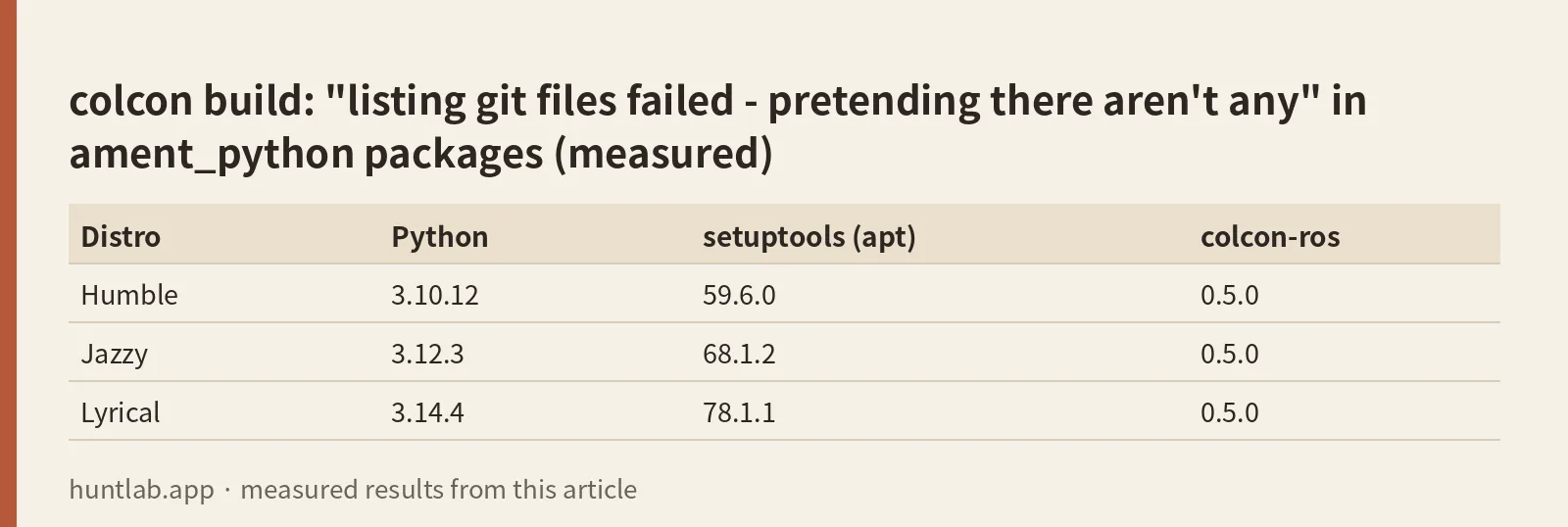
On 2026-10-27 I used the official ros:humble-ros-base, ros:jazzy-ros-base and ros:lyrical-ros-base Docker images. In each one I created a package with ros2 pkg create --build-type ament_python demo_py --node-name talker, ran colcon build, and then ran the node. I repeated this with setuptools_scm 7.1.0, 8.1.0 and 10.3.4 installed through pip, in a workspace that wasn’t a git repository, a git repository I owned, and a git repository owned by another user. “Builds” below means colcon build exited with 0 and ros2 run demo_py talker printed Hi from demo_py.
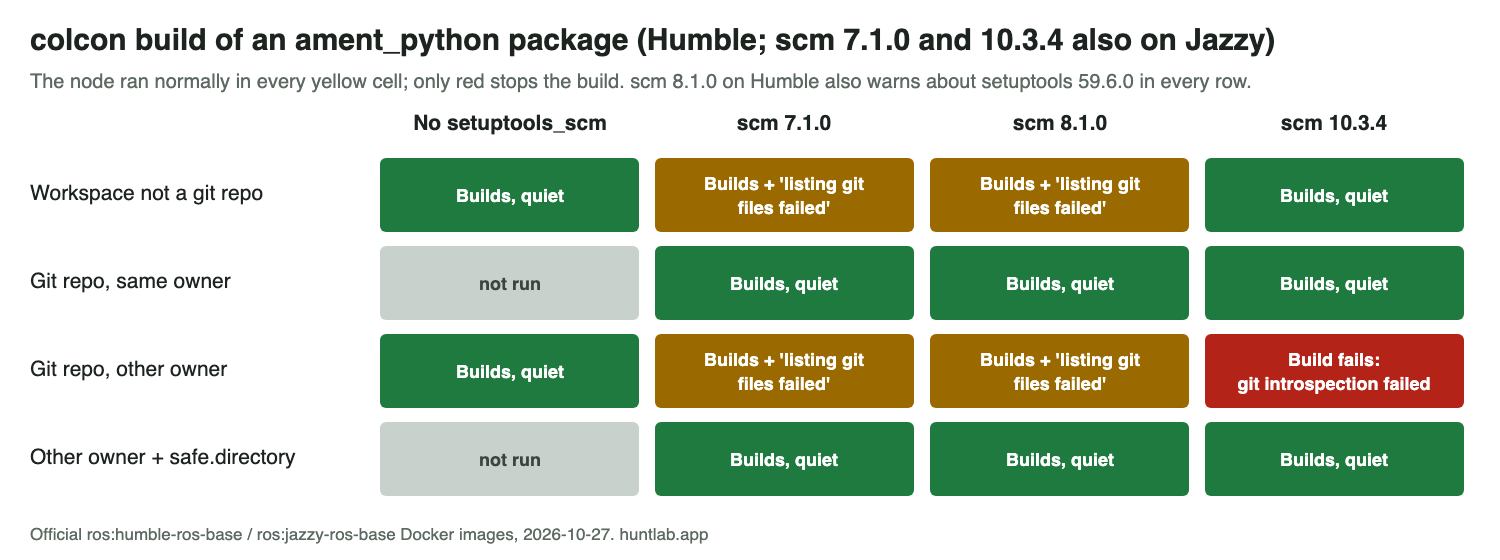
| Distro | Python | setuptools (apt) | colcon-ros |
|---|---|---|---|
| Humble | 3.10.12 | 59.6.0 | 0.5.0 |
| Jazzy | 3.12.3 | 68.1.2 | 0.5.0 |
| Lyrical | 3.14.4 | 78.1.1 | 0.5.0 |
When the message appears
- No setuptools_scm: never.
- setuptools_scm 7.1.0 (Humble and Jazzy) or 8.1.0 (Humble): when the workspace isn’t a git repository, and when it is one but owned by a different user (git refuses with
detected dubious ownership). Not inside a git repository you own. - setuptools_scm 10.3.4 (Humble and Jazzy): never. But see the next section.
The most common way to end up with setuptools_scm is a pip install of some unrelated Python project that depends on it. On Humble that just works. On Jazzy a plain pip install setuptools_scm (with PIP_BREAK_SYSTEM_PACKAGES=1) failed for me with Cannot uninstall packaging 24.0, RECORD file not found. Hint: The package was installed by debian., so nothing got installed. Lyrical failed the same way. Forcing it with --ignore-installed worked, but it also pulled in setuptools 84.2.1, and pip warned colcon-core 0.21.3 requires setuptools<80,>=30.3.0. The builds in my test still passed.
The case that does fail
With setuptools_scm 10.3.4, a workspace inside a git repository owned by another user stopped the build on both Humble and Jazzy:
git introspection failed: fatal: detected dubious ownership in repository at '/ws'
Failed   <<< demo_py [1.04s, exited with code 1]
You hit this when you build as a different user than the one who cloned the repo. Typical cases are sudo colcon build, a Docker container running as root on a bind-mounted checkout, or a shared workspace. Either fix worked:
# tell git the repo is fine (use your workspace path)
git config --global --add safe.directory /path/to/ws

# or remove setuptools_scm if nothing you use needs it
pip3 uninstall setuptools-scm
Building as the user who owns the files avoids it too. The same safe.directory line also silenced the 7.x/8.x message in a repo owned by another user.
The other ament_python warning: “doesn’t explicitly install a marker”
This one comes from colcon, not setuptools:
WARNING:colcon.colcon_ros.task.ament_python.build:Package 'demo_py' doesn't explicitly install a marker in the package index (colcon-ros currently does it implicitly but that fallback will be removed in the future)The “marker” is an empty file named after your package, installed into share/ament_index/resource_index/packages/. It’s how ros2 run and ros2 pkg list find the package. ros2 pkg create adds the file and the setup.py line that installs it. On all three distros (colcon-ros 0.5.0):
| setup.py / files | Result |
|---|---|
As generated by ros2 pkg create |
Builds, no warning |
data_files entry for resource_index/packages removed |
Builds with the marker warning. ros2 run still worked because colcon installs the marker for you. |
resource/demo_py file deleted, entry kept |
Fails: error: can't copy 'resource/demo_py': doesn't exist or not a regular file |
To fix the warning, put this back in data_files and make sure the empty file resource/<package_name> exists:
data_files=[
    ('share/ament_index/resource_index/packages',
        ['resource/' + package_name]),
    ('share/' + package_name, ['package.xml']),
],
If you renamed the package, rename the file in resource/ too. A leftover file with the old name gives you the can't copy error above.
Related: replacing ament_target_dependencies on ROS 2 Lyrical.
FAQ
Is “listing git files failed – pretending there aren’t any” an error?
No. It comes from setuptools_scm, and in my tests the build finished and the node ran every time this line appeared. If colcon build failed, the cause is another line in the output.
When does the listing git files failed message appear?
With setuptools_scm 7.1.0 or 8.1.0, when the workspace isn’t a git repository or is one owned by a different user. Without setuptools_scm it never appeared, and 10.3.4 didn’t print it.
How do I get rid of the message?
If you don’t use setuptools_scm, pip3 uninstall setuptools-scm removes it. In a repo owned by another user, git config --global --add safe.directory /path/to/ws also silenced it.
Does downgrading setuptools to 58.2.0 help?
I didn’t test 58.2.0. The message appeared with setuptools 59.6.0 and with 84.2.1, so the setuptools version doesn’t seem to be what triggers it.
Why does colcon build fail with “git introspection failed: fatal: detected dubious ownership”?
With setuptools_scm 10.3.4, a workspace inside a git repository owned by another user stopped the build on Humble and Jazzy. Adding the path to safe.directory, uninstalling setuptools-scm, or building as the user who owns the files avoids it.
Not tested
setuptools_scm versions other than 7.1.0, 8.1.0 and 10.3.4. I didn’t run setuptools_scm on Lyrical, because pip refused to install it there just as on Jazzy. I also didn’t test virtual environments, packages that use setup.cfg/pyproject.toml only, or builds without git installed while setuptools_scm 10.x is present. I tried that last one only with a repository owned by another user, and it built.
Build scripts and raw output: evidence folder. Questions this answers: colcon build on ROS2 humble outputs “listing git files failed – pretending there aren’t any”, ament_python: Package doesn’t explicitly install a marker in the package index. Related: ros2: command not found after sourcing local_setup.bash.