ROS 2 ROSInterruptException: rate.sleep() after rclpy.shutdown()
What happened when it actually ran
A common rclpy control node looks like this: rclpy.spin(node) runs in a background thread, and the main thread runs while rclpy.ok(): ... rate.sleep() at a fixed rate. When you stop that node, you often get a traceback that ends in:
rclpy.exceptions.ROSInterruptException: rclpy.shutdown() has been calledTwo questions follow. Is that an error? And when another thread calls rclpy.shutdown(), does the sleeping rate.sleep() wait for its next tick before it gives up? For a 1 Hz loop, that wait could be most of a second.
To find out, a small script ran six shutdown scenarios on ROS 2 Jazzy inside the official ros:jazzy-ros-base container, 5 times over. The short version:
- After
rclpy.shutdown(),rate.sleep()did not wait for the next tick. It woke up and raisedROSInterruptExceptionabout a millisecond after the call, at 10 Hz and at 1 Hz alike. - Calling
rate.sleep()again after shutdown raised the same exception straight away, without blocking. - Ctrl+C (SIGINT) took a different path. A loop in the main thread ended with
KeyboardInterrupt, notROSInterruptException. A loop in a worker thread never woke up at all until the test script destroyed the Rate by hand. - Calling
rclpy.shutdown()a second time raised in every run, with a different exception depending on how the node was stopped.rclpy.try_shutdown()never raised.
So ROSInterruptException is the normal “we are shutting down” signal from Rate, not a bug. Catch it outside the loop, catch KeyboardInterrupt too, and finish with rclpy.try_shutdown() instead of rclpy.shutdown(). The details, and the one case where this still isn’t enough (a rate loop in a worker thread), follow below.
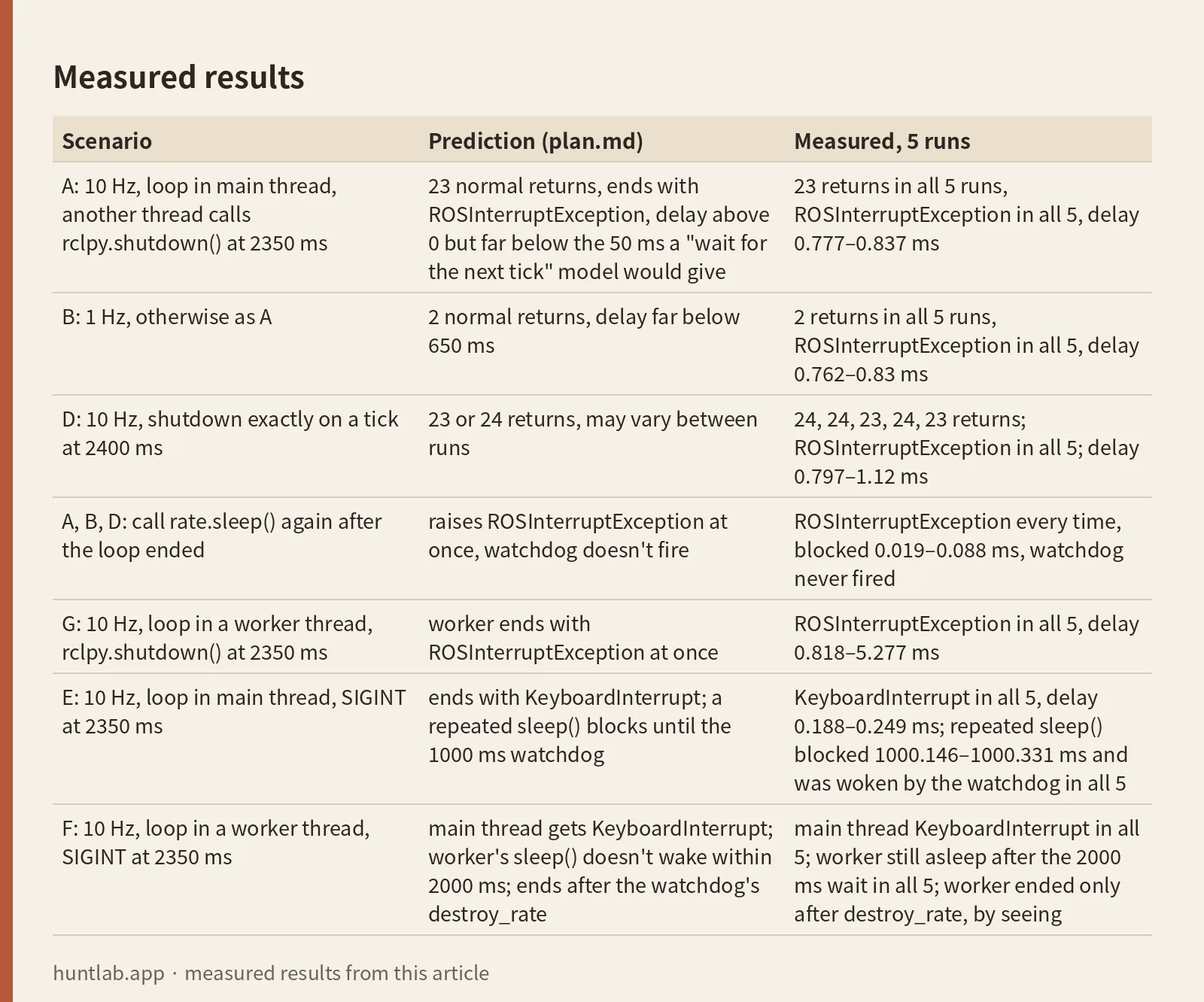
Measured results
Environment: image ros:jazzy-ros-base pinned as ros@sha256:8eed0a4669bbf43ee331878a4c39bd8ebddea8e3312a58b4fae8edb14526b617, ROS distro jazzy, Python 3.12.3, rclpy 7.1.12-1noble.20260912.162354, RMW rmw_fastrtps_cpp (the default), network none, 1 CPU and 1 GiB of memory. The harness ran the same script 5 times; all 5 runs exited with code 0. The script starts each scenario in a fresh Python process so that signal handlers and contexts don’t leak between scenarios. Times come from time.monotonic(), with t=0 taken right after node.create_rate(). Ctrl+C is simulated with os.kill(os.getpid(), signal.SIGINT) from a second thread. Where the loop is expected to hang, the script uses a watchdog that calls node.destroy_rate(rate) after a fixed wait (1000 ms for a repeated sleep(), 2000 ms for a worker-thread loop).
“Delay” below is the time from the rclpy.shutdown() or os.kill call to the moment the loop exited. Predictions come from plan.md, written before the runs.
| Scenario | Prediction (plan.md) | Measured, 5 runs |
|---|---|---|
A: 10 Hz, loop in main thread, another thread calls rclpy.shutdown() at 2350 ms |
23 normal returns, ends with ROSInterruptException, delay above 0 but far below the 50 ms a “wait for the next tick” model would give |
23 returns in all 5 runs, ROSInterruptException in all 5, delay 0.777–0.837 ms |
| B: 1 Hz, otherwise as A | 2 normal returns, delay far below 650 ms | 2 returns in all 5 runs, ROSInterruptException in all 5, delay 0.762–0.83 ms |
| D: 10 Hz, shutdown exactly on a tick at 2400 ms | 23 or 24 returns, may vary between runs | 24, 24, 23, 24, 23 returns; ROSInterruptException in all 5; delay 0.797–1.12 ms |
A, B, D: call rate.sleep() again after the loop ended |
raises ROSInterruptException at once, watchdog doesn’t fire |
ROSInterruptException every time, blocked 0.019–0.088 ms, watchdog never fired |
G: 10 Hz, loop in a worker thread, rclpy.shutdown() at 2350 ms |
worker ends with ROSInterruptException at once |
ROSInterruptException in all 5, delay 0.818–5.277 ms |
| E: 10 Hz, loop in main thread, SIGINT at 2350 ms | ends with KeyboardInterrupt; a repeated sleep() blocks until the 1000 ms watchdog |
KeyboardInterrupt in all 5, delay 0.188–0.249 ms; repeated sleep() blocked 1000.146–1000.331 ms and was woken by the watchdog in all 5 |
| F: 10 Hz, loop in a worker thread, SIGINT at 2350 ms | main thread gets KeyboardInterrupt; worker’s sleep() doesn’t wake within 2000 ms; ends after the watchdog’s destroy_rate |
main thread KeyboardInterrupt in all 5; worker still asleep after the 2000 ms wait in all 5; worker ended only after destroy_rate, by seeing rclpy.ok()==False, 2000.54–2001.655 ms after the signal |
| After the loop ended | Explicit rclpy.shutdown() (A, B, D, G) |
SIGINT (E, F) |
|---|---|---|
How the rclpy.spin() thread ended |
returned normally | ExternalShutdownException |
Calling rclpy.shutdown() again |
RuntimeError: Context must be initialized before it can be shutdown |
RCLError: failed to shutdown: rcl_shutdown already called on the given context, at ./src/rcl/init.c:333 |
rclpy.try_shutdown() |
returned None, no exception |
returned None, no exception |
| Traceback in the child process’s stderr | none | none |
Raw lines from run 1: the environment line and scenarios B, E and F, exactly as printed.
{"env": {"python": "3.12.3", "ros_distro": "jazzy", "rclpy": "7.1.12", "rmw": "default"}}
{"case": "B", "hz": 1, "at_ms": 2350, "action": "shutdown", "loop_thread": "main", "ok_right_after_loop_end": false, "ok_false_at_ms": 2350.987, "resleep_after_end": {"result": "ROSInterruptException", "msg": "rclpy.shutdown() has been called", "blocked_ms": 0.021, "watchdog_fired": false}, "second_shutdown": {"result": "raised", "type": "RuntimeError", "msg": "Context must be initialized before it can be shutdown"}, "try_shutdown": {"result": "ok", "returned": "None"}, "spin_thread": {"alive": false, "end": "returned", "t_ms": 2351.387}, "trigger": {"t_call_ms": 2350.202, "t_return_ms": 2350.847}, "normal_returns": 2, "return_times_ms": [1000.699, 2000.613], "returns_after_trigger_ms": [], "loop_end": {"how": "ROSInterruptException", "msg": "rclpy.shutdown() has been called", "t_ms": 2350.964}, "trigger_to_loop_end_ms": 0.762, "trigger_to_spin_end_ms": 1.185, "max_abs_tick_error_ms": 0.699, "child_exit": 0, "child_wall_ms": 2605.2, "child_stderr_traceback": false}
{"case": "E", "hz": 10, "at_ms": 2350, "action": "sigint", "loop_thread": "main", "ok_right_after_loop_end": true, "ok_false_at_ms": 2351.499, "resleep_after_end": {"result": "returned", "blocked_ms": 1000.331, "watchdog_fired": true}, "second_shutdown": {"result": "raised", "type": "RCLError", "msg": "failed to shutdown: rcl_shutdown already called on the given context, at ./src/rcl/init.c:333"}, "try_shutdown": {"result": "ok", "returned": "None"}, "spin_thread": {"alive": false, "end": "ExternalShutdownException", "t_ms": 2350.517}, "trigger": {"t_call_ms": 2350.131, "t_return_ms": 2350.19}, "normal_returns": 23, "return_times_ms": [100.652, 200.575, 300.554, 400.563, 500.6, 600.553, 700.55, 800.58, 900.558, 1000.562, 1100.543, 1200.542, 1300.548, 1400.575, 1500.561, 1600.573, 1700.526, 1800.556, 1900.556, 2000.577, 2100.557, 2200.564, 2300.582], "returns_after_trigger_ms": [], "loop_end": {"how": "KeyboardInterrupt", "msg": "", "t_ms": 2350.33}, "trigger_to_loop_end_ms": 0.199, "trigger_to_spin_end_ms": 0.386, "max_abs_tick_error_ms": 0.652, "child_exit": 0, "child_wall_ms": 3606.8, "child_stderr_traceback": false}
{"case": "F", "hz": 10, "at_ms": 2350, "action": "sigint", "loop_thread": "worker", "main_thread": {"how": "KeyboardInterrupt", "t_ms": 2350.297}, "ok_false_at_ms": 2350.335, "worker_finished_within_wait": false, "worker_wait_ms": 2000.0, "watchdog_destroy_rate": {"t_ms": 4350.488, "worker_finished_after": true}, "second_shutdown": {"result": "raised", "type": "RCLError", "msg": "failed to shutdown: rcl_shutdown already called on the given context, at ./src/rcl/init.c:333"}, "try_shutdown": {"result": "ok", "returned": "None"}, "spin_thread": {"alive": false, "end": "ExternalShutdownException", "t_ms": 2350.454}, "trigger": {"t_call_ms": 2350.106, "t_return_ms": 2350.164}, "normal_returns": 23, "return_times_ms": [100.631, 200.631, 300.584, 400.586, 500.565, 600.621, 700.518, 800.59, 900.581, 1000.544, 1100.559, 1200.706, 1300.522, 1400.568, 1500.552, 1600.55, 1700.584, 1800.589, 1900.556, 2000.6, 2100.591, 2200.563, 2300.572], "returns_after_trigger_ms": [4350.634], "loop_end": {"how": "rclpy.ok()==False", "t_ms": 4350.651}, "trigger_to_loop_end_ms": 2000.545, "trigger_to_spin_end_ms": 0.348, "max_abs_tick_error_ms": 0.706, "child_exit": 0, "child_wall_ms": 4604.2, "child_stderr_traceback": false}
A few details from the full results:
- Tick timing. Normal
sleep()returns landed close to whole multiples of the period. The largest gap from the ideal tick time was 1.387 ms in scenarios A, B, D, E and F. In G, one run reached 15.212 ms. - The 2400 ms boundary (D). In runs 1, 2 and 4 (24 returns), the 2400 ms tick returned at 2400.552, 2400.575 and 2400.552 ms, just before the shutdown call at 2400.598, 2400.629 and 2400.607 ms. In runs 3 and 5 (23 returns), the shutdown call came first, at 2400.121 and 2400.117 ms.
rclpy.ok()after Ctrl+C (E). Right after the loop caughtKeyboardInterrupt,rclpy.ok()was stillTruein runs 1 and 4. It turnedFalseat 2351.499 and 2351.457 ms in those runs. After an explicit shutdown it was alreadyFalsewhen the loop exited, in every run.- Spin thread after SIGINT.
rclpy.spin()ended withExternalShutdownException0.33–0.685 ms after the signal. - One result differed from the prediction. The plan expected
RCLErrorfrom a secondrclpy.shutdown()after an explicit shutdown. That error only appeared after SIGINT. After an explicit shutdown, the second call raisedRuntimeError: Context must be initialized before it can be shutdowninstead. Every other result matched the plan.
What the numbers mean: the slowest explicit-shutdown exit in A, B and D was about 1.1 ms, and the slowest in G was about 5.3 ms. A model where sleep() waits for the next tick would have added 50 ms at 10 Hz and 650 ms at 1 Hz in this setup. The measured delays are one to three orders of magnitude smaller, and they don’t grow when the period does (A and B are practically the same). That is the behavior of a wake-up signal, not of a timer that has to run out.
These are container measurements on 1 CPU. The exact milliseconds will be different on your machine, and nothing here was run on a simulator or a real robot. The conclusion “it doesn’t wait for the next tick” should hold elsewhere, though, because it rests on a gap of more than an order of magnitude and on the source code explained below, not on the precise values.
Reproduce it
The script, plan, README and raw results are in experiments/rclpy-close-node-rate-sleep-shutdown-ros-interrupt-exception. The exact files used for this article, pinned to a commit:
- experiment.py (standard library plus
rclpy;ament_index_pythonis used only to read the rclpy version) - plan.md (predictions written before the runs, in Korean)
- results.json (all 5 runs)
- README.md
To run it yourself (needs Docker, takes about 20 seconds):
curl -fsSLO https://raw.githubusercontent.com/sungpyo9053/blog/c03fa5198ffcd01128db2c3160bab1cefef6d3ca/experiments/rclpy-close-node-rate-sleep-shutdown-ros-interrupt-exception/experiment.py
docker run --rm --network none --cpus 1 --memory 1g -v "$PWD":/work
  ros@sha256:8eed0a4669bbf43ee331878a4c39bd8ebddea8e3312a58b4fae8edb14526b617
  bash -c "source /opt/ros/jazzy/setup.bash && python3 /work/experiment.py"
A successful run prints seven JSON lines (one environment line and one line per scenario) and exits with code 0.
Why rate.sleep() wakes up instead of waiting
It’s easy to think of rate.sleep() as “sleep until 100 ms have passed.” rclpy’s Rate doesn’t read a clock at all. node.create_rate(10) creates a 0.1 s timer with no callback of its own, and Rate plugs threading.Event.set into that callback slot. sleep() just waits on the event (timer.py L118-L177, node.py L1803-L1823). The source references here are the ros2/rclpy jazzy branch at commit 4e607c0, checked on 2026-10-27.
Two things can set that event. The timer callback sets it on every tick, but only while an executor is spinning the node. That’s why a rate loop needs rclpy.spin() in another thread, and why sleep() blocks forever without one. The other is shutdown: as soon as a Rate is created, it registers its own shutdown handler with context.on_shutdown().
Here is the relevant part of timer.py, condensed. This is a summary, not the verbatim source:
Rate.__init__:  self._timer.callback = self._event.set      # each tick sets the event
                context.on_shutdown(self._on_shutdown)       # call me on shutdown
_on_shutdown:   self._is_shutdown = True; self.destroy()
destroy:        self._is_destroyed = True; self._event.set() # shutdown sets the event too
_presleep:      if _is_shutdown: raise ROSInterruptException()   # (1) sleep() called after shutdown
                if _is_destroyed: raise RuntimeError(...)
sleep:          _presleep(); try: _event.wait() finally: _postsleep()
_postsleep:     if _is_shutdown: destroy(); raise ROSInterruptException()  # (2) sleep() that was waiting
rclpy.shutdown() calls Context.shutdown() on the default context. Holding a lock, that method first shuts down the underlying rcl context and then runs the registered shutdown callbacks (context.py L117-L166). Three consequences fall out of this order, and the test matched all three:
- A
sleep()that is already waiting is woken by the shutdown callback, not by a tick. Itsfinallyruns_postsleep(), which raisesROSInterruptException('rclpy.shutdown() has been called'). That’s path (2). - A
sleep()called after shutdown raises from_presleep()before it waits. That’s path (1). You getROSInterruptExceptionrather thanRuntimeError('Rate cannot sleep because it has been destroyed')because_is_shutdownis checked first. - Because rcl is shut down before the callbacks run, the loop already sees
rclpy.ok() == Falsewhen it wakes up.
No executor is needed for this wake-up. The thread that calls rclpy.shutdown() sets the event itself. rclpy’s own test test_shutdown_wakes_rate relies on exactly this: it puts a thread to sleep on a Rate with a period of about 115 days, calls rclpy.shutdown(), and expects the thread to return. The sleeping thread catches and ignores ROSInterruptException, with the comment “rate.sleep() can raise ROSInterruptException if the context is shutdown while it is sleeping.” (test_rate.py L115-L137).
The Jazzy rclpy Timer API page describes Rate.sleep() as “Block until timer triggers” and warns that it may block forever inside a callback on a SingleThreadedExecutor. It doesn’t mention ROSInterruptException. The exception is real and intended, but you only find it in the source and the tests. The exception class itself is defined in exceptions.py L154-L158 as “Raised when an operation is canceled by rclpy shutting down.”
How many iterations run before shutdown
With that model you can predict the loop count. Assume the first sleep() starts at t=0 and ticks arrive at whole multiples of the period. For a loop at f Hz, the period is T = 1000 / f ms. If shutdown happens at s ms, the number of normal sleep() returns before shutdown is n = floor(s / T). If s lands exactly on a tick, it’s a race between the timer thread and the shutdown thread.
For comparison, take a model that is deliberately wrong: “after shutdown, sleep() still waits for the next tick.” That isn’t how rclpy works, but it shows how much delay you would be dealing with otherwise. In that model the extra wait is T · ceil(s / T) − s, which can approach a full period. In rclpy’s actual design the theoretical extra wait is zero.
For a 10 Hz loop shut down at 2350 ms:
- T = 1000 / 10 = 100 ms
- n = floor(2350 / 100) = 23 returns, the last normal tick at 2300 ms
- the “wait for the next tick” model would add 2400 − 2350 = 50 ms
The same shutdown time on a 1 Hz loop gives two normal returns (1000 and 2000 ms), and the wrong model would add 3000 − 2350 = 650 ms. If a wheeled robot kept executing a 0.5 m/s command during those 650 ms, it would travel 0.5 × 0.65 = 0.325 m further. That’s why the question matters most for slow loops. The arithmetic is in a small checked script: example.py and verification.json. It’s plain arithmetic, not a ROS run.
The measured counts matched: 23 at 10 Hz, 2 at 1 Hz, and both 23 and 24 at the 2400 ms boundary, depending on whether the tick or the shutdown call came first. The measured delays were close to the theoretical zero, nowhere near 50 or 650 ms.
Try it on your own numbers. A 5 Hz loop shut down at 1730 ms: T = 200 ms, so n = floor(1730 / 200) = 8 returns, the last at 1600 ms. The wrong model would add 1800 − 1730 = 70 ms; rclpy adds roughly nothing. (This case wasn’t run; it’s the same formula.)
Why Ctrl+C gives KeyboardInterrupt instead
Scenarios E and F behaved differently because rclpy’s signal handling never goes through Context.shutdown().
rclpy.init() installs handlers for SIGINT and SIGTERM on the default context (__init__.py L65-L93). When SIGINT arrives, the handler first calls the previously installed handler. For a normal Python program that’s Python’s default, which raises KeyboardInterrupt. It then wakes a separate signal-handling thread (signal_handler.cpp L306-L320). That thread triggers guard conditions and calls the C-level rcl_shutdown() on each registered context (signal_handler.cpp L141-L155). The Python on_shutdown callbacks, including Rate._on_shutdown, are not on this path. This has been reported since 2020 as rclpy issue #532, “rclpy Context.on_shutdown callbacks are not called when Ctrl-C is pressed”.
That explains each SIGINT result:
- Main-thread loop (E). The loop did wake up, but
Ratehad nothing to do with it. Python signal handlers always run in the main thread (Python signal docs), and theKeyboardInterruptthey raise interruptedEvent.wait(). A repeatedsleep()then hung, because the shutdown callback never set the event and the stopped executor delivered no more ticks. - Worker-thread loop (F). Nothing interrupts a worker thread.
KeyboardInterruptgoes to the main thread, no shutdown callback sets the event, and the spin thread has exited, so no tick will come. The worker stays asleep until something callsdestroy_rate(). - Spin thread. The executor woke up, found the context shut down without its own shutdown having been requested, and raised
ExternalShutdownException(executors.py L130-L133).rclpy.spin()uses aSingleThreadedExecutor, which doesn’t catch it (executors.py L901-L920). If you don’t catch it in your spin thread, you’ll see an “Exception in thread” traceback. - Second
rclpy.shutdown(). The signal thread had already calledrcl_shutdown(), so the C++Context::shutdown()raisedRCLErrorwith “rcl_shutdown already called on the given context” (context.cpp L150-L165, also reported in rclpy issue #1081).rclpy.try_shutdown()only shuts down ifok()is still true, so it passes quietly.
The race in E, where rclpy.ok() was briefly still True after KeyboardInterrupt, comes from the same split: Python’s handler and the rcl shutdown run in different threads, and either can finish first.
This test didn’t explain why a second rclpy.shutdown() after an explicit shutdown raises RuntimeError rather than RCLError. The source lines behind that message weren’t traced. In practice it doesn’t matter: both paths raise, and try_shutdown() avoids both. What Ctrl+C and SIGTERM do to the rest of the node, including the “rcl_shutdown already called” error, is measured in ROS 2 node shutdown: Ctrl+C, SIGTERM and rcl_shutdown already called.
One trap turned up while the test script was being built, and it applies to any shutdown code that checks worker threads. When the main thread was inside worker.join(0.05) and SIGINT raised KeyboardInterrupt there, Python 3.12.3’s threading cleanup marked the still-running worker as stopped, and is_alive() returned False. The final script uses a threading.Event that the worker sets in its own finally block instead. This is Python standard-library behavior, not rclpy, and it was seen during trial runs rather than in the measured runs above.
Shutdown code that handles both paths
This is the loop that actually ran in every scenario. It’s the loop() function from experiment.py, minus the catch-all except BaseException and the finally block that record unexpected errors and timing:
try:
    while rclpy.ok():
        rate.sleep()
        returns.append(ms())
    loop_end["how"] = "rclpy.ok()==False"
except (ROSInterruptException, KeyboardInterrupt) as exc:
    loop_end.update(how=type(exc).__name__, msg=str(exc)[:160])
The try wraps the whole while, not just rate.sleep(). An explicit shutdown ends the loop with ROSInterruptException, and Ctrl+C in the main thread ends it with KeyboardInterrupt. If you catch KeyboardInterrupt inside the loop and carry on, the next sleep() can hang. E showed both halves of that: rclpy.ok() may still be True right after the interrupt, and a sleep() after SIGINT blocked until the watchdog. (That combination is an inference from two measurements, not a separate test.)
A complete node built on that pattern looks like this. This exact program was not run as a whole. The exceptions each except catches come from the measurements above and from the shutdown pattern in the Jazzy demo talker.py: except (KeyboardInterrupt, ExternalShutdownException) plus finally: node.destroy_node(); rclpy.try_shutdown(). The reasoning behind that demo pattern is in ros2/examples PR #379.
# Structure example (not run in this exact form):
# rate loop in the main thread, spin in a helper thread
import threading

import rclpy
from rclpy.exceptions import ROSInterruptException
from rclpy.executors import ExternalShutdownException


def spin_quietly(node):
    try:
        rclpy.spin(node)
    except ExternalShutdownException:  # raised here when Ctrl+C shuts the context down
        pass


def main():
    rclpy.init()
    node = rclpy.create_node("control_loop")
    threading.Thread(target=spin_quietly, args=(node,), daemon=True).start()
    rate = node.create_rate(10)
    try:
        while rclpy.ok():
            # read sensors, compute and publish commands
            rate.sleep()
    except (ROSInterruptException, KeyboardInterrupt):
        pass  # explicit shutdown or Ctrl+C: both mean "stop"
    finally:
        node.destroy_node()
        rclpy.try_shutdown()  # no-op if the context is already shut down


if __name__ == "__main__":
    main()
Notes on the choices:
try_shutdown(), notshutdown(), infinally. In the test, a secondrclpy.shutdown()raised every time, whichever way the node had stopped, andtry_shutdown()never did.- Keep the rate loop in the main thread. That’s the only place Ctrl+C can interrupt it.
daemon=Trueon the spin thread means the process doesn’t wait for it on exit. The Python threading docs warn that daemon threads are stopped abruptly at shutdown and their resources may not be released properly. If your spin thread holds resources that need cleanup, join it instead.- If the loop has to run in a worker thread, plan for F: Ctrl+C won’t wake it. In the test, the main thread calling
node.destroy_rate(rate)woke the worker every time. You could call it from the main thread’sexcept KeyboardInterrupt. In that case the worker’ssleep()returns without an exception (the Rate was destroyed, not shut down), and the loop exits through itswhile rclpy.ok()condition, so don’t rely on an exception to end it.
For the other half of the Rate story, why sleep() hangs without a spinning executor and how its period drifts, see the earlier HuntLab article rclpy rate.sleep() hangs or misses its period (in Korean).
None of this stops a robot
Everything above is about when a Python loop exits, not about when wheels stop. The 0.325 m figure assumes the driver keeps executing the last command. It’s a conversion, not a measurement. Whether you can still publish a final zero-velocity command after shutdown wasn’t tested. If you need one, sending it before shutdown, while the context is still valid, seems the safer design, but that’s an untested suggestion.
Stopping real hardware should be the job of lower layers. For example, diff_drive_controller in ros2_controllers for Jazzy has a cmd_vel_timeout parameter, 0.5 s by default. When the last cmd_vel command is older than that, the controller sets both wheel commands to zero and logs “Velocity command timed out. Braking.” (diff_drive_controller_parameter.yaml L94-L98, diff_drive_controller.cpp L120-L133). That was checked in the source, not on hardware. Check whether your own driver has a similar timeout. When you first try shutdown handling on a real robot, lift the wheels off the ground or drive slowly, and keep a hardware emergency stop within reach.
Related: fixing No module named ‘rclpy’ and rclpy._rclpy_pybind11.
FAQ
Is ROSInterruptException from rate.sleep() an error?
No. It is the normal shutdown signal from Rate, not a bug. Catch it outside the loop, catch KeyboardInterrupt too, and finish with rclpy.try_shutdown().
Does rate.sleep() wait for the next tick after rclpy.shutdown()?
No. On Jazzy it woke up and raised ROSInterruptException about a millisecond after the call, at 10 Hz and at 1 Hz alike.
Why does Ctrl+C give KeyboardInterrupt instead of ROSInterruptException?
rclpy’s signal handling never goes through Context.shutdown(), so the Rate’s shutdown callback doesn’t run. A loop in the main thread ended with KeyboardInterrupt from Python’s signal handler.
Why does a rate loop in a worker thread hang after Ctrl+C?
Nothing interrupts a worker thread, no shutdown callback sets the event, and the spin thread has exited. In the test the worker stayed asleep until the main thread called node.destroy_rate(rate).
Should I call rclpy.shutdown() or rclpy.try_shutdown() in finally?
Use try_shutdown(). In the test a second rclpy.shutdown() raised every time, whichever way the node had stopped, and try_shutdown() never did.
What this test didn’t cover
- SIGTERM (the default signal of
kill).rclpy.init()handles it alongside SIGINT, but it wasn’t measured. - A real terminal Ctrl+C. The test sent SIGINT to its own process with
os.kill. A terminal sends it to the whole foreground process group, which isn’t guaranteed to behave identically. try_shutdown()after Ctrl+C with a worker-thread loop. From the source it shouldn’t wake the worker’sRateeither (the context is already shut down, so no callbacks run), but that combination wasn’t run.- Other distributions and RMWs. Everything here is Jazzy, rclpy 7.1.12, Fast DDS. Rolling and later releases add a
with rclpy.init():context manager that changes how cleanup is done; it wasn’t examined. - Other hardware. One container with 1 CPU. Milliseconds will differ elsewhere; the ordering of events and the exception types are the parts expected to carry over.
Sources
- ros2/rclpy timer.py L118-L177:
Rateimplementation, event,on_shutdownregistration,_presleep/_postsleep - ros2/rclpy context.py L117-L166:
shutdown,try_shutdown,on_shutdown - ros2/rclpy node.py L1803-L1823:
create_rate - ros2/rclpy exceptions.py L154-L158:
ROSInterruptException - ros2/rclpy executors.py L901-L920:
SingleThreadedExecutorexception handling - ros2/rclpy __init__.py L65-L93: signal handlers installed by
rclpy.init() - ros2/rclpy signal_handler.cpp L141-L155: signal thread calls
rcl_shutdown()only - ros2/rclpy context.cpp L150-L165:
RCLErroron double shutdown - ros2/rclpy test_rate.py L115-L137:
test_shutdown_wakes_rate - Jazzy rclpy Timer API documentation
- rclpy issue #532:
on_shutdowncallbacks not called on Ctrl-C - rclpy issue #1081: “rcl_shutdown already called on the given context”
- ros2/demos talker.py L39-L50: Jazzy shutdown pattern
- ros2/examples PR #379: why the examples use
try_shutdown() - Python 3.12 signal and Python 3.12 threading
- ros2_controllers diff_drive_controller
cmd_vel_timeout